August 19, 2026
·
Updated November 6, 2026
·
14 min read
Testimonial Slider Widget: 11 Options and What They Cost
This guide compares 11 ways to add a testimonial slider or carousel to a website in 2026: hand-coded HTML and CSS, the Swiper, Splide and Flickity libraries, WordPress with Elementor, Webflow, Framer, Shopify, and hosted testimonial tools including ShowTrust. It covers prices, JavaScript weight, the accessibility rules for auto-rotating carousels, and when a static grid is the better layout.

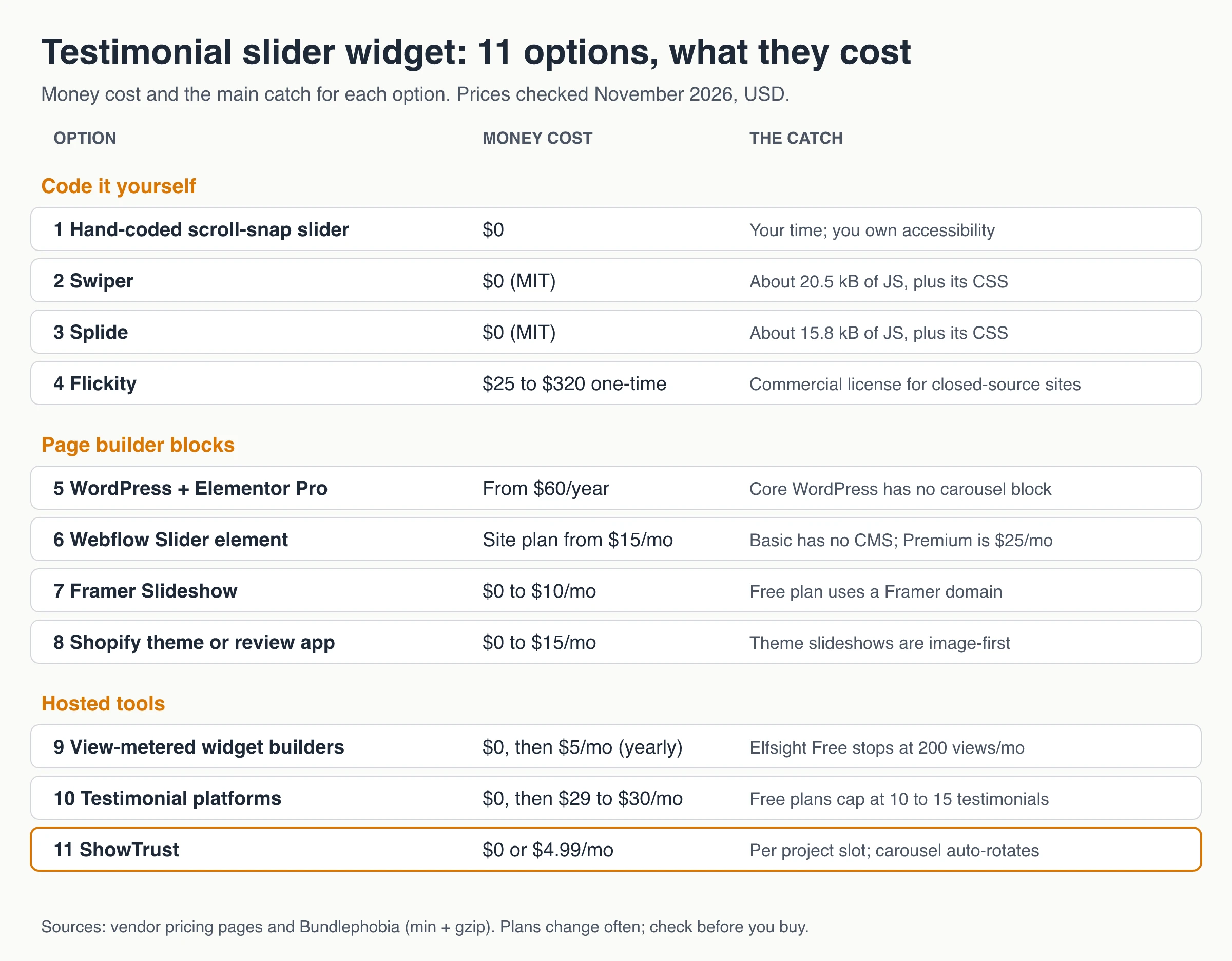
A testimonial slider widget can cost $0 (a few lines of HTML, CSS and JavaScript), a one-time library license of $25 to $320, a page-builder plan you may already pay for, or a hosted tool that runs from free to about $30 a month. The price is rarely the biggest cost. The JavaScript it adds and the accessibility work matter more: a slider that rotates on its own needs a visible way to pause it to meet WCAG 2.2.2.
Below are 11 real ways to add one, grouped into code you write, page-builder blocks and hosted tools. Each comes with its price as of November 2026, its weight and its catch, followed by copyable slider code with a pause button.
Testimonial slider widget options at a glance
A testimonial slider shows one or a few customer quotes at a time and moves to the next on a timer or when the visitor clicks. You can build one, use the block your site builder already has, or embed a hosted widget. Here is what each route costs.
| # | Option | Money cost (Nov 2026) | JavaScript added | Auto-rotation and pause |
|---|---|---|---|---|
| 1 | Hand-coded scroll-snap slider | $0 | 0 to about 1 kB | Your choice; the snippet below has a pause button |
| 2 | Swiper | $0 (MIT) | About 20.5 kB core, plus modules and CSS | Autoplay module; you add the pause button |
| 3 | Splide | $0 (MIT) | About 15.8 kB + CSS | Optional built-in play/pause button; pauses on hover and focus |
| 4 | Flickity | Free under GPLv3, or $25 to $320 one-time | About 11.6 kB + CSS | Pauses on hover; stops on click |
| 5 | WordPress + Elementor Pro | Plans from $60/year | Loaded by the plugin | Autoplay, pause on hover or interaction |
| 6 | Webflow Slider element | Site plan from $15/month (yearly) | Built in | Auto play with a delay; can stop after a set number of slides |
| 7 | Framer Slideshow | $0 on a Framer domain, $10/month for your own | Built in | Autoplay and looping |
| 8 | Shopify theme or review app | $0 to $15/month | Theme or app script | Depends on theme or app |
| 9 | View-metered widget builders | $0 for 200 views/month, then $5/month (yearly) | Vendor script | Autoplay, pause on hover |
| 10 | Testimonial platforms | $0 with 10 to 15 testimonials, then $29 to $30/month | Vendor script | Varies by widget |
| 11 | ShowTrust | $0, or $4.99/month per project slot | Under 8 kB (stated) | Rotates every 5 s, pauses on hover, no pause button |
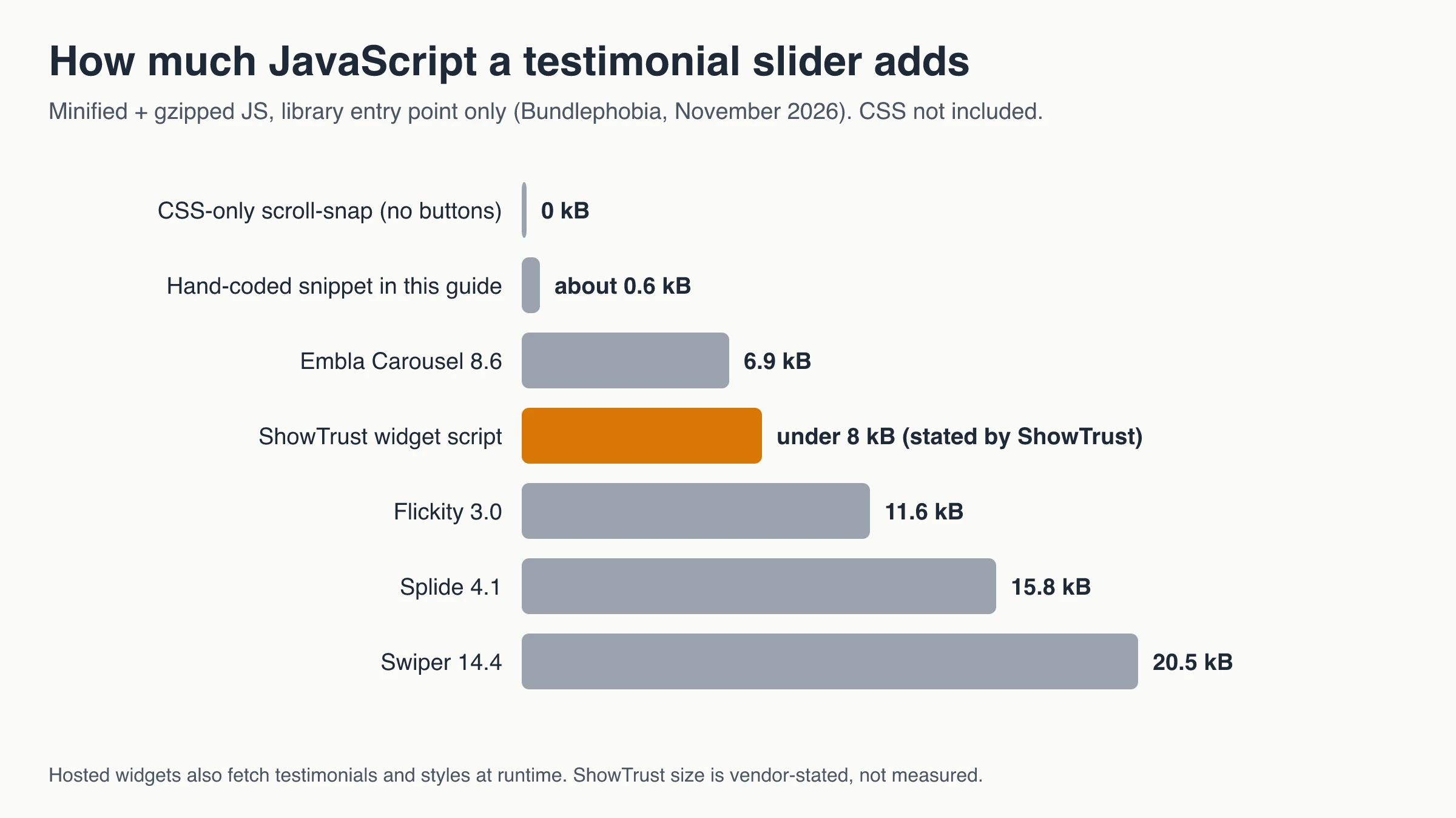
Library sizes are minified and gzipped JavaScript as reported by Bundlephobia, not counting each library’s stylesheet. Swiper’s figure is its core only; the Autoplay, Navigation and A11y modules add more.
Free testimonial slider code: build it yourself
Code costs no license fee, but you own the result: layout, accessibility, testing and every future edit. Adding a new testimonial means a code change, so this route suits sites where a developer already ships often.
1. Hand-coded HTML and CSS scroll-snap slider
Modern CSS can do most of a slider’s work. A row of slides with overflow-x: auto and CSS scroll snap swipes on phones and scrolls with a trackpad, with no JavaScript at all. A few lines of script add Previous/Next buttons and an optional timer.
- Cost: $0 and some developer time.
- Weight: 0 kB for the CSS-only version. The full snippet below is about 1.7 kB of unminified JavaScript, roughly 0.6 kB gzipped.
- Catch: you write the accessibility yourself, and non-developers can’t add testimonials.
Chrome 135 added CSS-only carousel features, ::scroll-button() and ::scroll-marker(), which create buttons and dots with proper roles (Chrome for Developers, March 2025). They are a Chromium feature, so treat them as a progressive enhancement, not your only controls.
2. Swiper
Swiper is MIT-licensed, so it costs nothing to use on a commercial site. The core of version 14.4.0 weighs about 20.5 kB minified and gzipped; the modules you import (Autoplay, Navigation, A11y) and the CSS come on top.
Per the Swiper API docs, the A11y module is on by default once you include it, and it labels the Previous/Next buttons for screen readers. Autoplay is a separate module. Its pauseOnMouseEnter option defaults to false, and there is no ready-made pause button: you build one that calls autoplay.stop() and autoplay.start(). Swiper’s site also promotes premium add-ons (Swiper Studio, UI Initiative), which you don’t need for a testimonial slider.
3. Splide
Splide is MIT-licensed, has no dependencies, and Bundlephobia measures version 4.1.4 at about 15.8 kB gzipped (Splide’s own site says 12 kB).
It does the most accessibility work out of the box. Its accessibility guide says v4 follows the W3C carousel pattern, pauses autoplay on hover and when focus enters, offers a play/pause toggle button, and keeps autoplay paused when the visitor’s system asks for reduced motion. If you want a library and don’t want to write the accessibility code yourself, start here.
4. Flickity
Flickity is the one library on this list with a real license fee. It is free under GPLv3 for open-source and personal projects. For commercial sites, themes and apps, Metafizzy points you to a one-time commercial license: $25 for one developer, $110 for up to 8, or $320 for unlimited developers.
Version 3.0.0 is about 11.6 kB gzipped. Its autoPlay option pauses while the mouse is over the carousel and stops when the visitor clicks. Like Swiper, it leaves a visible pause button to you.
Smaller MIT libraries exist too. Embla Carousel 8.6.0 is about 6.9 kB gzipped and ships no styles, so you build the look and the controls.
Testimonial slider blocks in page builders
If your site runs on a builder, its own slider block is often the cheapest option, since you already pay for the plan. The catch is that testimonials live inside the page, so every new quote is a manual edit.
5. WordPress with Elementor Pro
WordPress’s core block library has Quote, Pullquote and Gallery blocks but no carousel or slider block, so a slider means a plugin or an embed.
Elementor’s Testimonial Carousel widget is part of Elementor Pro. It has Autoplay, Autoplay Speed, Pause on Hover, Pause on Interaction, arrows and pagination (dots, fraction or progress). Elementor’s pricing page starts with the Essential plan, which includes the Pro widgets, at $60 billed yearly (as of November 2026); the page notes it renews at the regular rate. Free slider plugins exist on WordPress.org, but each one adds its own scripts, so check page speed after installing.
6. Webflow Slider element
Webflow’s built-in Slider element has an Auto play setting: you choose the delay before slides change and how many slides it plays before it stops (Webflow Help Center). It costs nothing extra, but publishing to your own domain needs a site plan. As of November 2026, Webflow’s pricing lists Basic at $15/month billed yearly for sites without a CMS, and Premium at $25/month billed yearly with the CMS.
If you turn on auto play and let it loop, add your own visible pause control with custom code and test it with a keyboard.
7. Framer Slideshow
Framer has a Slideshow component in its Insert panel that can autoplay, loop and be dragged (Framer Academy). Framer’s pricing starts at $0 on a Framer domain; a custom domain starts with Basic at $10/month billed yearly, and Pro is $30/month. Some marketplace slideshow components are paid, single-use licenses.
Webflow and Framer also accept hosted embeds. ShowTrust’s plain HTML install guide covers both.
8. Shopify theme section or review app
Shopify’s free Horizon theme lists a slideshow among its features, but theme slideshows are built around images and banners. For text testimonials, most stores add an app:
- Judge.me: the Forever Free plan includes carousels (video, cards, testimonials). Awesome is $15/month.
- Reputon Testimonials Slider: the free Demo plan shows 1 widget with up to 4 testimonials. Standard is about $5.99/month or $54/year (the listing shows prices in local currency).
Script-based tools can also go into a Custom Liquid section. ShowTrust has no Shopify app; it installs that way, as a script. For the trade-offs, see this guide to a Shopify testimonial widget.
Hosted testimonial slider widgets
A hosted widget is a script you paste once. After that, you add or approve testimonials in a dashboard and the slider updates without a deploy. You pay in one of three ways: a cap on views, a cap on testimonials, or a flat plan.
9. View-metered widget builders (Elfsight and similar)
Widget builders such as Elfsight, Common Ninja and Jotform let you type testimonials into an editor and paste the embed code. Elfsight’s pricing page shows how view metering works (as of November 2026):
- Free: 1 widget, 200 views a month, Elfsight branding.
- Basic: $5/month billed yearly, 5,000 views a month.
- Over the limit: the page says exceeding the monthly views “will temporarily deactivate your app”.
Elfsight’s testimonials slider has autoplay and an optional pause on hover. Testimonials are entered by hand, with no import from review sites. This is the cheapest route for a low-traffic site, but a popular page can hit 200 views in a day. Here is how pricing meters compare across social proof widgets.
10. Testimonial platforms (Senja, Shapo, Testimonial.to)
These tools collect testimonials as well as display them. You send a form link, approve what comes in, and show it as a wall or a carousel. Free plans cap the number of testimonials rather than views (as of November 2026):
| Tool | Free plan | First paid plan |
|---|---|---|
| Senja | 15 testimonials; new ones are hidden after that | Starter $29/month |
| Shapo | 15 testimonials, Shapo branding | Pro $29/month |
| Testimonial.to | 10 text + 2 video testimonials | Starter $25/month billed yearly, $30 monthly |
Senja advertises carousels and Shapo has a multi-carousel widget. Their paid plans also pull in new reviews automatically (Senja’s autosync, Shapo’s daily auto-sync), and Senja’s include team seats. ShowTrust has neither. For a broader comparison, see the best testimonial collection and display tools.
11. ShowTrust
ShowTrust collects testimonials on a hosted page and shows the approved ones in an embeddable wall with six layouts: masonry, horizontal scroll, vertical columns, carousel, polaroid scatter and quote wall.
- Price: Free is $0 with 1 project, unlimited testimonials, every layout, and a small credit link you can switch off. Pro is $4.99/month or $49.99/year per project slot and adds video testimonials and a white-label wall. No plan meters page views.
- Weight: a small async script (under 8 kB, per ShowTrust) plus a container div. It renders inside a shadow root, not an iframe (embed docs).
- How the carousel behaves: it shows one testimonial at a time, rotates every 5 seconds and pauses while the mouse is over it. When a visitor’s system asks for reduced motion, it stops and shows the first testimonial. It has no visible pause button or arrows, so on pages that must meet WCAG 2.2.2, use the static masonry layout or the hand-coded slider below. The horizontal scroll and vertical columns layouts also move on their own and pause on hover.
- Limits: no live sync with Google or other review sites (paste-import only), no review schema or search stars, and one login per account with no team roles.
Copyable testimonial slider embed code
This is a complete, dependency-free embed code for a testimonial slider. It uses scroll snap for swiping, real buttons for Previous/Next, and an optional timer with a Pause/Play button. It follows the main points of the W3C carousel pattern described in the next section.
<section class="ts" aria-roledescription="carousel" aria-label="Customer testimonials" data-interval="7000">
<div class="ts-controls">
<button type="button" class="ts-toggle">Pause</button>
<button type="button" class="ts-prev" aria-label="Previous testimonial">←</button>
<button type="button" class="ts-next" aria-label="Next testimonial">→</button>
</div>
<div class="ts-track" aria-live="off">
<figure class="ts-slide" role="group" aria-roledescription="slide" aria-label="1 of 3">
<blockquote>Paste a real, approved customer quote here.</blockquote>
<figcaption>Customer name, Role, Company</figcaption>
</figure>
<figure class="ts-slide" role="group" aria-roledescription="slide" aria-label="2 of 3">
<blockquote>Second quote. Keep each one short enough to read in a few seconds.</blockquote>
<figcaption>Customer name, Role, Company</figcaption>
</figure>
<figure class="ts-slide" role="group" aria-roledescription="slide" aria-label="3 of 3">
<blockquote>Third quote.</blockquote>
<figcaption>Customer name, Role, Company</figcaption>
</figure>
</div>
</section>
<style>
.ts { max-width: 640px; margin: 0 auto; }
.ts-controls { display: flex; gap: 8px; justify-content: flex-end; }
.ts-controls button { min-width: 44px; min-height: 44px; }
.ts-track {
display: flex; overflow-x: auto; scroll-snap-type: x mandatory;
scroll-behavior: smooth; min-height: 180px; /* reserve space: no layout shift */
}
.ts-slide { flex: 0 0 100%; scroll-snap-align: start; margin: 0; padding: 24px; box-sizing: border-box; }
.ts-slide blockquote { margin: 0 0 12px; font-size: 1.125rem; }
@media (prefers-reduced-motion: reduce) { .ts-track { scroll-behavior: auto; } }
</style>
<script>
(function () {
var root = document.querySelector('.ts');
var track = root.querySelector('.ts-track');
var toggle = root.querySelector('.ts-toggle');
var delay = Number(root.dataset.interval) || 0;
var reduce = window.matchMedia('(prefers-reduced-motion: reduce)').matches;
var timer = null, userStopped = false;
function go(dir) {
var w = track.clientWidth;
var atEnd = track.scrollLeft + w >= track.scrollWidth - 2;
var atStart = track.scrollLeft <= 2;
if (dir > 0 && atEnd) track.scrollTo({ left: 0 });
else if (dir < 0 && atStart) track.scrollTo({ left: track.scrollWidth });
else track.scrollBy({ left: dir * w });
}
function start() {
if (!delay || reduce || userStopped || timer) return;
timer = setInterval(function () { go(1); }, delay);
track.setAttribute('aria-live', 'off');
toggle.textContent = 'Pause';
}
function stop() {
clearInterval(timer); timer = null;
track.setAttribute('aria-live', 'polite');
toggle.textContent = 'Play';
}
root.querySelector('.ts-prev').addEventListener('click', function () { go(-1); });
root.querySelector('.ts-next').addEventListener('click', function () { go(1); });
toggle.addEventListener('click', function () {
if (userStopped) { userStopped = false; start(); } else { userStopped = true; stop(); }
});
root.addEventListener('mouseenter', function () { if (timer) { clearInterval(timer); timer = null; } });
root.addEventListener('mouseleave', start);
root.addEventListener('focusin', function (e) { if (e.target !== toggle && !userStopped) { userStopped = true; stop(); } });
if (!delay || reduce) { toggle.hidden = true; track.setAttribute('aria-live', 'polite'); }
else start();
})();
</script>
How to use it:
- Replace the three placeholder quotes with real, approved testimonials, and update each
aria-label(“1 of 3”) if you add slides. - Keep
data-interval="7000"for a 7-second timer, or delete the attribute for a manual-only slider. The Pause button then hides itself. - Set
min-heighton.ts-trackto roughly your tallest slide so the page doesn’t jump when slides change. - Test it: Tab to the controls, press Pause, and turn on your operating system’s reduce-motion setting to confirm the timer stays off.
The script handles one slider per page. For several, wrap the script body in a loop over document.querySelectorAll('.ts').
How to make a testimonial carousel accessible
Auto-rotation is where testimonial sliders most often fail accessibility. WCAG success criterion 2.2.2 Pause, Stop, Hide (Level A) applies to moving content that starts on its own, lasts more than five seconds and sits beside other content. That content needs a way for the user to pause, stop or hide it. A testimonial carousel that loops forever fits that description.
Pause on hover helps mouse users, but it does nothing for keyboard or touch users, and rotation resumes as soon as the pointer leaves. Treat it as an extra, not as the pause mechanism.
The W3C’s carousel tutorial and the ARIA Authoring Practices carousel pattern add up to this checklist:
- A visible Pause/Play button. Use a native
<button>whose label names the action, and make it the first control inside the carousel. - Pause on hover and on keyboard focus. Per the ARIA pattern, once focus enters, rotation doesn’t restart until the user presses Play.
- Real buttons for Previous/Next with text labels, large enough to tap.
- Labels for assistive tech. Put
aria-roledescription="carousel"and a label on the container, androle="group"witharia-roledescription="slide"on each slide. Setaria-live="off"while rotating and"polite"when stopped, so screen readers aren’t interrupted every few seconds. - Respect reduced motion. If
prefers-reduced-motionis set toreduce, don’t auto-rotate. - Give people time to read. Nielsen Norman Group’s carousel guidelines use a reading speed of about 3 words per second. A 5-second slide fits a quote of about 15 words; a 30-word quote needs around 10 seconds.
There is a usability case against auto-rotation too. In a 2013 article, Jakob Nielsen describes a user who missed an offer in a homepage accordion that rotated every 5 seconds, and concludes that panels “should show a new panel only when users ask for it” (NN/g). NN/g’s guidelines also advise against auto-advancing on mobile. A manual slider avoids both problems.
Keep a testimonial slider from slowing your page
A slider affects speed in three ways: the script it loads, the images inside it, and layout shift when it appears.
- Reserve the height. A slider that loads late and pushes content down counts toward Cumulative Layout Shift. Give the container a
min-heightclose to the rendered height (web.dev on CLS). This matters most for hosted widgets, which render after their script loads. - Load scripts without blocking. Use
asyncordeferfor library and widget scripts, and follow web.dev’s third-party embed best practices for anything loaded from another domain. - Lazy-load images past the first slide. Add
loading="lazy"to avatars and logos in hidden slides (browser-level lazy loading), but not to the first visible one if it sits near the top of the page. - Count the CSS too. Swiper and Splide each ship a stylesheet on top of the JavaScript sizes above.
- Keep slides few. NN/g suggests about five frames or fewer. Fewer slides also means fewer images to load.
General embed troubleshooting (CSP, consent banners, containers) is covered in the guide to embedding testimonials on your website.
Slider or grid? When a carousel is the wrong layout
A slider hides most of its content at any moment, so it works best when space is tight and each quote is short. A testimonial grid or wall shows everything at once.
| Use a slider when | Use a grid or wall when |
|---|---|
| You have a narrow band of space, like a homepage strip | You have more than about five testimonials to show |
| Quotes are one or two sentences | Quotes are long or include video |
| You can keep it manual or give it a pause button | One quote answers a key objection and must not be missed |
| The page already has plenty of other content | The page exists to show proof, like a testimonials page |
NN/g also warns not to put important information only in a carousel. If one testimonial carries the argument, pin it in a static spot and let the slider hold the rest.
Build or buy: a five-step check
- List your non-negotiables. Platform, who adds new testimonials, whether you need video, and the accessibility level you must meet.
- Add up the real cost. License or plan fee, plus the hours to build, test and update. A free library still costs a developer’s time for every new quote.
- Check who can update it. If marketing or support should publish new testimonials, a hosted tool with an approval step beats code.
- Pilot on one page. Measure layout shift and test keyboard controls before rolling it out site-wide.
- Plan your exit. A hand-coded slider is plain HTML you own. With a hosted tool, check that you can export your testimonials (ShowTrust exports CSV, for example).
Which testimonial slider widget should you choose?
- You have a developer and want zero fees: the hand-coded snippet above, or Splide if you’d rather not write the accessibility code.
- You already use a builder: its own block (Elementor Pro, Webflow Slider, Framer Slideshow), with a pause control added if it auto-rotates.
- You’re on Shopify: a review app with a free carousel, such as Judge.me, or a script-based widget in a Custom Liquid section.
- Non-developers will add testimonials: a hosted tool. Compare what the free plan caps (views or testimonials) against your traffic and how many quotes you have.
- The page must meet WCAG 2.2.2: a manual slider, an auto-rotating one with a visible pause button, or a static grid.
Frequently Asked Questions
- Is there a free testimonial slider widget?
- Yes. You can hand-code one or use the MIT-licensed Swiper or Splide libraries at no cost. Hosted tools have free plans with limits: as of November 2026, Elfsight Free allows 200 views a month, Senja and Shapo allow 15 testimonials, Testimonial.to allows 10 text and 2 video testimonials, and ShowTrust Free covers 1 project with unlimited testimonials and a small credit link you can switch off.
- Does an auto-rotating testimonial carousel meet WCAG?
- Only if users can pause, stop or hide it. WCAG 2.2.2 (Level A) requires that for moving content that starts automatically, lasts more than five seconds and sits alongside other content. A visible Pause/Play button is the usual fix. Pause on hover alone doesn't help keyboard or touch users.
- How long should each testimonial stay on screen?
- Long enough to read. Nielsen Norman Group uses about 3 words per second as a reading guide, so a 5-second slide fits roughly 15 words and a 30-word quote needs around 10 seconds. Letting visitors move slides themselves avoids the timing problem.
- How much does a testimonial slider slow down a page?
- It depends on what it loads. As of November 2026, Bundlephobia lists Swiper's core at about 20.5 kB and Splide at about 15.8 kB of gzipped JavaScript, plus their CSS. A CSS scroll-snap slider adds almost nothing. Reserve the slider's height so it doesn't cause layout shift.
- Can I add a testimonial slider without coding?
- Yes. Use your builder's own block (Elementor Pro, Webflow Slider, Framer Slideshow), a Shopify review app, or a hosted widget whose embed code you paste into a custom HTML block.
- Does ShowTrust have a testimonial slider?
- Yes. The carousel layout is included on the Free plan. It shows one testimonial at a time, rotates every 5 seconds, pauses on hover and stops for visitors who prefer reduced motion. It has no visible pause button, so use the static masonry layout where WCAG 2.2.2 applies.
Want a testimonial carousel or a static wall without writing slider code? ShowTrust’s Free plan includes all six layouts and unlimited testimonials for one project, and Pro ($4.99/month per project slot) adds video and a white-label wall.
Written by
ShowTrust
Notes from the ShowTrust team on collecting testimonials and building authentic social proof.
Share: