July 1, 2026
·
Updated November 6, 2026
·
15 min read
9 Real Video Testimonial Examples and Why They Work
Every example links to the original video, checked on YouTube in November 2026. Published results come from each vendor's own case-study page; the Gong figures are what customers say in the video. None of these sources reports how much the video itself lifted conversions.

There's no public data on what makes high-converting testimonial videos, but the strongest public examples point to five habits: a named customer on screen in the first few seconds, one specific before-and-after, a runtime short enough to finish, captions for people watching on mute, and a spot on the page right next to the doubt the video answers. None of that needs a film crew.
Below are nine real, public customer videos from Canva, HubSpot, Atlassian, Slack, Zoom and Gong, with what each one does well, where it falls short and what to borrow. After the examples comes the practical part: the questions to ask, how long to make the video, how to frame a self-recorded clip and how to handle permission.
What makes a testimonial video convert
No public study isolates why one customer video sells better than another, but the examples below point to these patterns:
- A named person in the first five seconds. Name, role and company on screen say “customer, not actor”. Canva, Atlassian, Zoom and Gong all use name cards.
- One specific “before”. “We had to wait about six weeks to make any edits” (ClassPass) is far more believable than “managing our site was hard.”
- One concrete “after”. A number, a time frame or a step removed. If the customer doesn’t say the number, put it in the title and link the source, as HubSpot does with ClassPass.
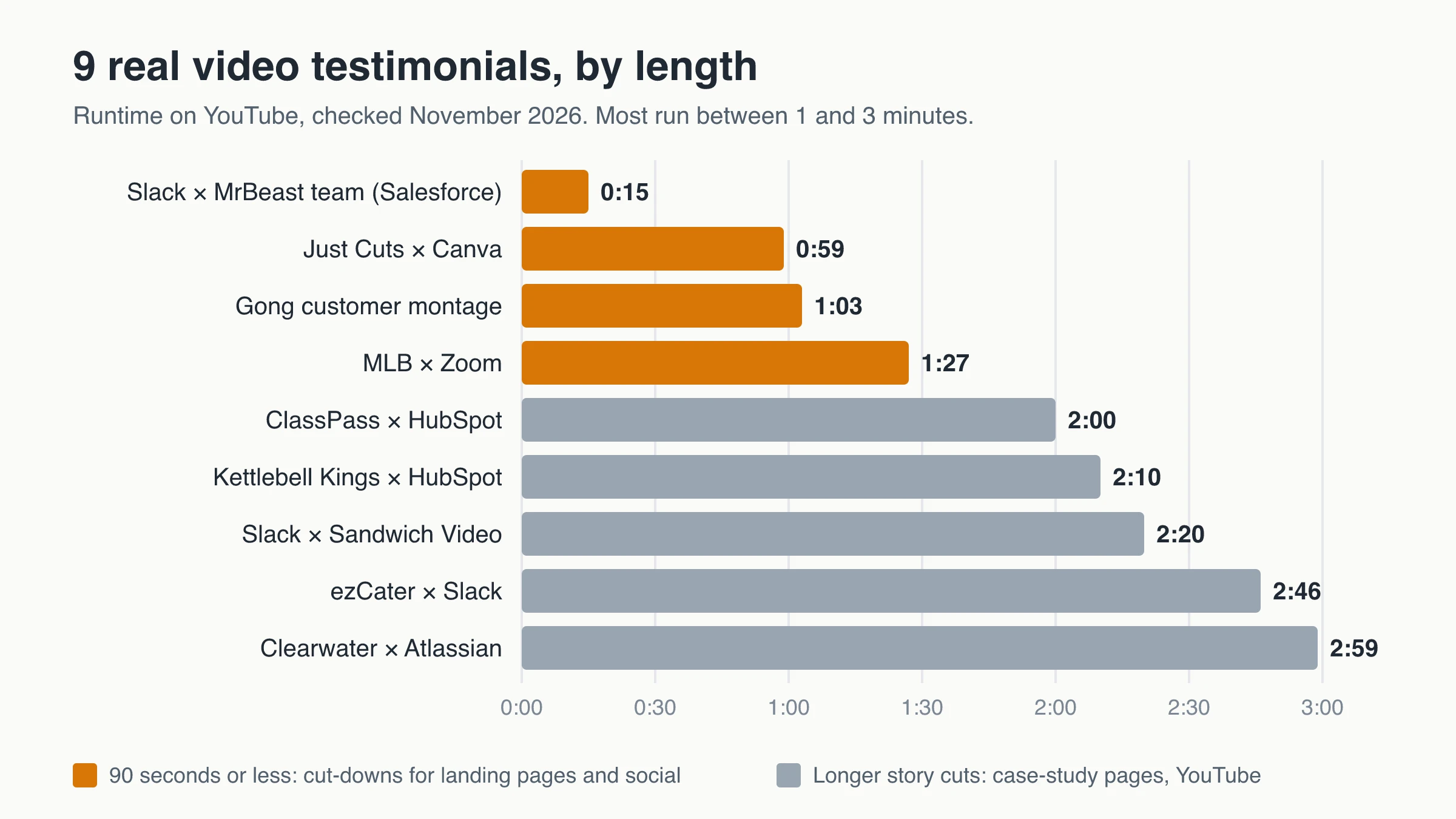
- Short enough to finish. Seven of the nine examples run between one and three minutes. The two shortest are 15 and 59 seconds.
- Captions. Browsers only allow autoplay with the sound off unless the visitor has interacted with the site (Chrome’s autoplay policy), and captions for prerecorded video are a Level A accessibility requirement under WCAG 2.2 success criterion 1.2.2.
- Placed next to the objection it answers. A clip about cost belongs on the pricing page, not the About page.
A video testimonial also carries what text can’t: a voice, a real workplace, a small admission like a customer saying the tool felt expensive at first.
9 real video testimonial examples
All nine are public customer stories published by the vendor or its parent company, from a 15-second social clip to three-minute interviews.
| # | Video | Length | Format | What to borrow |
|---|---|---|---|---|
| 1 | Just Cuts × Canva | 0:59 | One speaker, direct to camera | One plain number, burned-in captions |
| 2 | ClassPass × HubSpot | 2:00 | Interview + B-roll | A specific “before” (a six-week wait) |
| 3 | Clearwater Analytics × Atlassian | 2:59 | Internal champion interview | Answers “was it worth it?” in the first line |
| 4 | Kettlebell Kings × HubSpot | 2:10 | Customer interview + product B-roll | Admits the price felt high at first |
| 5 | Slack × Sandwich Video | 2:20 | Team story with humor | The skeptic-to-convert arc |
| 6 | MLB × Zoom | 1:27 | Executive on location | The setting shows the product at work |
| 7 | Gong customer montage | 1:03 | Many voices, a number or two each | Name cards and on-screen figures |
| 8 | ezCater × Slack | 2:46 | Mini-documentary | Opens with the customer’s stakes |
| 9 | MrBeast team × Slack | 0:15 | Social cut-down | Problem and payoff in 15 seconds |
1. Just Cuts × Canva: one number, said plainly
Watch: How Just Cuts tripled creative production with Canva (Canva, March 2025, 0:59)
Kelly Gaunt, Marketing and Brand Lead at Just Cuts, talks straight to camera. In under a minute she covers who they are (a salon franchise with 230 salons in Australia, New Zealand and the UK), the old process (a “really cumbersome” design request system) and the change: a 10-to-20-step process cut to three or four, and three times as many designs published in the first month.
Why it works: the result is one sentence with a time frame, not a superlative. Her name card appears in the opening seconds, captions are burned into the picture so it reads fine on mute, and it’s one camera in a plain room.
Published result: Canva’s Just Cuts case study reports 3x designs in the first month, design production sped up by 82% and approval time cut from one week to 10 minutes.
It’s the easiest format to copy (59 seconds, published March 2025):
2. ClassPass × HubSpot: a “before” with a number in it
Watch: 52% Increase in Lead Conversion Rate | ClassPass x HubSpot’s Customer Success Story (HubSpot, November 2022, 2:00)
ClassPass’s team opens with scale (28 countries, a billion-dollar valuation in 2020), then names the exact constraint: website edits waited about six weeks because engineering worked in six-week sprints. Now marketing ships changes itself. B-roll of the team at work runs between interview shots.
Why it works: “six weeks” is a detail a buyer with the same bottleneck will recognize, and the result sits in the title, seen before anyone presses play.
Published result: HubSpot’s ClassPass case study says that after switching to Content Hub (the product the video calls CMS Hub), ClassPass saw “a 52% increase in their lead conversion rate from their website.” The speaker never says the number; the title and the case study carry it.
Where it falls short: the last 40 seconds drift into general praise. Cut that and it would run about 80 seconds.
3. Clearwater Analytics × Atlassian: answer the objection first
Watch: Clearwater Analytics gains efficiencies by migrating to Atlassian cloud (Atlassian, August 2023, 2:59)
The first line answers the question every migration buyer has: was it worth it? “Totally.” Erica Larson, a process engineer, then covers what changed for engineering, IT, marketing, legal and HR, and how she won approval: a quarter of research, the numbers plugged in, an “easy sell” to her executive team.
Why it works: for a purchase that needs sign-off, the champion’s own internal pitch is a script the prospect can reuse with their boss, and the department-by-department tour speaks to a whole buying committee.
Published result: Atlassian’s Clearwater Analytics story, which embeds the video, reports $75K in annual AWS hosting savings. The written story also admits a first migration attempt had to be paused and retried, candor that makes the page around the video more credible. At three minutes, this is a case-study-page video, not a landing-page clip.
4. Kettlebell Kings × HubSpot: admitting the price
Watch: Kettlebell Kings: HubSpot Customer Success Story (HubSpot, February 2019, 2:10)
It opens with ten seconds of B-roll of people training with kettlebells. The speaker, who first came across HubSpot while selling e-commerce software, admits it was “something expensive” for where the business was at first, then gives concrete uses: automated weekly workout emails, and one system covering work that would otherwise mean hiring for “ten different roles”.
Why it works: the price admission meets a common small-business objection head-on, and the B-roll shows the company’s own kettlebells being used and packed.
Where it falls short: no numbers. “Local brand to global brand” is a feeling, so it works as brand proof more than ROI proof.
5. Slack × Sandwich Video: the skeptic who came around
Watch: “So Yeah, We Tried Slack …” (Slack, August 2014, 2:20; about 1.5 million views as of November 2026)
Slack asked Sandwich Video, a production company, to make it, and the studio became a customer along the way. The narrator says his company ran “entirely on email and Dropbox” and was doing just fine; teammates describe old habits with deadpan humor, then what changed. The description sums up the arc: they didn’t want to make the video, and months later they were “in love”.
Why it works: a doubter’s conversion mirrors the viewer’s own doubt, and the humor carries a 2:20 runtime.
Where it falls short: the middle becomes a list of integrations, the interface is from 2014, and a production company filming itself sets a polish bar few teams should chase. Borrow the arc, not the budget.
6. MLB × Zoom: let the location do the talking
Watch: How MLB Uses Zoom CX for Fan Experience (Zoom, October 2025, 1:27)
Neil Boland, MLB’s senior vice president of technology, appears with a name card in the replay operations center where, as he puts it, hundreds of close plays are reviewed. B-roll of staff at work runs under his account of how MLB uses Zoom’s contact center tools.
Why it works: the setting shows scale within the first ten seconds, and at 87 seconds it fits on a landing page.
Published results: Zoom’s written MLB story lists 392 supervisor hours saved per week during peak times and 50% more calls reviewed, and quotes Boland saying information that took 12 to 24 hours or more now arrives in real time.
Where it falls short: much of the script sounds like vendor copy (“cutting edge innovation”) rather than a customer’s words, and none of those numbers make it into the video.
7. Gong customer montage: one claim per voice
Watch: Gong Customers Win More with Revenue AI (Gong, November 2025, 1:03)
Customers appear one after another, each with a name card (name, title, company logo) and a result or two: seller productivity up 64%, about ten hours a week back for one rep, a 30% increase in deal velocity and a 45% increase in average deal size, and 54 new reps at twice their expected gross profit a few months in. An off-camera voice prompts them (“What about revenue?”), and big on-screen numbers back up the claims.
Why it works: short answers keep the pace high, and every number stays attached to a named person and company. It’s built as an ad: a narrator opens and closes, ending with a call to book a demo.
Watch out: the figures have no baseline or time frame. The FTC’s Endorsement Guides FAQ says specific results are usually read as what others can expect, so you need proof they’re typical or a clear disclosure of what people generally get.
8. ezCater × Slack: open with the customer’s stakes
Watch: Slack helps ezCater overdeliver (Slack, March 2025, 2:46)
The first 20 seconds don’t mention software. ezCater’s team talks about food as belonging at work, and why business catering has high stakes: it has to arrive on time and be what you ordered.
Why it works: it opens on the customer’s world, food and belonging at work, before any product appears. It also has 13 uploaded caption tracks in nine languages on top of YouTube’s auto-captions; the other eight examples rely on auto-captions or burned-in text.
Where it falls short: the second half stacks product names (Salesforce, Agentforce, Data Cloud, Slack) and reads like a feature tour.
9. MrBeast team × Slack: a 15-second cut-down
Watch: “I F@#%ing love Slack!” (Salesforce, February 2026, 0:15)
Salesforce, Slack’s parent company, posted this about its customer MrBeast. In the first nine seconds the team sets up the problem (never all in one place: Saudi Arabia, building wells in Africa, the pyramids, Antarctica), then the payoff (Slack is “truly the key to the success”), then the title line.
Why it works: problem, payoff, one emotional line, shot in the team’s own workspace.
Where it falls short: it works because the customer is famous. An unknown customer can’t establish who they are in 15 seconds, so use cut-downs like this to point to a longer story, not replace it.
How long should a video testimonial be?
Match the length to where the video will live:
| Placement | Suggested length | Example above |
|---|---|---|
| Social feed or ad | 15–30 seconds | MrBeast team × Slack (0:15) |
| Landing page, pricing page, popup | 30–90 seconds | Just Cuts × Canva (0:59), MLB × Zoom (1:27) |
| Case-study page or YouTube | 2–3 minutes | ClassPass × HubSpot (2:00), Clearwater × Atlassian (2:59) |
Vidico, a video production agency, recommends longer cuts (as of November 2026): 60 to 120 seconds for social media and landing pages, and 3 to 4 minutes on a YouTube channel.
For self-recorded clips, set a hard limit and say it up front; someone alone at a laptop will fill whatever time you give them. If you can edit, record long and publish short.
Video testimonial questions to ask
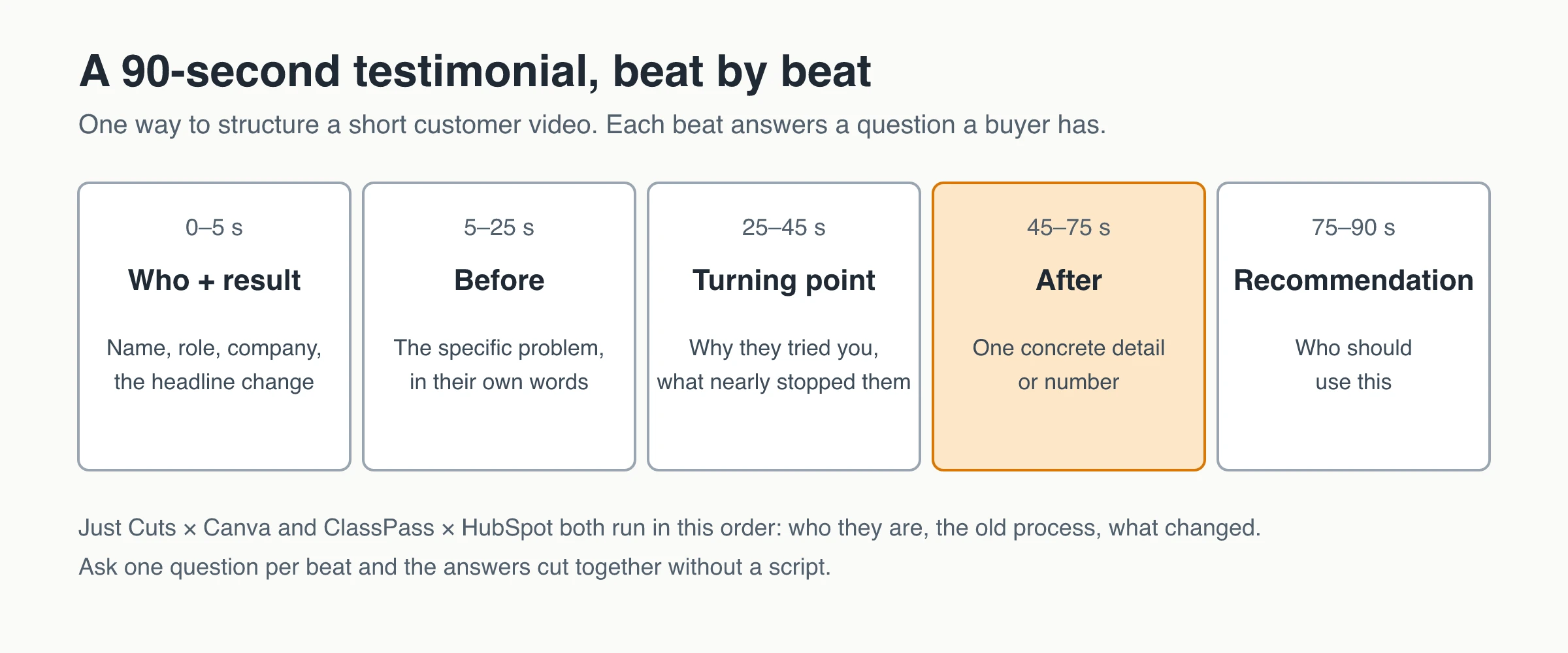
Ask one question per take, in plain words, shown on screen while they record:
- “Who are you, and what does your team do?” Five to ten seconds of context.
- “What were you doing before, and what was annoying about it?” This is your “before”. Push gently for a detail like ClassPass’s six-week wait.
- “What almost stopped you from trying us?” The answer is often the objection your next buyer has, as with Kettlebell Kings on price.
- “What was your first win? Say it in one sentence.”
- “What changed after the first week or month? Use a number if you have one.” Only publish numbers the customer confirms.
- “Who would you recommend this to, and who isn’t it for?” The second half of that question makes the first half more believable.
If the customer already left a written review, quote one sentence from it and ask for the story behind it, then check the clip says the same thing as the review.
Skip yes/no questions and “How much do you love us?”, and never hand people lines to read; viewers hear a script and treat the clip like an ad. For prompts tailored to your product, try the testimonial question generator.
How to collect video testimonials like these
Most of the examples above are professional shoots, but the same structure works for clips customers record themselves. The full flow is in the guide on how to collect testimonials; for video:
- Pick the moment. Ask right after a clear win: the first project shipped, a support issue solved, a renewal. If you can’t name the win, it’s too early to ask.
- Ask one person for one short clip. Say how long it takes and list the questions. These testimonial request email templates include a video version.
- Make recording easy. A browser link that works on a phone with no app or account removes most of the friction. Don’t ask for studio quality.
- Collect permission in the same flow, not afterward.
- Review before publishing. Confirm any numbers with the customer; trim, but don’t change the meaning.
- Publish next to the objection, with name, role and company visible.
Framing, light and sound for self-recorded clips
Put a few tips in the request:
- Face a window, never sit with it behind you.
- Camera at eye level: a laptop on books, or a phone propped up, not handheld.
- Quiet room, close to the mic. Earbud mics are fine.
- Show the real workplace, as the MLB and Kettlebell Kings videos do.
- Landscape for websites, vertical for Stories, Reels and Shorts. Decide before they record.
At events, a micro-booth works: a quiet corner, one light, a prompt card with a single question, a release on a tablet and two minutes per person.
Permission, releases and FTC disclosure
Get written consent that covers where you’ll use the clip: site, social, sales emails, paid ads. The guide to getting permission to use testimonials covers wording and records. In the US, FTC rules apply to video as they do to text:
- Disclose incentives that could change how much weight viewers give the endorsement, even small gifts or contest entries.
- Never make a reward depend on praise. The FTC’s Rule on the Use of Consumer Reviews and Testimonials (16 CFR Part 465) bars review incentives conditioned on a particular sentiment, and bars fake testimonials outright.
- Disclose employees and relatives who appear on camera.
- Treat results as typical claims, as noted under the Gong example.
Rules differ by country and industry, so check with counsel if you work in a regulated field.
Where to place testimonial videos
- Pricing page: a customer saying the price paid off, beside the plan table. See testimonials on pricing pages.
- Landing pages: next to the claim the clip proves, near the call to action.
- A testimonial wall: mixing video with written quotes in a Wall of Love gives skimmers proof even if they never press play.
- Case-study pages: the long cut plus the numbers, as Atlassian does for Clearwater.
- Sales follow-ups: one clip that matches the prospect’s industry.
Use a thumbnail that shows the person’s face, not a logo.
Recording options: browser link, video call or agency shoot
Three common ways to get customer videos made, as of November 2026:
| Option | Best for | Cost | Trade-offs |
|---|---|---|---|
| In-browser recording link (a testimonial tool) | Many short, authentic clips from customers recording on their own | From $4.99/month per project slot (ShowTrust Pro); other tools vary | Phone or laptop quality; the customer records alone; editing and captions depend on the tool |
| Recorded video call (Zoom, Google Meet, Loom) | Guided interviews with B2B champions | Usually tools you already pay for | You schedule, edit, caption and host the clip yourself |
| Agency or freelance shoot | Flagship stories like the Slack, Zoom and Atlassian examples | Vidico says most B2B companies spend $5,000 to $15,000 on a professional one | Weeks of scheduling, one customer per shoot, not repeatable every month |
Many teams mix them: a browser link for steady volume, a call or shoot for the one or two stories that carry a sales deck.
Where ShowTrust fits, and where it doesn’t
ShowTrust collects video testimonials on its Pro plan ($4.99/month or $49.99/year per project slot). Your customer opens your collection page, which can offer video and text, video only or text only, and then either:
- records in the browser on desktop or phone, with a 3-second countdown, your questions shown one at a time, a timer and a review step with “Record again”, or
- uploads an MP4, MOV or WebM file of up to 200 MB.
You set the length from 15 seconds to 5 minutes (2 minutes by default) with up to five questions, and there’s no cap on the number of videos. Customers can add a star rating and a written note, which gives you a text version for people who won’t press play. A permission checkbox records consent with each testimonial, and rewards can be limited to video testimonials. Approved videos play inline in your Wall of Love, one at a time, and analytics count plays.
What it doesn’t do: no captions or transcription, no editing or AI clean-up, no branching question flows, no HD export, and one take per testimonial (the customer can re-record before sending, but you can’t stitch answers together). On the Free plan, the collection page collects written testimonials only.
So ShowTrust covers asking, recording, approving and displaying; captioned, edited cuts like the examples above happen outside it. For branching async video interviews, see ShowTrust vs. VideoAsk.
Start with one clip
- Pick the objection your buyers raise most: price, setup time, switching cost or “will it work for a business like mine”.
- Choose three customers who got past that exact objection, and ask each for a 60-to-90-second clip with three questions.
- Publish the best one next to that objection, with name, role and company on screen and captions where you can add them.
- Repeat every month with the next objection on the list.
Frequently Asked Questions
- How long should a video testimonial be?
- Aim for 30 to 90 seconds on a landing or pricing page, 15 to 30 seconds for social, and 2 to 3 minutes for a case-study page or YouTube. The nine examples in this article run from 15 seconds to just under 3 minutes.
- What questions should I ask for a video testimonial?
- One question per take: who they are, what they did before, what almost stopped them from trying you, their first win, what changed after a week or a month, and who they would recommend you to. Avoid yes/no questions and scripts.
- Do I need permission to use a customer's video testimonial?
- Yes. Get written consent that names where the clip will appear, such as your website, social media and paid ads, and keep a record. Rules vary by country and industry, so check with counsel in regulated fields.
- Can I give customers a reward for a video testimonial?
- You can thank people for their time, but disclose the reward if it could affect how viewers weigh the testimonial, and never make it depend on a positive opinion.
- Do video testimonials need captions?
- They should. Browsers generally autoplay video only with the sound off, and captions for prerecorded video are a Level A requirement in WCAG 2.2. Burned-in captions work everywhere the clip is shown.
- Can customers record a video testimonial on their phone?
- Yes. Browser-based recorders such as ShowTrust Pro work on phones without an app. Ask customers to prop the phone at eye level and face a window.
ShowTrust’s Free plan collects unlimited written testimonials for one project. In-browser video recording and uploads are part of Pro at $4.99/month or $49.99/year per project slot. See ShowTrust plans.
Written by
ShowTrust
Notes from the ShowTrust team on collecting testimonials and building authentic social proof.
Share: