July 2, 2026
·
Updated November 6, 2026
·
15 min read
How to Build a Customer Testimonials Page (SaaS Examples)
A practical guide to planning, collecting, laying out and publishing a customer testimonials page for a SaaS product, with real examples and Google's rules for review markup.

A testimonials page is a dedicated page, often at /customers, /testimonials or /wall-of-love, that gathers your customer proof in one place so a hesitant buyer can find someone like them and take the next step. A good one has an outcome-led headline, filters by use case or company type, specific quotes with real names and roles, one or two longer stories or videos, and a single clear call to action. To help in search as well, the quotes need to be real HTML text rather than screenshots, and testimonials about your own company won't earn review stars in Google.
This guide walks through the page block by block, shows what five real SaaS customer pages do, covers how to collect testimonials worth publishing and the SEO rules that apply, and ends with a build path using an embedded or hosted wall of love.
What is a testimonials page, and when do you need one?
A testimonials page (also called a customer page, customer stories page or wall of love) is a standalone URL whose only job is proof. A homepage section gives a quick signal on the way past. A dedicated page lets a visitor dig in by segment, and gives your sales, onboarding and support emails one link to send when someone asks “who else uses this?”
You likely need one when you have more good testimonials than a homepage strip can show, you sell to several segments that each want to see peers, or your team keeps pasting quotes into emails and proposals. With only a handful of testimonials, put them on the homepage and pricing page first. A near-empty wall looks worse than no wall.
Where visitors come from shapes what the page should lead with:
| Visitor arrives from | Their first question | Lead with |
|---|---|---|
| Paid ads or other cold traffic | “Is this legit?” | Recognizable customers, a count, short specific quotes |
| Search or your blog | “Does it fit my situation?” | Filters by use case, quotes that name the problem |
| A sales email or demo follow-up | “Will it handle my specific concern?” | A story or filtered view for their industry or objection |
| Existing users and community | “Can I add mine?” | The wall plus a “share your experience” link |
What to put on a testimonials page
Most strong testimonials pages use the same seven blocks, in roughly this order. You can drop a block, but keep the order: broad reassurance first, then proof from people like the visitor, then depth, then the action.
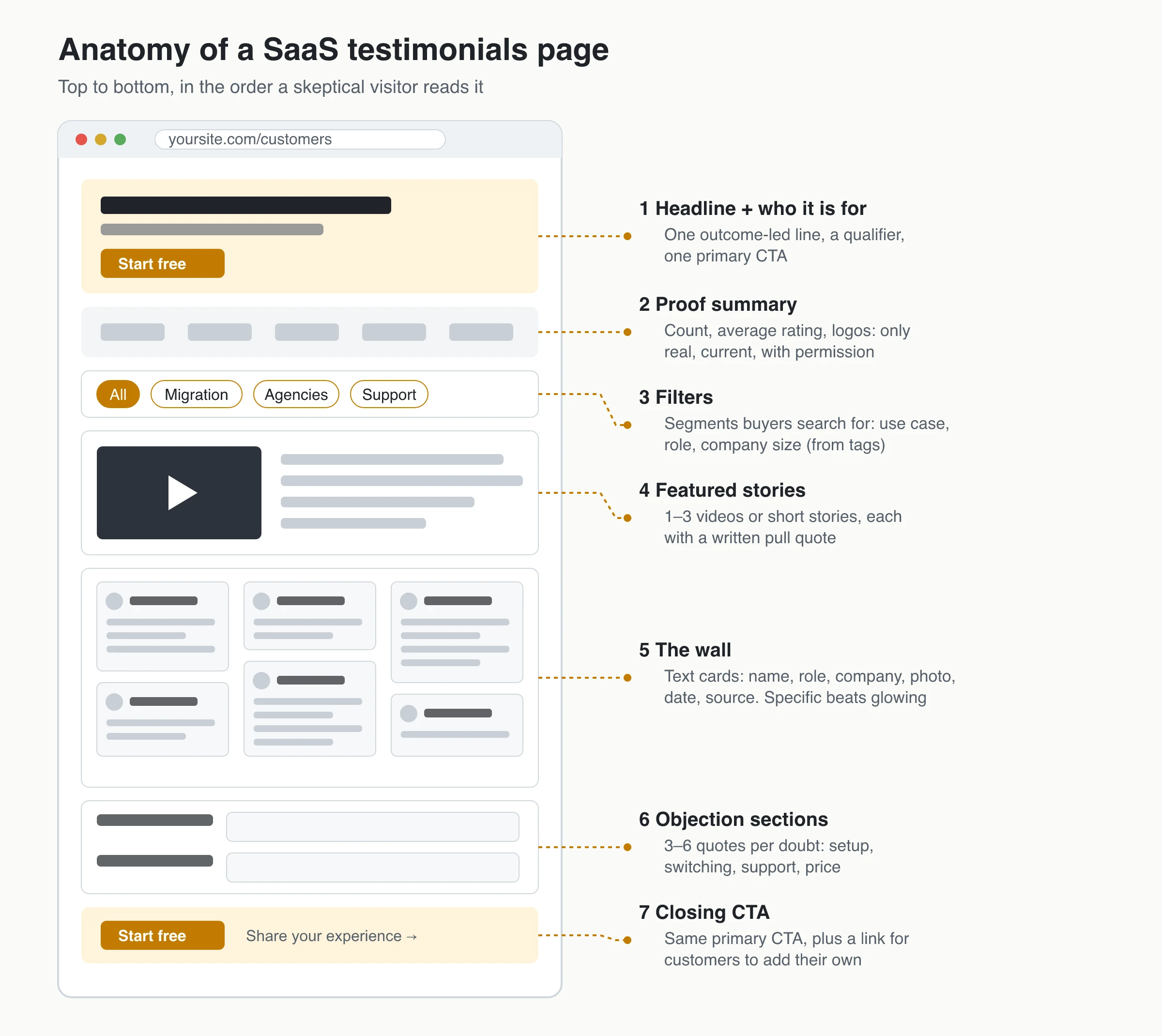
Headline and subheadline
Lead with the outcome your customers describe and who they are, not with “Our customers love us.” The subheadline names the audience so visitors can self-select in a few seconds, and one primary button sits right under it.
Patterns that sound like customers rather than ad copy: “Teams that stopped ____ and started ____,” “How ____ teams ____ without ____,” or “What ____ say after switching from ____.” If the line could sit on any competitor’s page, rewrite it with your customers’ own words.
Proof summary: counts, ratings and logos
A strip under the hero gives cold visitors a fast signal. Use only what is true and current:
- Counts and averages: show them only if they cover every testimonial you’ve published, not a hand-picked subset presented as the whole.
- Logos: only real, current customers who agreed to it. A logo reads as an endorsement, so skip lapsed trials and companies where one employee once signed up.
- Third-party ratings: if you show a G2 or Capterra score, link to the profile so visitors can check it.
Skip the strip rather than pad it.
Filters and segments
Filters turn a wall of praise into a way to find “someone like me.” Pick four to eight segments that match real buying questions: use case (“migration,” “client reporting”), role, company size or type, and the objection a quote answers. Tag each testimonial when you approve it, not later. If your filters update the page URL, sales can send a prospect a pre-filtered view for their industry.
Video first or text first?
For most SaaS pages, text first and video featured works best:
- Text is scannable, quick to load and readable by search engines. A visitor can skim a dozen quotes in the time one video plays.
- Video shows a real person and is harder to fake, but it only works for visitors who choose to press play.
Feature your one to three strongest videos near the top, each with a written pull quote and a line on who the customer is, so the point lands without playback. Keep the rest of the wall text, and use click-to-play players.
Lead with video when your product is visual (design, recording tools) or your customers are recognizable creators. If a video has no captions, put its key lines on the page as text.
The testimonial card: what makes it believable
A quote earns trust when the reader can answer “Could this be real?” and “Could this be me?” Each card needs:
- Specifics: the situation before, what changed, and a concrete detail. “Amazing product, highly recommend” (illustrative) tells a buyer nothing. “We moved our onboarding emails out of three tools in a week, and support answered our migration questions the same day” (illustrative) does.
- Identity: name, role, company and a photo when the customer agrees.
- Context: segment, use case or team type, so the reader can map the story to their own.
- Source and date: where it came from (your form, a review site, a post on X) and when.
If a customer wants to stay anonymous, add context instead: “Head of Operations, 40-person logistics company” carries more weight than “J.D.”
Objection sections and the order of proof
Below the wall, group three to six quotes under each doubt you hear on sales calls, with plain headings like “Setting it up” or “Switching from another tool.” An order that works for skeptical readers:
- Broad consensus first: logos, counts, recognizable names.
- Quotes from customers who match the target visitor.
- One or two deeper stories or videos.
- Safety near the CTA: a quote about support, cancellation or the free plan.
- The CTA, right after the deepest proof, with the same label as the one in the hero. Keep the page ungated, and end with a “Share your experience” link so customers can add their own.
The page is also a source for quotes you place elsewhere. A quote about price works best directly under your pricing table, and a “switching was painless” quote belongs next to your migration offer. For that placement, see testimonials on pricing pages.
Testimonials page examples from real SaaS companies
These five pages were live in November 2026. The descriptions cover structure only. None of these companies publishes conversion results for its page, so don’t read any of them as a proven winner.
Notion: customer stories with size and industry filters
Notion’s customer stories page opens with a featured story, then lets visitors filter by team size (small, medium, enterprise, each with an employee range) and by industry. Many cards pair a story headline with a result stat, and a “Request a demo” button follows the grid. Borrow: company-size filters, often the first thing a B2B buyer checks.
Linear: industry tabs, labeled video and written stories, and a customer list
Linear’s customers page uses tabs (Featured, SaaS, AI, Fintech, Consumer, Hardware, Health, Enterprise). Story cards say “Watch video” or “Read story,” so visitors know the format before clicking. Below the stories, a list of customer logos tags each company by industry and links to its story or website; the last row reads “Your company” with a “Make the switch” link. Borrow: mixing video and text, and labeling which is which.
Superhuman: a share button and product filters
Superhuman’s testimonials page opens with a headline (“The people have spoken. The love is real.”), a “Share your experience” button that opens a pre-filled post on X, and a “Get Superhuman” button. Below it, a wall of short posts with star ratings and dates can be filtered by product (Superhuman Go, Grammarly, Superhuman Mail, Superhuman Docs). The wall loads in an iframe from a third-party testimonial tool, so its quotes aren’t part of superhuman.com’s own HTML. Borrow: the share button and the product filter. Check before copying: an iframe wall, if you want the quotes indexed with your own page (see the SEO section below).
lemlist: social posts mixed with review-site cards
lemlist’s wall of love (“Some love from our users”) mixes LinkedIn posts, shown with the author’s name and reaction and comment counts, with G2 review cards that show the G2 icon, a rating and the reviewer’s answers to G2’s questions. Many G2 cards name only the reviewer’s industry, not the person. There are no filters; “Start free trial” and “Get a demo” sit in the header and again at the end of the page. Borrow: showing where each review came from.
Tella: a tweet wall with use-case labels
Tella’s Customer Love page is mostly posts from X and LinkedIn, attributed by name and handle. A row of labels above the wall groups them by use case (Online Course, Product Demo, Tutorial and others), and the page closes with “Try Tella today!” and a “Get started” button. Borrow: segmenting by what the customer made with the product, which suits creator tools.
What they have in common: a sign-up or demo button that is never far away, a name or source on almost every quote, and, on four of the five, a way to narrow the wall (filters, tabs or labels). Notion and Linear lean on long stories; the other three rely on volume and short posts.
How to collect testimonials for the page
The layout matters less than the quotes in it. Plan collection around the segments and objections you want to cover, then fill the gaps on purpose.
Who to ask, and when
Ask right after a moment a customer would mention to a colleague:
- customers who just reached a clear win (migration done, first report sent)
- renewals, upgrades and people who refer others
- customers in the segments you want more of
- people who nearly didn’t buy: ask what almost stopped them. Those answers fill your objection sections.
Keep the request short, with one link, and follow up once. For wording, see these testimonial request email templates.
Questions that produce specific answers
Left alone, people write “Great tool!” Guide them with two to five questions that pull out context, contrast and consequences:
- What were you using or doing before?
- What made you look for something else?
- What do you do differently now?
- What almost stopped you from starting?
To draft prompts for your product, try the testimonial question generator.
Permission and attribution
Get a clear yes to publish the quote, name, photo and any logo, and record how each customer wants to be named. A permission checkbox on the collection form is a simple record. Ask again before reusing a quote somewhere new, such as paid ads.
Never write testimonials yourself or publish one from someone who didn’t use the product. Under the FTC’s rule on consumer reviews and testimonials, 16 CFR 465.2, it is a violation to write or create a testimonial that misrepresents whether its author exists, whether they used the product, or what their experience was, or to spread one you knew or should have known was misleading. If you gave a reward for the testimonial, say so next to it. The step-by-step version is in how to get permission to use testimonials. This is general guidance, not legal advice.
Edit without distortion, including with AI
Most testimonials need trimming, not rewriting. Fix typos, cut filler and tangents, and keep the customer’s meaning, numbers and tone. The FTC’s Endorsement Guides say an endorsement may not be reworded to distort the endorser’s opinion. If a quote only works after heavy edits, send the customer the edited version to approve, or ask them for a new one.
AI tools help transcribe a call or find the strongest line in a long reply, and they also make it easy to publish quotes nobody said. Keep the source (form entry, email, recording) for every quote, label paraphrases as summaries without quotation marks, compare the final text with the source by hand, and never let a tool fill in a job title, company size or result. If the customer wouldn’t recognize the words as theirs, the quote doesn’t belong on the page.
Testimonials page SEO: indexing, iframes and review stars
A testimonials page can show up for searches like “[your brand] reviews” or “[your brand] customers,” and it gives search engines real customer language about your product.
Put the testimonials in indexable HTML text
Google’s JavaScript SEO documentation is blunt: if content isn’t visible in the rendered HTML, Google won’t be able to index it. In practice:
- Screenshots of quotes are images; search engines get only the alt text.
- Script widgets that render into your page put the quotes in the rendered HTML. Google says it flattens shadow DOM content when rendering, so shadow-root widgets count too.
- Iframe widgets load quotes from another site’s page, and whether Google indexes that text with your page also depends on that page’s robots rules, which you usually don’t control.
Don’t assume: after publishing, run the page through the URL Inspection tool in Search Console and check that a few quotes appear in the rendered HTML. Give the page its own title and a short written intro, and link to it from your navigation and pricing page.
Should the testimonials page be indexed?
Usually yes, if it has substance: your own intro, enough testimonials to be useful, and quotes that aren’t just copied from a review site. Use noindex if the page is thin, nearly duplicates another page, or exists only for logged-in users.
A hosted wall on a vendor’s domain can be indexed too, but it builds a URL on the vendor’s site, not yours. For a page on your own domain, embed the wall on a page you own and use the hosted link for bios and emails.
Can a testimonials page get review stars in Google?
For testimonials about your own company, no. Google’s review snippet guidelines say that when the entity being reviewed controls the reviews about itself, pages using LocalBusiness or Organization markup are ineligible for the star review feature, including reviews shown through an embedded third-party widget.
Google does support review snippets for SoftwareApplication markup, but the same guidelines apply: don’t aggregate reviews from other websites (so quotes imported from G2 or X don’t count), don’t include fake or undisclosed incentivized reviews, and mark up only reviews visible on the page.
Google’s general structured data policies also require markup to be a true representation of the page. An average of testimonials you hand-picked doesn’t represent what your users think, so it’s a poor basis for review markup, and even valid markup doesn’t guarantee stars. If you collect genuine, representative reviews of your product, the free review schema generator produces the JSON-LD. On a testimonials page, put the effort into readable text instead.
Build the page with ShowTrust: hosted wall or embedded Wall of Love
ShowTrust gives each project two ways to publish approved testimonials. Use either or both.
| Hosted wall | Embedded Wall of Love | |
|---|---|---|
| Where it lives | showtrust.to/w/your-name | Any page you own, such as yoursite.com/customers |
| Setup | On by default; copy the link from the Wall of Love editor | Paste a script and a container div once |
| What’s on it | Your wall’s design, testimonial count, average rating, video count, topic filters from your tags, and a “Share your experience” button | The wall only; you write the headline, intro, objection sections and CTAs around it |
| Search | Indexable once it has at least three testimonials, on showtrust.to | Part of your own page; check the rendered HTML |
| Best for | Bios, sales emails, proposals, or before you have a page | Your main testimonials page |
The hosted wall shows approved testimonials only, displays scrolling layouts as a grid, and can be switched off at any time.
Six steps to a live testimonials page
- Collect. Share your collection page at showtrust.to/your-name (no customer account needed). Add up to five questions, ask for role, company, photo and star rating, and turn on the permission checkbox. Send email invites, or import X posts, App Store reviews, a CSV, or text pasted from G2, Capterra or Trustpilot. Imports are one-off, not a live sync.
- Curate. Submissions arrive as Pending. Approve, fix typos (not meaning), pin your strongest quote, and tag by use case or objection with approval and tags. Clear the demo data before launch.
- Pick a layout. There are six: masonry, horizontal scroll, vertical columns, carousel, polaroid scatter and quote wall. For a full page, a static layout like masonry lets visitors scan; the carousel rotates every 5 seconds and suits a homepage strip better. Choose how many cards show before “Show all” (3 to 50).
- Embed. Paste the script and container from the Wall of Love embed code. It’s an async script under 8 kB that renders in a shadow root, with no iframe. Guides cover Next.js, Astro, Vite + React and plain HTML.
- Write the rest of the page. Add your headline, intro and objection sections around the wall. Next to an objection, a single-testimonial embed shows just the quote that answers it.
- Link it. Add the page to your navigation and pricing page, and put the hosted wall link in your email signature and proposals.
Know the limits: ShowTrust doesn’t caption or transcribe videos, emit review schema or sync reviews live from G2 or Google, and each account has a single login. Video testimonials are on Pro, and the Free plan shows a small credit link you can switch off.
How to tell if your testimonials page works
Judge the page by what visitors do next, not by time on page: clicks on its CTA, signups or demo requests from visitors who viewed it compared with those who didn’t, and how often sales sends the link. For the wall itself, ShowTrust’s testimonial analytics report impressions (at least one second on screen), CTA clicks, click-through rate and video plays, without cookies.
Once a month, add at least one testimonial for your weakest segment, retire quotes that mention old pricing, features or job titles, and check that your filters still match how buyers describe themselves.
If the page gets visits but few clicks, that’s a different problem. Work through why a testimonials page isn’t converting.
Testimonials page checklist
- One action for the page, and a headline in your customers’ words.
- Counts, ratings and logos only if true, current and permitted.
- Four to eight filters based on how buyers describe themselves.
- Specific quotes with name, role, company, source and date.
- One to three featured stories or videos, each with a written pull quote.
- Quotes grouped under real objections, followed by the CTA.
- Quotes in HTML text, checked in URL Inspection, plus a monthly refresh.
Frequently Asked Questions
- How many testimonials should a testimonials page have?
- There is no magic number. Aim for a few specific quotes per main segment and objection; a dozen detailed testimonials beat a hundred one-word ones. Add new ones regularly so the page doesn't look abandoned.
- What is the difference between a wall of love and a case studies page?
- A wall of love shows many short testimonials, often social posts, in a grid you can scan in seconds. A case studies page has fewer, longer stories with the problem, the decision and the result. Many SaaS pages combine both.
- Should a testimonials page be indexed or set to noindex?
- Keep it indexable when it has your own intro and a useful number of testimonials in readable text. Use noindex only if it is thin, duplicates another page or sits behind a login.
- Can I show G2 or Capterra reviews on my testimonials page?
- Yes, if you follow the review site's rules for reusing its content. G2, for example, allows vendors to republish its reviews only on a Professional plan or above, with a backlink to the review on G2 and the reviewer's opt-in (as of November 2026). Quote accurately, show the source, and keep these reviews out of your own review markup, since Google's guidelines say not to aggregate reviews from other websites.
- Should I put my testimonials page behind a form?
- No. Visitors come to the page to check your claims, and a form adds friction at exactly that moment. Keep the page open and put your demo or signup button next to the most relevant proof.
ShowTrust’s Free plan covers one project with unlimited written testimonials, a collection page, approval and tags, an embeddable Wall of Love and a hosted wall at showtrust.to/w/your-name, with a small credit link you can switch off. Pro, at $4.99/month or $49.99/year per project slot, adds video testimonials and white-label. Compare plans.
Written by
ShowTrust
Notes from the ShowTrust team on collecting testimonials and building authentic social proof.
Share: