September 10, 2026
·
Updated November 6, 2026
·
14 min read
How to Collect Testimonials After Purchase: Email vs In-App
Below: when to ask by product type, how post-purchase email and in-app prompts compare, four trigger recipes with do-not-ask checks, what the FTC says about rewards and review gating, and how to measure the result.


To collect testimonials after purchase, ask at the first moment the customer can describe a result: a few days after delivery for physical goods, right after the first real outcome for software, and at sign-off for services. Use email to reach every buyer, including the ones who never come back, and an in-app or on-site prompt to catch active customers while the result is fresh.
Whichever channel you use, send one ask and one reminder, skip anyone with an open problem, and never tie a reward to positive words.
When to ask for a testimonial after purchase
Ask when the customer can describe a result in their own words. Ask before that and the best you’ll get is “fast shipping, looks great.” Wait too long and the details that make a testimonial persuasive (what they tried before, what changed, how fast) have faded.
Research on review requests supports “not too soon.” In two randomized field experiments with more than 300,000 customers of a South Korean travel marketplace and an apparel marketplace, a review reminder sent immediately after the experience made customers less likely to post a review than sending no reminder at all, while delayed reminders made them more likely. Early reminders hurt most with younger customers, and products that take longer to evaluate needed more time. Timing had little effect on ratings or sentiment (Jung, Ryu, Han and Cho, Journal of Marketing, 2023, summarized by Phys.org). The study measured product reviews, not testimonials, but the same logic applies: wait until there’s something to report.
| What you sell | Ask after | Starting wait (test it) | Best first channel |
|---|---|---|---|
| Physical goods | Delivery is confirmed and they’ve used it | A few days for everyday items; a few weeks when results take time (skincare, fitness gear) | Email, plus a QR card in the box |
| SaaS or web app | The first meaningful result (report sent, first invoice paid, first project shipped) | None. Trigger on the event | In-app prompt, with email as a backstop |
| Course or digital product | The first completed module or first applied result | Days to weeks, depending on the course | Email or in-product |
| Service or project | Sign-off or handover | Same day to a few days | A personal email from whoever did the work |
| Support interaction | The customer confirms the fix | Within a day | A reply in the same thread |
These waits are starting points, not benchmarks. Your own delivery times, time-to-value and response data should set the final numbers.
One-time purchases vs subscriptions
The two models need different triggers.
- One-time purchase: trigger on delivery or first use of that order. Cap asks per customer, not per order, so a repeat buyer isn’t asked after every package.
- Subscription: ignore the purchase date. Trigger on a usage milestone (first result, a habit like the fifth week of use) and, later, on a natural checkpoint such as a renewal or anniversary. Never ask during a failed payment, a downgrade or a cancellation flow.
Email vs in-app prompts: which gets more testimonials?
Neither wins everywhere. The deciding question is whether customers come back to your product after buying.
No public benchmark compares testimonial completion by channel. The response rates that circulate online are survey (NPS or CSAT) figures, and each divides by something different: invitations sent, prompts displayed or unique visitors. Treat any “in-app gets 10x more responses” claim as a reason to run your own test, not as a forecast.
| Post-purchase email | In-app or on-site prompt | |
|---|---|---|
| Who it reaches | Every buyer with a deliverable address | Only customers who come back |
| Timing control | Exact delay after any event (delivery, sign-off) | The moment of a product event, if they’re active |
| Context when asked | The customer has to remember | The result is on screen |
| Friction | Open, click, form in a new tab | Click, form opens on the page |
| What breaks first | Inbox placement, ignored emails, spam complaints | Prompt fatigue, customers who never return |
When post-purchase email is the better choice
Email is the default when customers don’t log in anywhere after buying: physical products, one-off digital purchases, and client services. It also handles delays well. “Five days after the carrier marks it delivered” is easy in email and impossible in-app if they never visit.
Two practical limits:
- Deliverability. If you send from your own domain at volume, Gmail’s email sender guidelines apply. Every sender needs SPF or DKIM authentication and a spam rate in Postmaster Tools below 0.3% (Google recommends staying under 0.1%). Above 5,000 messages a day to Gmail accounts, you also need SPF, DKIM and DMARC, plus one-click unsubscribe on marketing messages. A request that arrives at the wrong moment pushes the spam rate up.
- Opens are a poor signal. Apple’s Mail Privacy Protection downloads remote content in the background by default, whether or not the person engages with the email. Opens from Apple Mail users get inflated, so judge email by forms opened and testimonials submitted.
For the wording itself, use these testimonial request email templates instead of writing from scratch.
When an in-app or on-site prompt is the better choice
In-app prompts win when the value happens inside your product: SaaS, membership sites, online tools and stores with repeat orders. Ask right after the milestone, at a natural pause, not mid-task.
- Use two steps. First a small, dismissible line (“Got a minute to tell us how the import went?”), then the full form only if they say yes. It respects attention, and it separates “interested” from “finished” in your data.
- Never prompt on bad moments: error screens, billing pages, the first session, or during a support conversation.
- Treat a dismissal as an answer. Start a long cooldown instead of showing the prompt on every login.
Use both: in-app first, email as the backstop
For most SaaS products the strongest setup is hybrid. Show the in-app prompt for a fixed window after the milestone (for example, 7 to 14 days). If the customer doesn’t see it or doesn’t answer, send one email. Count both as one ask.
Keep the backstop tightly targeted. An email to a customer who has already churned or downgraded is more likely to produce a complaint than a testimonial.
Other places to ask after a purchase
Email and in-app prompts do most of the work, but a few other touchpoints are worth adding.
| Touchpoint | Works well for | Watch out for |
|---|---|---|
| Order thank-you page | Instant-access digital products, repeat customers | Too early for physical goods. Use it to say “we’ll ask how it went next week” |
| Receipt or order confirmation email | Downloads and instant services | Same problem: nobody has used the product yet |
| QR code on a packaging insert | Physical goods, at unboxing and first use | Link straight to the testimonial form, not your homepage |
| Support close-out | Any business | Only after the customer confirms the fix, in the same thread |
| Always-on link (account page, footer, help center) | Customers who want to share without being asked | Low volume; it complements triggers, it doesn’t replace them |
A hosted testimonial collection page makes the QR and always-on options easy: one link works on a printed card, in a footer and in an email, and ShowTrust generates a printable QR code (PNG or SVG) for it.
Trigger recipes for post-purchase testimonial requests
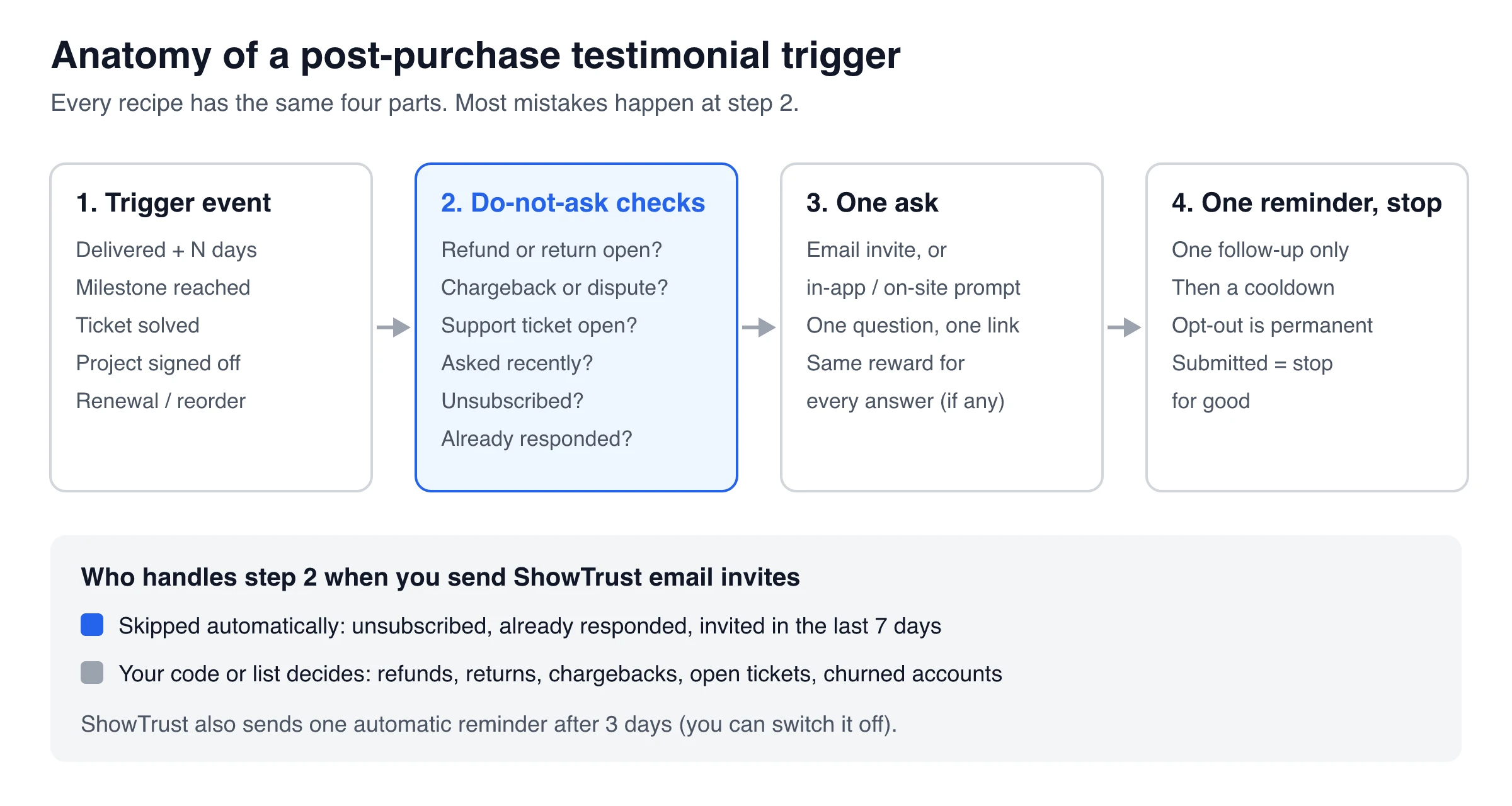
Every recipe below has the same four parts: a trigger event, do-not-ask checks, one ask, and one reminder before you stop. Copy the shape and change the event. For broader automation (forms, Zapier-style workflows), see this guide to automating testimonial collection.
Recipe 1: Delivery confirmed + N days (physical goods)
- Trigger: the “delivered” tracking event for the order, from your carrier, shipping tool or store platform.
- Wait: N days. Start with enough time to use the product once; go longer for products whose results take weeks.
- Skip if: a return or refund is requested, a damaged-item ticket is open, the customer was asked recently, or they’ve already left a testimonial.
- Ask: an email with one question (“How is the [product] working for you so far?”) and one link. A QR card in the box gives early adopters a second path.
Recipe 2: Milestone reached (SaaS and apps)
- Trigger: the product event that shows real value, such as the first report sent, the first invoice paid, or the tenth project created. Pick a milestone that retained customers usually hit, not a vanity click.
- Wait: none for the in-app prompt (show it at the next natural pause). Email only if they haven’t seen or answered it within your window.
- Skip if: a payment failed, a support ticket is open, the account is internal or a test, or they dismissed the prompt recently.
- Ask: a two-step in-app prompt that opens the testimonial form, with one email as the backstop.
Recipe 3: Support ticket solved
- Trigger: the ticket is marked solved and the customer has confirmed the fix (a “thanks, that worked” reply counts).
- Wait: a few hours to a day.
- Skip if: the ticket was about a refund, a billing dispute or a bug that’s still open elsewhere, or it was reopened or escalated.
- Ask: in the same thread. Quote what they already said and ask whether you may publish it. Get explicit permission first; the testimonial permission guide has the wording.
Recipe 4: Project sign-off (services and agencies)
- Trigger: the client accepts the final deliverable, or the last invoice is paid.
- Skip if: the invoice or scope is disputed.
- Ask: a personal email from the person who did the work. Offer to draft the testimonial from their feedback for them to approve. Busy clients often say yes to editing a draft.
Fallback triggers when you have no event tracking
Missing events shouldn’t stop collection. These proxies work with data you already have:
- A fixed number of days after purchase (the simplest proxy; set it longer than your usual delivery time)
- Orders marked delivered in your store admin
- An onboarding checklist marked complete
- An invoice paid or a renewal processed
- A manual “happy customer” tag added by support or customer success after a good call
A weekly batch works too: export last week’s eligible customers, remove anyone on your do-not-ask list, and upload the rest.
Do-not-ask rules, caps and reminders
Most post-purchase programs go wrong through volume, not timing. These rules keep a well-timed ask from turning into nagging:
- One cap per customer across every channel. Email, in-app and support asks all count toward the same limit (for example, one testimonial ask per quarter).
- A cooldown after any ask, even one they ignored.
- One reminder, then stop. A second reminder rarely helps and mostly adds complaints.
- Hard stops: a refund or return in progress, a chargeback or dispute, an open or escalated ticket, a failed payment, a cancelled account, and employees or test accounts.
- Opt-outs are permanent and apply to every channel.
- Once someone submits, stop asking. A later request for a case study is a separate, personal conversation.
ShowTrust email invites handle part of this automatically: nobody is invited twice within 7 days or after they’ve answered an invite, every email has one-click unsubscribe, and one reminder goes out after 3 days (you can switch it off). Refunds, chargebacks and open tickets live in your own systems, so filter those before you send.
How to add an in-app testimonial prompt without an in-app messaging tool
In-app messaging platforms can target and schedule prompts, but you don’t need one just to collect testimonials inside your app or store. A form that opens over the current page does the job.
ShowTrust’s on-site widgets add a “Leave a testimonial” button with one script tag. The form opens in a pop-up on your page, so customers don’t leave the app. Text, star rating, photo upload and your thank-you reward all work inside it, and so does video recording on Pro. There are three ways to open it:
- A floating button in the corner of every page, switched on from the dashboard.
- Any element you choose, such as a link in your footer, your order-history page or a success screen:
<a href="#" data-showtrust-collect>Tell us how it went</a>
- Your own code, called from the milestone in Recipe 2 once your do-not-ask checks pass:
// e.g. inside the "Yes" handler of your own small banner
window.ShowTrust.openCollect();
The last option gives you the two-step pattern: your banner asks first, and the form opens only if they click yes. Form opens are counted in ShowTrust’s analytics, so you can compare them with submissions.
Limits to know: ShowTrust doesn’t decide who sees the prompt or how often. Targeting, caps and cooldowns for an in-app prompt live in your code. The widget is a web script, so in a native mobile app you’d link to the hosted collection page instead.
Send the request automatically from checkout or your backend
For the email side, call the invites endpoint from your checkout, fulfillment or onboarding code. ShowTrust’s invites API (POST /v1/projects/:id/invites) emails each customer a request with a link that pre-fills their name and email:
// Server-side, after the order is delivered
await fetch(`${API_BASE}/v1/projects/${PROJECT_ID}/invites`, {
  method: "POST",
  headers: {
    "x-showtrust-account-id": ACCOUNT_ID,
    "x-api-key": API_KEY,
    "Content-Type": "application/json",
  },
  body: JSON.stringify({ recipients: [{ email: "jane@example.com", name: "Jane" }] }),
});
What happens next:
- The email goes out under your business name, and replies come to your account email.
- Anyone who unsubscribed, already answered an invite or was invited in the last 7 days is skipped and listed in the response. That stops a duplicate call from emailing someone twice in a week, but it isn’t a quarterly cap, so keep your own.
- You can send 1 to 200 recipients per request, with an optional subject and message (both support
{{name}}). The daily cap is 25 invites on Free and 500 on Pro, and the automatic reminder after 3 days applies here too.
The endpoint sends right away. For “delivered + 5 days,” schedule the call in your own job queue or in any automation tool that can send an HTTP request. No code at all? Upload a CSV of last week’s delivered orders on the invites screen once a week.
Incentives and review gating: what the FTC rules say
Thank-you rewards are legal in the US if they don’t depend on what the customer says and you disclose them. Three sources matter:
- The Consumer Reviews and Testimonials Rule (16 CFR Part 465), in effect since October 21, 2024. Section 465.4 makes it illegal to give compensation or incentives “conditioned expressly or by implication” on a review expressing a particular sentiment, positive or negative. The FTC’s questions and answers on the rule note that 465.4 applies to consumer reviews, that incentives without a sentiment condition aren’t prohibited, and that failing to disclose incentives could still violate the FTC Act.
- The Endorsement Guides. Section 255.5 requires clearly disclosing material connections the audience wouldn’t expect, such as payments or free or discounted products. Section 255.2 says paying customers for positive reviews is deceptive even when the payment is disclosed. It also says advertisers shouldn’t procure, suppress or edit reviews in ways that distort what customers think.
- Review gating. The FTC’s guide on soliciting reviews is blunt: don’t ask for reviews only from customers you think will leave positive ones. The Endorsement Guides give the classic example (255.2, Example 11): surveying buyers, then inviting only the very happy ones to post on review sites. That’s review gating, and it’s a risk whenever an NPS or CSAT score decides who gets the public-review ask.
Testimonials on your own site are selected by nature, and that’s expected. But don’t label a curated wall as “all reviews,” and don’t present an average of hand-picked ratings as your overall score. Section 465.7(b) targets review sections that hide negative reviews while implying they show most or all of them.
Safe and unsafe incentives
Safe:
- The same thank-you (a discount, a free month, a donation) for every testimonial, whatever it says
- A prize-draw entry for every submission, with clear rules
- A disclosure wherever the incentivized testimonial appears
Not safe:
- “Leave a 5-star review and get 20% off”
- Bigger rewards for better ratings
- Holding back support, a refund or warranty help until the customer reviews you
A useful test: would the reward still feel fair if the testimonial were critical?
ShowTrust rewards show a coupon code or link either instantly on the thank-you screen or by email after you approve the testimonial. The after-approval option stops people from submitting junk to collect codes. If you use it, approve for genuine effort, not for tone. A reward that only arrives for testimonials you liked enough to approve starts to look like a sentiment condition. If you can’t commit to that, deliver the reward instantly.
How to measure post-purchase testimonial collection
Judge every channel on one number: approved testimonials per eligible customer. Opens, clicks and prompt views are diagnostics, not outcomes.
The funnel is the same for both channels: eligible (passed your triggers and do-not-ask checks), reached, form opened, submitted, approved (publishable, with permission). Only “reached” differs. For email it means delivered, not opened. For an in-app prompt it means shown, counted once per person.
To compare channels fairly, run a simple A/B test:
- Define eligibility once, with the same suppression rules for every group.
- Randomize by customer or account, not by visit, into “email first” and “in-app first” (add a hybrid group only if you can keep the targeting clean).
- Send every group to the same form, with the same approval rules.
- Pick the winner on approved testimonials per eligible customer. Check the approval rate (approved ÷ submitted) too, to catch a channel that brings more volume but lower quality.
Also compare who you ask with who you publish. If one customer segment disappears between the two, your triggers or your approvals are filtering it out.
In ShowTrust, email invites track response rate per project, the analytics count on-site form opens, and every testimonial sits in Pending, Approved or Rejected, so the main funnel steps are visible without extra tooling.
Start with one trigger, then add the second channel
Pick the trigger that matches what you sell (delivery plus a few days, a product milestone, or project sign-off), add the do-not-ask checks, and send one ask with one reminder. Once that runs reliably, add the second channel: an email backstop for an in-app program, or an on-site button and a QR card for an email program.
For the bigger picture, from the request to publishing on your site, see how to collect testimonials end to end.
Frequently Asked Questions
- How long after a purchase should you ask for a testimonial?
- Ask once the customer has had a result. For physical goods that usually means a few days after delivery (longer if results take weeks). For software, ask right after the first meaningful outcome. For services, ask at sign-off. Then test the exact delay against your own response data.
- Is email or an in-app prompt better for collecting testimonials?
- Email reaches every buyer, including people who never return, so it suits physical goods and services. In-app prompts reach only active users but catch them in context, so they suit SaaS and apps. Many SaaS teams use an in-app prompt first and one email as a backstop, counted as a single ask.
- Can I offer a discount in exchange for a testimonial?
- Yes, if every customer gets the same reward no matter what they say, and you disclose the incentive where the testimonial appears. The FTC's review rule (16 CFR 465.4) bans rewards that depend on positive or negative sentiment, such as a discount only for 5-star reviews, and the Endorsement Guides treat paid-for praise as deceptive even when disclosed.
- Is it legal to ask only happy customers for reviews?
- The FTC advises against asking for reviews only from customers you expect to be positive, and its Endorsement Guides describe inviting only satisfied buyers to post on review sites as potentially deceptive. Choosing which testimonials to show on your own site is normal, but don't present that selection as all of your reviews.
- Should I ask again after a customer ignores the request?
- Send one reminder a few days later, then stop and start a cooldown. Customers who unsubscribe, have an open problem or have already submitted should not be asked again.
ShowTrust collects testimonials after purchase by email (up to 25 invites a day on Free, sent from your checkout code via the API if you like) and with an on-site “Leave a testimonial” button on every plan. Pro ($4.99/month or $49.99/year per project slot) adds video and 500 invites a day. Compare plans.
Written by
ShowTrust
Notes from the ShowTrust team on collecting testimonials and building authentic social proof.
Share: