June 20, 2026
·
Updated November 6, 2026
·
13 min read
Ecommerce Testimonials vs Product Reviews: Where Each Wins
A practical guide to ecommerce testimonials: how store-level testimonials differ from per-product reviews, review apps and Google store ratings; which one helps buyers in which situation; placement on the home page, product page, cart, checkout and after purchase; credibility signals such as photos, specifics, dates and visible negatives (including the FTC's review suppression rule, 16 CFR 465.7); three real store examples; and a collection process.

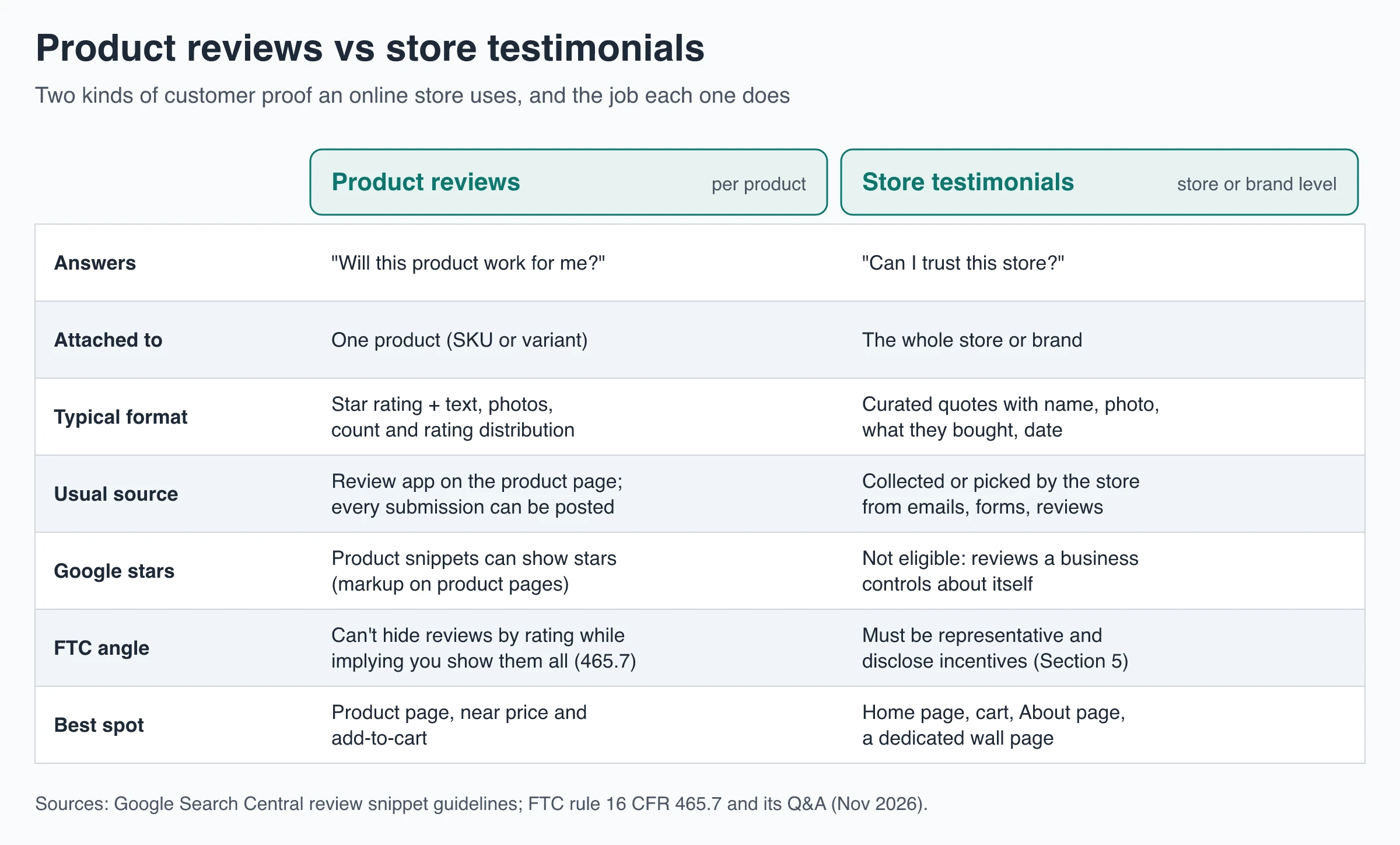
Ecommerce testimonials are quotes about your store as a whole: how ordering, delivery, quality and support went. Product reviews are ratings and comments about one product. Reviews answer "Will this product work for me?" and testimonials answer "Can I trust this store?", so most online stores need both: reviews on product pages, testimonials on the home page, in the cart and on a dedicated wall page.
This guide covers the difference, when each one helps a buyer, where to place them, what makes them believable, and how to collect them without running into the FTC's rules on review suppression.
What are ecommerce testimonials?
An ecommerce testimonial is a short statement from a customer about their experience buying from your store, shown in your own marketing: on the home page, in a cart drawer, in emails or on a testimonials page (often called a wall of love). A good one names what the person bought and what happened: the parcel arrived before the weekend trip, the size chart was right, support swapped a faulty zipper without a fight.
The FTC draws the same line in its Consumer Reviews and Testimonials Rule Q&A. A consumer review is an evaluation submitted to and published on a site or section built to receive and display such evaluations, such as the reviews block on a product page. A testimonial is an advertising message that people are likely to read as a customer’s own opinion. The FTC’s answer is blunt: most consumer reviews aren’t testimonials and most testimonials aren’t reviews. Once you lift a review out of the reviews section and feature it in your marketing, it becomes a testimonial.
Ecommerce testimonials vs product reviews
Product reviews: one product, rated and counted
A product review is attached to a single product or variant. It usually has a star rating, text, sometimes photos, and it sits in a list with a total count and a rating breakdown. Stores collect them with a review app or their platform’s built-in reviews, which emails buyers after delivery and publishes what comes back.
Their power is volume. In research first published in 2017, Northwestern’s Spiegel Research Center found that the purchase likelihood for a product with five reviews was 270% higher than for a product with no reviews. Displaying reviews raised the conversion rate by 380% for a higher-priced product versus 190% for a lower-priced one, and the marginal benefit of additional reviews began diminishing rapidly after the first five. Those numbers are about product reviews on product pages, not store testimonials, and they are almost a decade old, so read them as a direction rather than a forecast for your store.
Store testimonials: the whole buying experience
A testimonial isn’t tied to a SKU. It speaks to things no single product review covers: whether the store is real, how fast it ships, how returns went, what support was like. Testimonials are usually fewer and hand-picked, and they persuade through detail rather than count. That’s why they work on pages where there is no single product to review: the home page, About page, cart and a testimonials page.
The trade-off is that buyers know testimonials are chosen by the store. That makes specifics, real names and visible dates more important for testimonials than for reviews (more on that below).
Where Google stars and store ratings fit
Two Google features get mixed up with both:
- Review stars in search results. Google’s review snippet guidelines support stars for reviews of a product, but say pages are ineligible when “the entity that’s being reviewed controls the reviews about itself” and marks them up as an Organization or LocalBusiness. Testimonials about your own store fall in that self-serving bucket. Product reviews marked up on product pages are the case that can earn stars, which is why review apps add that markup. If you hand-code it, a review schema generator helps with the JSON-LD syntax for products, not for testimonials about the store.
- Store ratings (seller ratings) in ads and Shopping. These come from Google Customer Reviews, third-party review partners and Google’s own shopping research, not from quotes on your site. Per Google Ads Help, most merchants get a rating after 100 or more eligible reviews, the reviews must be from the last 24 months, and a rating of 3.5 or higher is needed to show on text ads.
So a testimonial wall won’t put stars next to your store in Google. It does its work on your own pages.
When each one helps a buyer
Think about the question the shopper is stuck on, then pick the proof that answers it.
| Buyer situation | What they’re unsure about | Proof that helps most |
|---|---|---|
| First visit to a store they’ve never heard of | Is this store real? Will the order arrive? | Store testimonials about delivery, packaging and support |
| Comparing two products or sizes | Which one fits my use? | Product reviews filtered by variant, with photos |
| Expensive or hard-to-return item | Will I regret this? | Many product reviews, including low ratings and how the store responded |
| Buying a gift with a deadline | Will it come on time and look good? | Testimonials that mention delivery dates and gift packaging |
| Subscription or refill product | Will cancelling or changing it be painless? | Testimonials about support and account changes |
| Returning customer | Usually little doubt left | Neither needs much space; don’t block the path to checkout |
The pattern: product reviews do the heavy lifting when the risk is the product, and testimonials do it when the risk is the store. A small brand with few reviews per product leans on store testimonials until product reviews build up.
Where to put testimonials on an ecommerce site
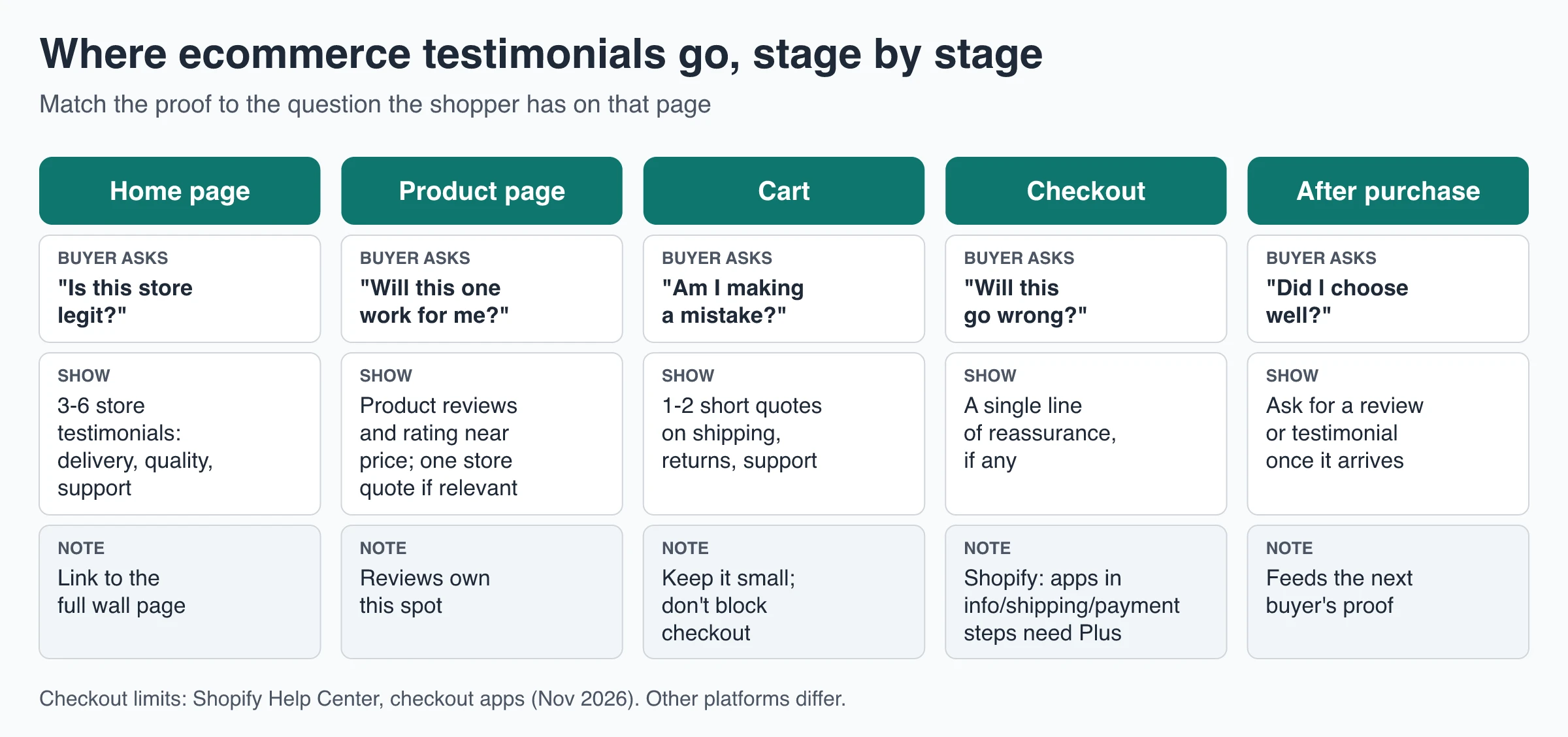
Home page
New visitors decide in seconds whether to keep browsing. A row of three to six store testimonials below the hero or next to best sellers answers “Is this store legit?”. Pick quotes that mention delivery, quality or support rather than “Love it!”, and link the row to the full testimonials page.
Product page
This is product-review territory: rating and count near the title, the full reviews block lower down. Add a store testimonial only when it answers a worry the reviews don’t, such as “Ships from the US in two days” next to the delivery estimate, or a returns quote next to the size selector.
Cart
In the cart, the doubt shifts to “Am I making a mistake?”. One or two short quotes about shipping, returns or support can sit under the order summary. Keep them small and never above the checkout button.
Checkout
Checkout is the least flexible spot and the one where distractions cost most. A single line of reassurance is plenty. Platforms also restrict it: on Shopify, apps that customize the information, shipping and payment steps are available only on Shopify Plus, while the thank-you and order status pages are open to Basic Shopify and up, per Shopify’s checkout apps guide. The limits of Shopify testimonial widgets covers what that means in practice.
After purchase
The thank-you page and the delivery email are where the next testimonial comes from. Ask once the order has arrived and been used, not at the moment of payment. That’s covered in the collection steps below.
A dedicated testimonials page
A full wall works best on its own page, linked from the footer, About page and home page row. It gives a skeptical buyer one place to read many experiences, and it gives your smaller placements somewhere to point. Use a static grid or masonry layout so people can scan many cards at once; if you use a moving carousel, give it a pause control.
What makes ecommerce testimonials credible
Buyers discount praise that looks chosen. Every element on a testimonial card either adds evidence or removes it.
Specifics beat adjectives
“Great quality!” tells a shopper nothing. “Ordered the 32-inch in navy, hemmed once, still no pilling after a winter of weekly washes” tells them fit, use and durability. Put the product or variant on the card, and favor quotes that mention a concrete detail: a size, a timeframe, a problem that got solved.
Real names and photos, with permission
A first name plus last initial, a city or a customer photo makes a quote harder to fake. Customer photos of the product in use do double duty: they show scale and finish. Get explicit permission to publish the name, photo and words, and keep a record of it.
Recent dates
Show the date on each card. Undated quotes, or a wall whose newest card is two years old, suggest the store stopped hearing from customers. Retire quotes about discontinued products and add new ones on a schedule.
Negatives you don’t hide
Shoppers go looking for the bad news. In Baymard Institute’s product-page usability testing (published 2019), 53% of users specifically sought out negative reviews for products they were interested in, and users said they don’t trust only positive reviews. The Spiegel research points the same way: purchase likelihood typically peaked at average ratings of 4.0 to 4.7 and dropped as ratings approached a perfect 5.0.
For product reviews, hiding negatives is also a legal risk in the US. The FTC’s rule on review suppression, 16 CFR 465.7, makes it a violation for a business to imply that the reviews shown in its reviews section represent most or all of the reviews submitted when reviews are being withheld because of their rating or negative sentiment. Withholding is allowed only on criteria applied to every review regardless of sentiment, such as abusive content, someone else’s personal information, a review the seller reasonably believes is fake, or one unrelated to what you sell. Sorting reviews, for example by helpfulness, isn’t suppression.
Testimonials work differently. The FTC’s Q&A says the suppression provision doesn’t stop a business from featuring particularly positive reviews in marketing, but warns that non-representative reviews in marketing could still be deceptive under Section 5 of the FTC Act. In practice: a curated wall is fine, but don’t label it “all our reviews”, don’t pick quotes that promise results most customers don’t get, and don’t filter which customers you ask based on whether they’re happy (that’s review gating).
Incentives disclosed
Thank-you coupons are a common way to raise response rates. Under the FTC rule on buying positive or negative reviews, 16 CFR 465.4, a business may not offer compensation or other incentives conditioned, expressly or by implication, on a review expressing a particular sentiment. Offer the reward for any honest response, not just the glowing ones. The rule itself doesn’t require disclosing incentives, but the FTC’s Q&A warns that failing to disclose them could violate the FTC Act, so say on the card or caption when a quoted customer received something for it.
If your testimonials aren’t moving buyers
Check these before redesigning anything:
- Wrong page: product-level doubts answered with store quotes, or vice versa.
- Generic quotes: nothing on the card a skeptic could check.
- No dates or old dates: the wall looks abandoned.
- Too perfect: every card five stars and polished copy.
- Hard to reach: the wall sits below a long footer or behind a carousel nobody advances.
Ecommerce testimonial and review pages from real stores
Three stores show three different approaches. These descriptions reflect the pages as of November 2026; layouts change.
Ridge: every product review on one page
Ridge’s reviews page gathers product reviews from across the catalog. At the top is an average of 4.8 based on more than 100,000 reviews, with the full star breakdown visible, including about 1.2k one-star reviews. Shoppers can sort by lowest rating or bring reviews with photos and videos to the top, and each review names the exact product and variant. It’s a store-wide page built from product reviews, and its openness about low ratings is what makes the 4.8 believable.
Saatva: curated testimonials plus outside profiles
Saatva’s reviews page opens like a testimonial wall: a carousel of dated customer quotes, each naming the mattress bought, some marked “Verified Reviewer”. The page also links out to Saatva’s profiles on BBB, Trustpilot, ResellerRatings and Google, and further down it shows the full product-review list (a 4.8 average from roughly 13,000 reviews, with search and a rating filter). That pairing, a curated highlight reel plus a path to every review, including third-party ones, is a fair model for a store-level testimonial page.
Purple: a review hub organized by category
Purple’s reviews page leads with “125k+ Total Product Reviews | 4.3 Stars” and organizes reviews by product category: mattresses, pillows, bedding, bed frames and seat cushions. Putting a 4.3 average in the headline sets honest expectations rather than implying perfection, and the category split helps a shopper reach reviews for the type of product they’re considering.
How to collect ecommerce testimonials
- Ask after delivery, not after payment. Time the request for a few days to a couple of weeks after the order arrives, depending on how long the product takes to prove itself. A comparison of post-purchase emails and in-app prompts covers timing in detail.
- Ask everyone, not just happy customers. Sending requests only to people who gave a high satisfaction score skews your wall and, for reviews, runs into the FTC issues above.
- Ask specific questions. “What were you unsure about before ordering?”, “Which product and size did you get, and how is it working?”, “How was delivery and packaging?” and “Who would you recommend us to?” produce quotes with detail.
- Make it short and mobile-friendly. No account, a few questions, an optional photo upload and a star rating.
- Get permission in the form. A checkbox for using their name, photo and words, recorded with each response.
- Review, approve and tag. Fix typos, never meaning. Tag by topic (shipping, fit, support) so you can place the right quote on the right page.
- Refresh on a schedule. Add new quotes monthly or quarterly and retire stale ones.
Where ShowTrust fits, and where it doesn’t
ShowTrust is for store-level testimonials, not per-product reviews. It has no Shopify app, no theme app extension and no product-review sync, it doesn’t attach testimonials to individual products, and its widget doesn’t add review markup or Google stars. If you need star ratings on every product page, use your platform’s reviews or a review app for that part.
For the testimonial side, it covers the steps above:
- Collect: a hosted collection page at showtrust.to/your-name with no customer account, up to five questions, optional photo upload and star rating, and a permission checkbox (Don’t ask, Optional or Required) recorded with each testimonial. Email invites are included: 25 a day on Free, 500 a day on Pro.
- Reward honestly: optional thank-you rewards, a coupon code or link for all testimonials or video only, shown on the thank-you screen or emailed after approval. Showing it on the thank-you screen rewards every response, which fits the advice above.
- Curate: approve, reject, pin, tag and fix typos, with one owner login (no team roles).
- Display: a wall embedded with a small script and a container, in six layouts, with optional dates and ratings and a filter to show only certain tags. There’s also a hosted wall page at showtrust.to/w/your-name with the testimonial count, average rating and topic filters.
On Shopify it goes into a Custom Liquid section or theme code like any other script; the guide to adding testimonials to Shopify walks through that and the app-based alternatives, and the Shopify testimonial widget explainer covers how widgets, app blocks and sections differ. Testimonials are text on Free; video testimonials need Pro.
Ecommerce testimonials checklist
- Product reviews on product pages, store testimonials on the home page, cart and a testimonials page.
- Each card shows a name, what they bought, a concrete detail and a date.
- Low ratings stay visible in your reviews section; the testimonial wall isn’t presented as “all reviews”.
- Requests go to every customer after delivery, with permission captured in the form.
- Incentives are offered for any honest response and disclosed.
- Quotes are refreshed on a schedule and retired when products are discontinued.
Frequently Asked Questions
- What is the difference between a testimonial and a product review?
- A product review is a rating and comment about one product, published in a reviews section where customers submit them. A testimonial is a quote about the customer's experience with the store or brand, chosen by the business and used in its marketing. Reviews answer whether a product will work; testimonials answer whether the store can be trusted.
- Does an online store need both reviews and testimonials?
- Usually yes. Product reviews do the most work on product pages, especially for expensive items. Store testimonials help on the home page, in the cart and on a testimonials page, where shoppers are judging the store rather than one product. A new store with few product reviews can lean on testimonials until reviews build up.
- Can I show only positive testimonials on my store?
- A curated testimonial wall is allowed, but it must not mislead. The FTC says its review suppression rule applies to reviews sections, not to selecting positive reviews for marketing, while warning that non-representative testimonials can still be deceptive under Section 5 of the FTC Act. In your product reviews section, don't hide reviews because they are negative while implying you show them all.
- Will testimonials on my website show star ratings in Google?
- No. Google treats reviews a business controls about itself as self-serving and ineligible for review stars. Product reviews marked up on product pages can be eligible, and store ratings in Google ads come from Google Customer Reviews and third-party review partners, not from your site.
- Where should testimonials go on an ecommerce site?
- Start with a short row on the home page, one or two quotes about shipping or returns in the cart, and a dedicated testimonials page linked from the footer. Leave the product page mainly to product reviews, and keep checkout to a single line of reassurance at most.
Want a store-level testimonial wall without a Shopify app? ShowTrust is free for one project with unlimited text testimonials and a small credit link you can switch off; Pro is $4.99/month or $49.99/year per project slot and adds white-label and video testimonials.
Written by
ShowTrust
Notes from the ShowTrust team on collecting testimonials and building authentic social proof.
Share: