September 4, 2026
·
Updated November 6, 2026
·
15 min read
How to Collect Testimonials for SaaS: Request to Publish
A practical method for collecting SaaS testimonials: when to ask, which channels to use, what questions to send, and the request, collect, approve and publish flow. General guidance, not legal advice.

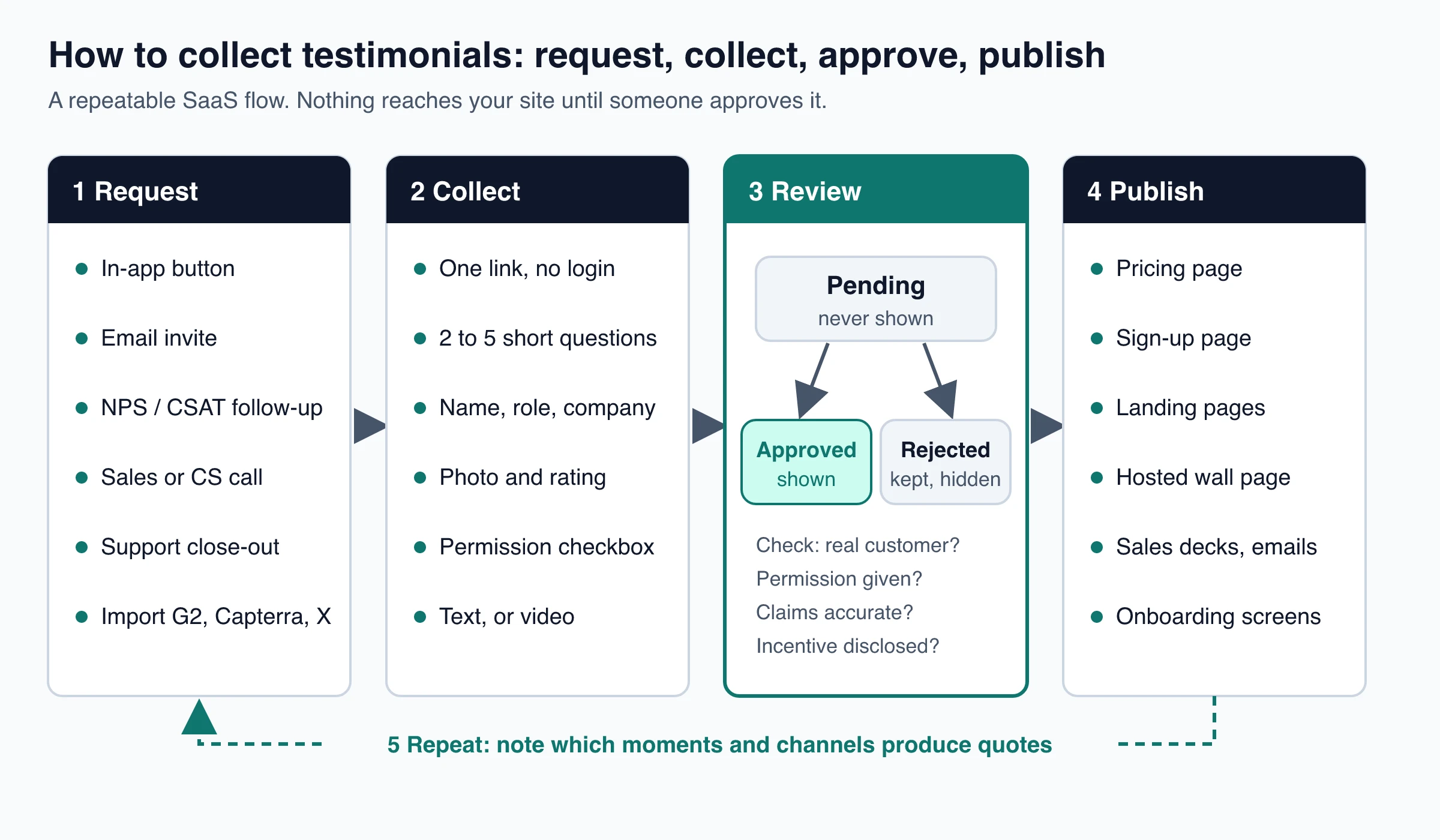
To collect testimonials from SaaS customers, ask right after they get value from your product (a first milestone, a solved support ticket, a high survey score, a renewal), send them one link or an in-app button that takes two minutes, and ask for permission in the same step. Then review each submission and publish only the ones you approve.
That's the whole method. The rest of this guide covers the details that decide whether it works: which lifecycle moments to use, which channel fits each one, what to ask, the rules for NPS promoters and review sites like G2, and where the finished quotes should go.
How to collect testimonials: the 5-step flow
Collecting testimonials works best as a small system that runs all year, not a one-off email blast. Every testimonial moves through the same five steps:
- Request. Ask at a moment when the customer just got value, through the channel they’re already using (your app, email, a call).
- Collect. Send them to one short form: two to five questions, their name, role and company, an optional photo, and a permission checkbox.
- Review. Every submission lands as pending. Someone checks it’s from a real customer, the claims are accurate, and permission was given, then approves or rejects it.
- Publish. Approved testimonials go where buyers make decisions: the pricing page, sign-up page, landing pages, a hosted testimonial page, sales decks.
- Repeat. Track which moments and channels produce usable quotes, and do more of those.
Most teams get stuck at step 1 (asking at random times) or step 3 (no clear owner for approvals). The sections below cover each step in order.
When to ask SaaS customers for a testimonial
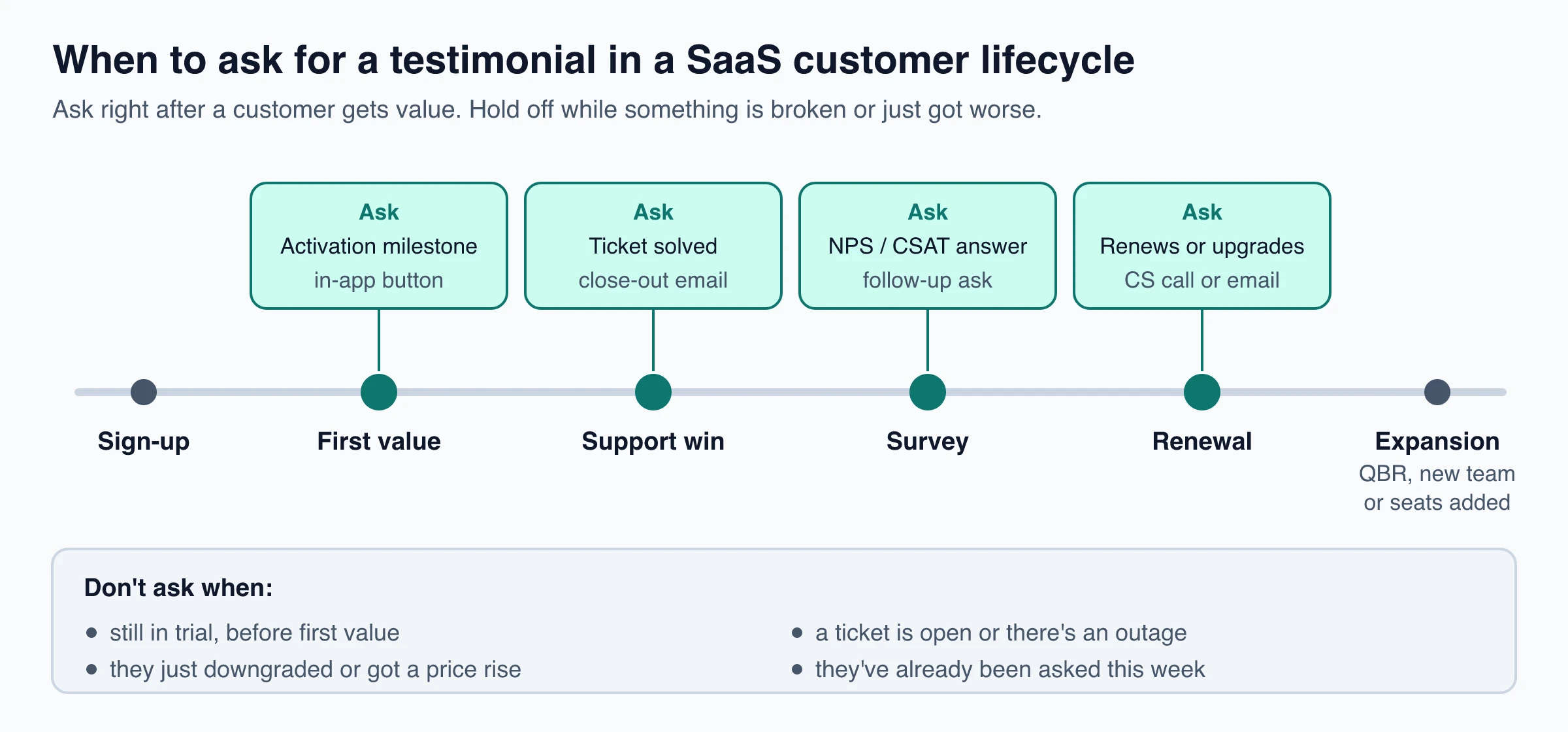
The best time to ask is within a day or two of a moment the customer would describe as a win. The details are fresh, and the request feels connected to something real instead of arriving out of nowhere.
In SaaS, those moments are visible in your own data. You don’t have to guess who’s happy; you can trigger the ask from an event.
| Moment | Signal in your data | Best channel | What to ask about |
|---|---|---|---|
| Activation milestone | First project shipped, first invoice sent, first integration live | In-app button or prompt | What they used before and what’s easier now |
| Support win | Ticket closed as solved, positive CSAT rating | Close-out email from the agent | What was broken and how it was handled |
| Survey answer | NPS 9 or 10, or a positive comment in a CSAT survey | Follow-up on the thank-you screen or by email | Expand the comment they already wrote |
| Renewal or upgrade | Annual renewal, plan upgrade, seats added | Customer success call or personal email | The result that made them stay or expand |
| Public praise | A post on X or LinkedIn, a message in your community | Reply asking to use it | Permission to quote it, plus their role |
Expansion moments (a good quarterly business review, a second team adopting the product) work the same way as renewals: the customer has just told you why the product matters, so ask them to put it in writing.
When not to ask
Some moments reliably produce no reply or an awkward one:
- Before first value. A trial user who hasn’t finished setup has nothing specific to say.
- During an open ticket or an outage. Fix the problem first. The close-out is a better moment anyway.
- Right after a downgrade or a price increase. Wait for the next positive signal.
- Too often. Cap requests per person. One ask plus one reminder is plenty, and someone who has answered shouldn’t be asked again for months.
Asking NPS promoters without crossing into review gating
Using Net Promoter Score answers to decide who to ask is common and sensible for testimonials you’ll publish yourself. A customer who scored you 10 and wrote a detailed comment has already done half the work.
Public review sites are different. Sending only happy customers to a review site, and steering unhappy ones elsewhere, is review gating, and the major platforms ban it:
- G2’s in-app review prompt docs say you should not segment customers to solicit only positive reviews, and that reviews collected that way may be removed (as of November 2026).
- Google’s contributor policy bars merchants from discouraging negative reviews or selectively soliciting positive ones.
- The FTC’s Consumer Reviews and Testimonials Rule Q&A says the rule doesn’t specifically ban asking only happy customers for reviews, but the practice could still violate the FTC Act. It adds that showing only positive reviews in marketing isn’t a rule violation, though non-representative reviews could be deceptive.
A clean split: send review-site requests to everyone in a segment (for example, all accounts active for 90 days), and save the personal testimonial ask for people who’ve told you something specific and positive. Don’t present a hand-picked set of quotes as “what all our customers say”.
Channels for collecting SaaS testimonials
Most SaaS teams need three or four channels, not all of them. Pick the ones that match the moments you can detect.
| Channel | Effort to set up | Volume | Quote quality | Best for |
|---|---|---|---|---|
| In-app prompt or button | Medium (needs a developer once) | High | Short, specific | Activation milestones, self-serve products |
| Email request | Low | Medium | Varies; best when personal | Support wins, renewals, batch asks |
| NPS / CSAT follow-up | Low if you already survey | Medium | Builds on a comment they wrote | Turning survey comments into quotes |
| Sales and CS calls | Low, but takes people’s time | Low | Highest; you can draft it with them | Enterprise accounts, case studies |
| Review sites (G2, Capterra) | Medium | Medium | Public and detailed, but not yours | Third-party proof buyers check anyway |
| Existing praise (inbox, social, Slack) | Low | Low to medium | Already written; needs permission | Getting your first 10 quotes fast |
In-app prompt
In-app asks catch customers while they’re using the product, which is the main advantage over email. Two patterns work:
- Event-triggered prompt. Show a small banner or modal when someone completes the milestone you care about. Keep it dismissible and don’t show it again for weeks after a dismissal.
- Always-available button. A “Leave a testimonial” link in the help menu or account settings catches people who want to say something nice on their own schedule.
Either way, open the form inside the app (a pop-up) rather than sending people to another site, and pre-fill their name and email since you already know them. For the trade-offs between in-app prompts and email after a purchase or sign-up, see email vs in-app prompts for testimonial requests.
Email request
Email is the default channel and still the easiest to start with. What makes it work:
- Send it from a person (the founder, the CSM, the support agent who solved the ticket), not a no-reply address.
- Name the specific moment (“glad the import is running again”).
- Ask for two or three sentences and give one link or let them just reply.
- Send one reminder a few days later, then stop.
For copy-and-paste wording by situation, including follow-ups and permission lines, use these testimonial request email templates.
NPS and CSAT follow-up
If you already run NPS or CSAT surveys, you’re sitting on raw testimonials. Many respondents explain their score in a sentence or two.
Two ways to use them:
- On the thank-you screen. After a high score, add one line: “Mind if we share that? Add your name and role here.” Anyone can dismiss it.
- In a follow-up email. Quote their own comment back to them and ask if you can publish it, lightly edited, with their name and company.
Don’t publish a survey comment without asking. Survey answers are given as feedback, not as marketing.
Sales and customer success calls
A live ask gets a much higher yes rate than an email. In a 2017 study in the Journal of Experimental Social Psychology (Roghanizad and Bohns), 45 students each asked 10 strangers to fill out a questionnaire, either face to face or by email. Both groups expected about half to agree. In person, about 7 in 10 did; by email, about 2%. Asking a customer you already know on a video call isn’t the same situation, but the direction holds.
On a call, a good pattern is: ask what’s changed since they started, write down their words, then send a two-sentence draft for them to approve or edit. Busy B2B buyers often prefer approving a draft to writing from scratch. Keep their meaning and wording; just trim it.
Support ticket close-out
Support is where a lot of genuine gratitude shows up (“you saved my launch”). When a ticket closes with a positive rating or a thank-you, the agent can ask in the same thread. The quote is naturally specific because it’s about a real problem and how it was solved.
Keep a reference to the ticket with the testimonial so you can confirm the details later.
G2, Capterra and importing existing reviews
Review sites matter because SaaS buyers check them independently of your website. Two separate jobs:
- Getting reviews on the site. G2 offers in-app review prompts that show its review form inside your product, with incentives and an optional NPS question configured on G2’s side. Ask everyone in a segment, not just promoters.
- Quoting reviews on your own site. Each platform sets its own rules. As of November 2026, G2’s community guidelines say vendors may republish reviews only on certain paid plans, must link back to the review on G2, and need the customer to opt in. Check Capterra’s and any other site’s terms before you quote.
The simplest safe route when a G2 or Capterra reviewer wrote something great: contact them, ask whether you can feature it on your site, and collect it through your own form so you have their permission on record.
You can also gather praise you already have: search your inbox and support tool for “thank you”, “love”, “saved”; check mentions on X and LinkedIn; scan community channels. Ask each person before publishing.
What to ask: questions that produce usable SaaS testimonials
Open questions like “What do you think of us?” produce vague praise. Specific prompts produce quotes a buyer can act on. Pick two to five of these:
- What were you using (or doing) before, and what wasn’t working?
- What made you choose this product over the alternatives?
- What’s one result you’ve seen since you started? A number helps if you have one.
- What would you tell a colleague in your role who’s considering it?
- Was there anything you were worried about before signing up? How did it turn out?
The testimonial question generator suggests variations by industry and goal.
Three shapes that tend to work well on SaaS pages:
- Outcome plus context: “We used [Product] for [use case]. The biggest difference was [specific result] within [time frame].”
- Objection remover: “I was worried about [setup time / switching cost / learning curve], but [what actually happened].”
- Who it’s for: “If you’re a [role] dealing with [problem], [Product] helps you [result].”
If a customer gives you a number (“cut reporting from two days to two hours”), confirm it with them before publishing. Once it’s on your site, it’s your claim too (see the Permission section below).
Text or video testimonials for SaaS?
Start with text. It’s faster for customers to give, easier to approve, and works everywhere: pricing pages, sign-up forms, onboarding screens, emails.
Add video for the moments where a face and voice carry more weight than a sentence:
- Late-stage evaluation, when buyers look for proof that people like them succeeded.
- Sales follow-ups and decks for larger deals.
- A dedicated testimonials or customers page.
There’s no reliable public data on how much video testimonials change a SaaS sales pipeline, so treat claims about specific lift with caution. A practical sequence: collect text from everyone, then invite your most articulate customers to record a short video (one to two minutes is enough) with the same questions shown on screen. For formats that work, see these video testimonial collection examples.
Permission, incentives and the FTC
Before a testimonial goes live, you need three things on record:
- Permission to publish it as marketing, with the name, role, company and photo they agreed to show. A permission checkbox on the form, with the exact wording saved, is the simplest proof.
- Any material connection. If they got a discount, gift card, free months, or they’re an investor or friend, disclose it next to the testimonial. Under the FTC Endorsement Guides (16 CFR 255.5), connections a reader wouldn’t expect must be disclosed clearly.
- Accuracy. Under 16 CFR 255.1, advertisers can be liable for misleading or unsubstantiated statements made through endorsements, and an endorsement claiming someone uses the product should stay up only while you have good reason to believe they still do.
On incentives: a thank-you reward for leaving a testimonial is allowed if it doesn’t depend on the testimonial being positive. For consumer reviews, the FTC rule (16 CFR 465.4) bans incentives conditioned on a particular sentiment. The FTC’s Q&A also notes that testimonials on your own site are something you disseminate, not just host, so you can be liable if they’re fake or false.
Review sites set stricter rules for their own reviews. As of November 2026, Google’s policy bars businesses from offering any incentive in exchange for a review, and G2 caps incentives at $100, never ties them to a positive opinion, and labels incentivized reviews.
For a full walkthrough of consent wording and record-keeping, read how to get permission to use testimonials.
Review and approve before anything goes live
Treat every submission as a record, not a message. At minimum, keep:
- The quote, exactly as submitted (keep the original if you trim it later).
- Public attribution: name, role, company, photo.
- Context: which product area, which use case, which moment triggered the ask.
- Private contact: an email address so you can re-confirm details.
- Permission and disclosures: whether they ticked the box and any incentive or relationship.
- Source: the ticket, call, survey or post it came from.
Then give each record a state, and keep it simple: pending (submitted, not shown), approved (shown) and rejected (kept, never shown). The rule that prevents most mistakes: pending is never displayed. Your website should show approved testimonials only, never “the latest 12”. Timestamps are for sorting; states decide what’s public.
Light edits for typos and length are normal. If an edit changes the meaning, send it back to the customer to approve.
Who approves
For most SaaS teams, one person (often the founder or head of marketing) reviews the queue weekly. Agencies and larger teams sometimes add a step where the customer’s own company signs off on a quote that names their brand. For checklists, approval emails and how to organize approved quotes with tags, see the testimonial approval workflow.
Where to publish SaaS testimonials
Place each testimonial where it answers the question the reader has on that page:
| Page | The buyer’s question | Testimonial that answers it |
|---|---|---|
| Pricing page | “Is it worth the money?” | A result or time saved, from someone on a similar plan |
| Sign-up or trial page | “Will setup be painful?” | “We were live in an afternoon” |
| Feature or use-case pages | “Does it handle my case?” | A quote from someone in that role or industry |
| Homepage | “Is this legit?” | Two or three short quotes with names, photos and companies |
| Testimonials page | “Who else uses it?” | All approved testimonials, filterable by topic |
| Sales decks and follow-up emails | “Has this worked for companies like mine?” | Quotes from the same industry or company size |
| Onboarding screens | “Did I make the right choice?” | A quote about the result they’re working toward |
Short beats long on high-intent pages. Save longer quotes and videos for a dedicated testimonials page; this guide to building a customer testimonials landing page for SaaS covers its structure.
Setting up the flow in ShowTrust
ShowTrust is one of several tools that cover this flow end to end. Here is how each step maps to it, with its limits:
- Collection page. Each project gets a hosted form at showtrust.to/your-name. Customers don’t need an account. You set up to five questions, which fields to ask for (role, company, photo, star rating), and a permission checkbox (off, optional or required). Customers can tap “Autofill with X” to fill in their name and photo. The form text comes in 9 languages.
- Requests. Email invites go out under your business name with
{{name}}personalization and one automatic reminder after 3 days; nobody is invited twice within 7 days or after they respond. Free sends up to 25 a day, Pro 500. To trigger an ask from your product, call the invites API from onboarding or support code, or add a Leave-a-testimonial button to your app that opens the form in a pop-up (any element withdata-showtrust-collect, orwindow.ShowTrust.openCollect()). - Imports. Import existing praise from an X post or App Store link, a CSV, or pasted text from G2, Capterra, Trustpilot or an email (quoting review-site reviews still has to follow each site’s rules above). AI splits pasted text into separate testimonials, and you check each row before saving. There is no live sync with review sites, and no direct Google Business Profile connection.
- Review. New submissions arrive as pending, with an email alert (and optionally a Slack or Discord message). You approve, reject, edit, pin or tag them. Approval is a single owner’s click: there are no team seats, approver roles or audit trail.
- Publish. Approved testimonials appear on your embedded Wall of Love and hosted wall page within about five minutes, with no redeploy. Signed webhooks (
testimonial.created,testimonial.approved) can push them to other tools.
Video testimonials (recorded in the browser or uploaded, 15 seconds to 5 minutes) are a Pro feature. ShowTrust doesn’t transcribe or caption videos, doesn’t send SMS, and doesn’t verify a submitter’s identity or purchase, so the review step is still yours.
Turn collection into a monthly habit
The teams with a steady supply of testimonials don’t write better emails. They ask at the same moments every time and review the queue on a schedule.
- Weekly: clear the pending queue.
- Monthly: check which triggers and channels produced usable quotes, and switch off the ones that don’t.
- Every six months: refresh old testimonials. Confirm the person still uses the product and still holds the role you show; replace quotes that mention features or prices you’ve since changed.
Start with one trigger you can detect today, such as the activation milestone or the support close-out, and add the next one once it’s running.
Frequently Asked Questions
- How do you ask a SaaS customer for a testimonial?
- Ask right after they get a result, through the channel they already use: an in-app prompt, a short personal email, or on a call. Mention the specific win, ask for two or three sentences, give them one link or let them reply, and ask permission to show their name and company. Offer to draft it for their approval if they're busy.
- When is the best time to ask for a testimonial in SaaS?
- Within a day or two of a clear win: reaching an activation milestone, a solved support ticket, a high NPS or CSAT score with a comment, or a renewal or upgrade. Avoid asking during a trial before first value, while a ticket is open, or right after a price increase or downgrade.
- Can I ask only NPS promoters for testimonials?
- For testimonials you publish on your own site, asking customers who gave a high score is common, but don't present a hand-picked set as representative of all customers. For public review sites like G2 or Google, asking only happy customers is review gating, which those platforms prohibit; the FTC says it could also violate the FTC Act.
- Can I use G2 or Capterra reviews as testimonials on my website?
- Only within each site's rules. As of November 2026, G2's guidelines limit republishing to certain paid plans and require a link back to the review and the customer's opt-in. The simplest route is to contact the reviewer, ask permission, and collect the quote through your own form.
- Should you offer an incentive for a testimonial?
- You can offer a small thank-you, as long as it doesn't depend on the testimonial being positive. Disclose it next to the testimonial, because the FTC Endorsement Guides require clear disclosure of material connections a reader wouldn't expect.
- How many questions should a testimonial form have?
- Two to five. Ask what they used before, what changed, and what they'd tell someone in their role. More questions lower the completion rate without improving the quotes.
ShowTrust’s Free plan gives you a hosted collection page, unlimited written testimonials and up to 25 email invites a day, with a small credit link you can switch off. Pro ($4.99/month or $49.99/year per project slot) adds video, 500 invites a day and white-label walls. Compare plans.
Written by
ShowTrust
Notes from the ShowTrust team on collecting testimonials and building authentic social proof.
Share: