June 28, 2026
·
Updated November 6, 2026
·
14 min read
Testimonial Management Software for Agencies: How It Works
A practical guide to testimonial management software for agencies: the collect, store, curate, display and reuse loop, an evaluation checklist, a multi-client operating model, a per-client setup checklist and agency pricing models as of November 2026.

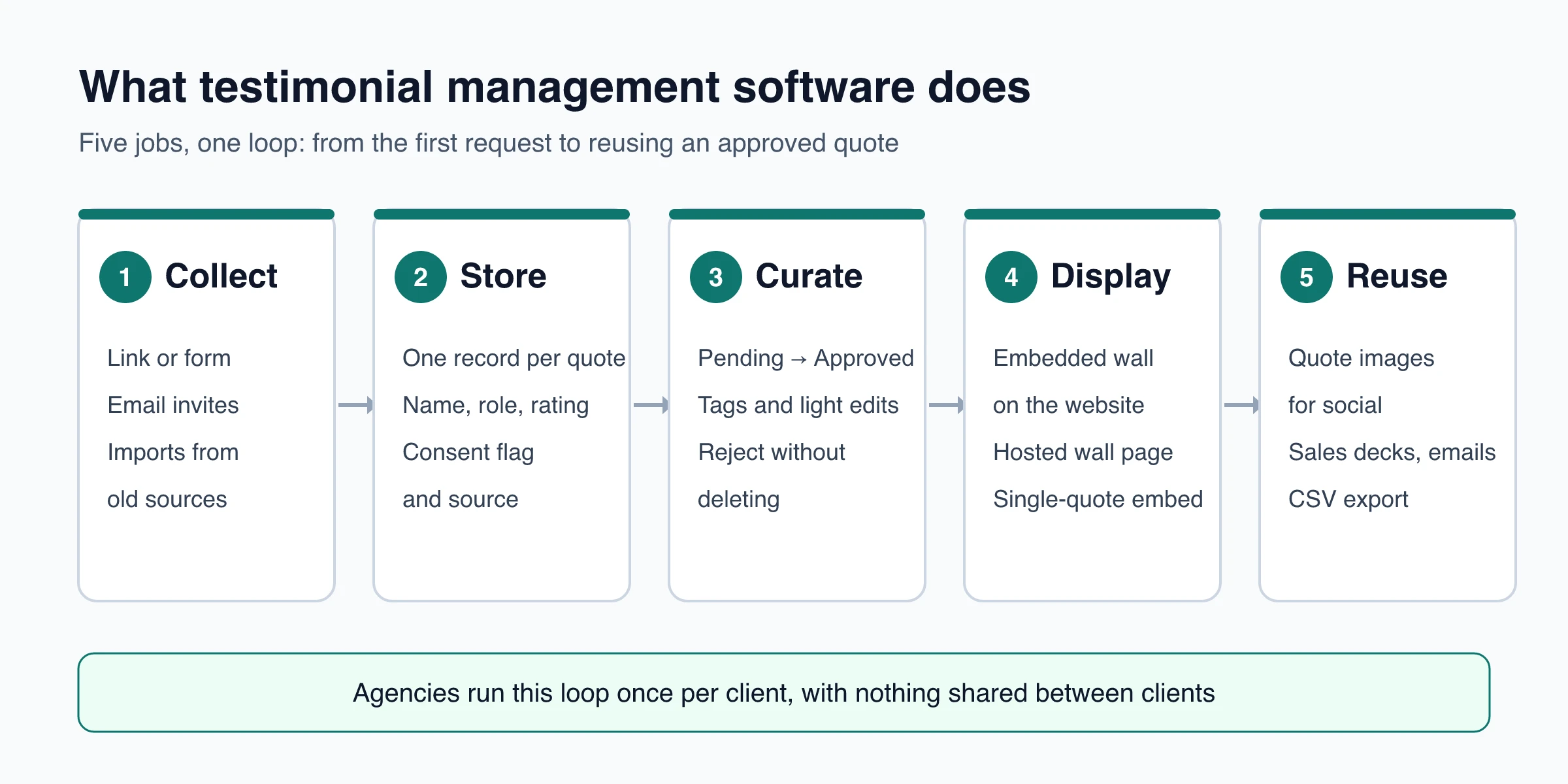
Testimonial management software collects customer testimonials, stores them with attribution and permission, lets you approve which ones go public, displays them on a website through an embed, and makes them easy to reuse elsewhere. For an agency, one requirement sits on top of that: separation. Each client needs its own collection page, its own approved quotes, its own branded wall and its own numbers, with nothing leaking between accounts.
This guide covers what the software does at each stage, what to check before you choose a tool, how to run testimonials across many clients (when to ask, when to stop, how clients sign off, how to report), and a setup checklist for each new client. The worked example uses one ShowTrust project per client, limits included.
What does testimonial management software do?
Testimonial management software handles the whole life of a customer quote, from the request to the page where it appears. Most tools in the category do five jobs.
| Stage | What the software does | Why it matters |
|---|---|---|
| Collect | A hosted form or link customers fill in without an account, email requests, imports of quotes you already have | Asking is usually the bottleneck. A link you can paste anywhere makes each request easier |
| Store | One record per testimonial: text or video, name, role, company, rating, source, and whether the customer ticked a permission box | A quote without attribution or consent is hard to use later |
| Curate | A review queue (pending, approved, rejected), tags, small edits for typos | Nothing goes public until someone approves it |
| Display | An embeddable wall, carousel or single-quote card, often a hosted page as well | The website is where buyers usually see them |
| Reuse | Quote images, share links, exports for sales decks and emails | An approved quote earns more when it is used beyond one page |
Two neighboring categories get mixed up with it. Review management software focuses on third-party review sites such as Google or G2: monitoring, replying and asking for public reviews. A CRM stores customer records and can trigger a request at the right deal stage, but it has no collection page, approval queue or wall to embed. If you are deciding which system should own what, see how testimonial tools and CRMs split the work.
What to evaluate in testimonial management software
Feature lists look alike from a distance. These questions separate tools in practice, especially when you will run one tool for several brands.
| Area | Questions to ask |
|---|---|
| Collection | Can customers submit without creating an account? Text and video? Email requests with a reminder and an unsubscribe link? Can you import quotes from a CSV or from review sites? |
| Consent | Is there a permission checkbox, and is its value stored with each testimonial and included in exports? |
| Curation | Does every submission land as pending? Can you tag, fix typos and reject without deleting? |
| Display | Is the widget a script or an iframe, and how heavy is it? Can you remove the vendor’s branding? Can it match each client’s site? |
| Multiple clients | Are clients separated into projects or workspaces? Is each one billed separately? Can a client log in, and do you want them to? |
| Team access | How many seats are included? Are there roles or approver permissions? |
| Reporting | Does it show impressions, clicks and per-site numbers you can put in a client report? |
| Integrations | Slack or Discord alerts, webhooks, an API? Native CRM connectors or only webhooks? |
| Pricing model | Per project, per seat, per space or metered by views? What does the eleventh client cost? |
For a testimonial tool for multiple clients, free-plan limits matter less than the pricing model, because the cost of client number ten is the one you will live with. For tool-by-tool comparisons, see the roundup of testimonial collection and display tools.
How agencies manage client testimonials across accounts
The software is the easy part. What breaks at five or fifteen clients is the operating model: who asks, when, who signs off, and how results get reported. A workable model has six parts.
Give every client its own workspace
Set up one project or workspace per client rather than one shared library with client tags. Separation keeps a quote from showing up on the wrong client’s site, gives each client its own collection link and branding, and keeps offboarding simple: you can hand over an export or close one workspace without touching the others.
Before collecting anything, write a one-line definition of a usable testimonial for that client: who it is from (name, role, company), which service or product it is about, one concrete outcome, and permission to publish. A submission that misses one of these stays pending until the gap is filled.
Ask at moments the client already has
Requests work best when they ride on a moment that already exists in the client’s customer journey. Pick two or three per client and run them every time.
| Moment | Why it works | Typical channel |
|---|---|---|
| After onboarding or a first result | The value is fresh | Email request or in-app link |
| After a project milestone or delivery | There is a concrete outcome to describe | Email from the account manager |
| After a support problem is solved | Goodwill is high | Link in the support reply |
| At renewal | The customer just chose the client again | Email request |
| After a purchase, event or launch | Details are specific | Post-purchase email, QR code on print or at the venue |
Your agency’s own quarterly reviews, renewals and project wrap-ups are the same kind of moment one level up. Give the agency its own workspace and ask your clients there.
Follow up once, then stop
Set stop rules before the first send so nobody improvises with a client’s customers:
- Send the request inside the chosen moment, personalized with the customer’s name.
- Send one reminder a few days later to people who have not responded.
- Stop. If the relationship justifies it, the account manager can ask once in person or by direct email.
- Never ask again after someone unsubscribes, declines or has already left a testimonial.
- Do not ask the same person twice in one quarter, even from two different campaigns.
Rule 5 is the easiest to break when two campaigns run at the same time. ShowTrust email invites enforce the first four: one automatic reminder after three days (you can switch it off), a one-click unsubscribe, and nobody is invited twice within seven days or after they have responded. The quarter-long gap is a rule your team keeps.
Get permission and client sign-off before publishing
Two separate approvals are involved. The customer gives permission to use their words, and the client confirms the quote can speak for their brand. Keep a record of both.
- Customer permission. Use a checkbox on the form with wording the client agreed to, and keep its value with the testimonial. For the wording, see how to get permission to use testimonials.
- Client sign-off. Name one approver on the client side. Send the exact text that will go live in one batch per week or per campaign, not one email per quote. If you change a quote beyond a typo after sign-off, send it back.
- Rewards. If you offer a thank-you reward, offer it for any honest testimonial, not only positive ones. The FTC’s Rule on the Use of Consumer Reviews and Testimonials bans incentives conditioned on a particular sentiment in consumer reviews (16 CFR 465.4).
Agencies carry their own exposure. The FTC’s Endorsement Guides say advertising agencies and similar intermediaries may be liable for endorsements they create or disseminate when they know or should know those endorsements are deceptive (16 CFR 255.1(f)), and they call for clear disclosure of material connections between an endorser and the seller that the audience would not expect (255.5). This is general information, not legal advice. For the review steps themselves, see this testimonial approval workflow.
Name and tag the same way for every client
A shared convention lets anyone on the team search any client’s library. Use a title or tag pattern such as Client, Service, Outcome, Date, for example “Acme / SEO retainer / more demo requests / 2026-10”.
Keep a short, fixed tag list per client (service line, customer segment, the objection the quote answers) and write one sentence defining each tag so two people tag the same quote the same way. Once a month, remove duplicates and retire stale quotes, such as a customer who has left or a feature that has changed.
Report testimonial results apart from channel results
Clients will ask whether testimonials work. Report what the testimonial tool measures, and keep it separate from traffic swings caused by ads, SEO or seasonality.
- Show how often the wall was actually seen, how many visitors clicked its call to action, and on which pages or domains.
- If a page converted better in the month you added a wall and also launched a campaign, say both happened instead of crediting the wall.
- Where traffic allows, compare similar pages with and without the wall over the same period rather than before and after.
- Label readings honestly: a few weeks of data is “early”, not proof.
In ShowTrust, wall analytics report impressions (a wall on screen for at least a second), CTA clicks, click-through rate, a 30-day daily chart and impressions per site, per project.
Running it in ShowTrust: one project per client
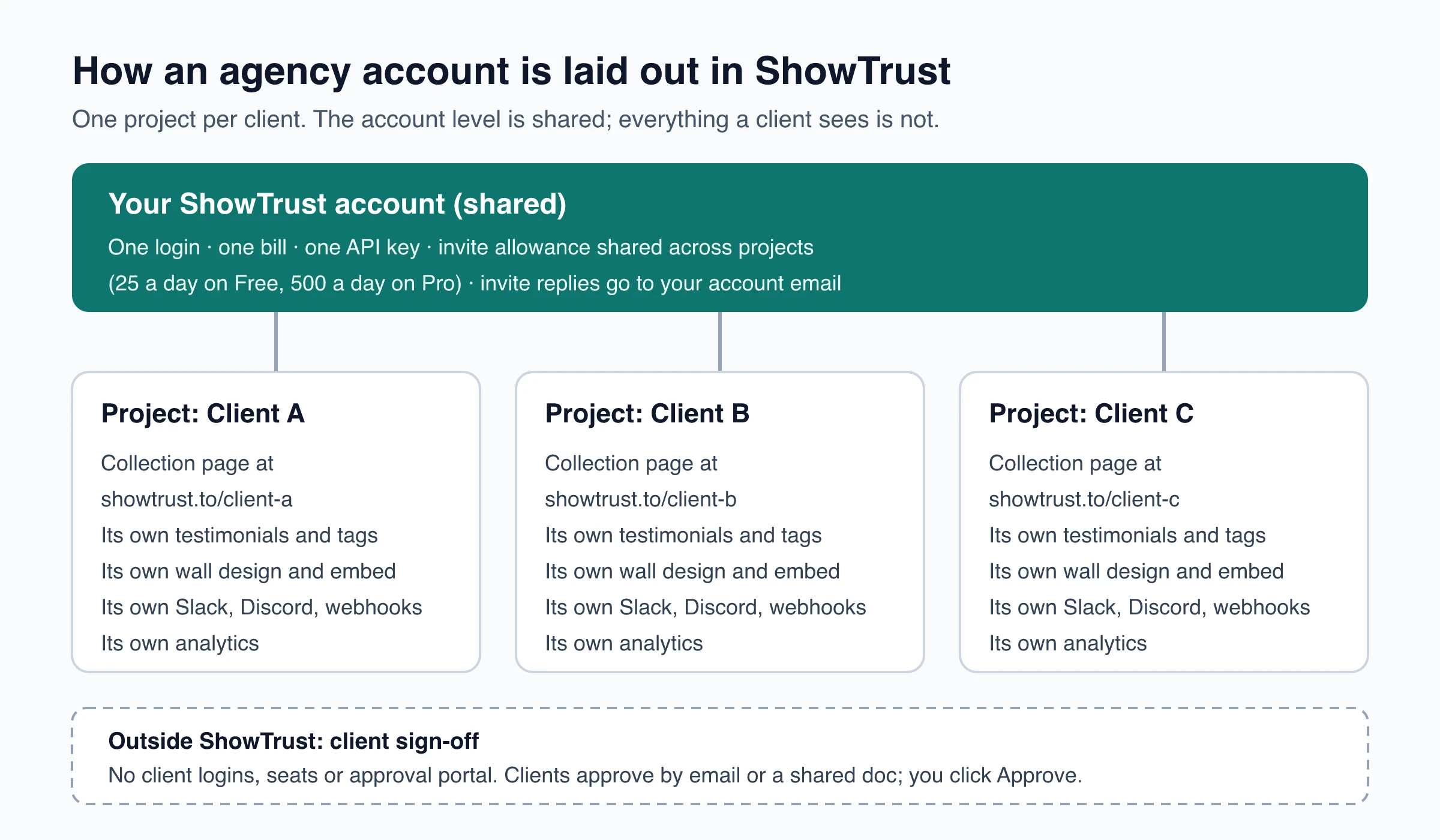
ShowTrust handles the agency case with projects. A project is one website or product with its own collection page, testimonials, wall settings and analytics. An agency creates one per client and switches between them from one dashboard.
What each client project gets
- A hosted collection page at showtrust.to/client-name, with the client’s logo, colors, headline and up to five questions. Customers do not need an account.
- Its own testimonials, statuses (pending, approved, rejected) and tags. Nothing is shared between projects, so one client’s wall never shows another client’s quotes.
- Its own wall: six layouts, eight card styles, six palettes, light or dark. Each project has one wall design.
- Its own alerts and automations: Slack or Discord posts and signed webhooks (testimonial.created, testimonial.approved) are set up per project. See the notifications and webhooks docs.
- Its own analytics, including impressions per site where the wall is embedded.
What stays at account level
- One login and one bill for every client.
- One API key. The REST API can create projects, add and list testimonials, update wall settings, fetch the embed snippet and send invites, which helps if you onboard clients often.
- The daily invite allowance is per account and shared by all projects: 25 a day on Free, 500 a day on Pro.
- Invite emails go out under the sender name you set, such as the client’s business name, but replies go to your account email. Plan for your inbox, not the client’s, to receive them.
- Email alerts for new testimonials go to the account owner.
What ShowTrust does not do for agencies
Tell clients these limits up front:
- No team seats, roles or client logins. There is one login per account. Approval is one person moving a testimonial from Pending to Approved, so client sign-off happens outside the tool, by email or a shared document.
- No client approval portal, audit trail or version history.
- No custom domain. Collection pages live at showtrust.to/client-name and hosted walls at showtrust.to/w/client-name.
- One wall design per project. A client who wants a carousel on the homepage and a masonry wall on a case-study page needs a second project, and testimonials do not carry over automatically. A CSV export from one project and an import into the other moves them.
- No live review sync. Google Business Profile, Facebook and Yelp reviews come in by copy and paste; other imports use a CSV, an X post link or an App Store link.
- No SMS requests, no native CRM connectors (webhooks and the API instead), and no transcription or captions for video.
A Slack channel you share with a client can carry new-testimonial posts so the client sees quotes as they arrive. The post’s Review button opens your dashboard, so the approval click stays with you.
White-label and branding per client
On Free, walls show a small “Wall of love by ShowTrust” credit that you can switch off. Pro is white-label: the credit is always off on every project in the account. Pro also turns on video testimonials (recorded in the browser or uploaded, 15 seconds to 5 minutes) and raises the invite allowance to 500 a day.
Setup checklist for each new client
Run this list for every new client. Pilot it with one client first, then reuse the questions, permission wording and invite email as templates for the next.
- Agree on the brief. What counts as a usable testimonial, which two or three moments you will ask at, who signs off on the client side, and where the wall will appear.
- Create the project, named after the client. The name becomes the collection page address, which you can change later.
- Brand the collection page. Add the logo, colors and headline, and write up to five questions for that client’s customers, such as “What were you using before?” and “What changed in the first month?”. Choose the fields (role, company, photo, star rating) and the form language.
- Set the permission checkbox to Required with wording the client approved. Each testimonial records whether it was ticked, and the CSV export includes it.
- Choose text, video or both. Video needs Pro; without it, the form falls back to text.
- Import what the client already has: a CSV, quotes pasted from G2, Capterra, Trustpilot, LinkedIn or emails, X posts or App Store reviews by link. Check each one in the review step before approving. Duplicates are skipped, and imports are a one-time copy, not a sync.
- Clear the demo testimonials before anything goes live.
- Send the first invites. Paste the client’s customer list or upload a CSV, set the sender name to the client’s business, and use
{{name}}in the message. Decide whether the automatic reminder stays on. - Design the wall: layout, palette, card style, and optionally only certain tags.
- Embed it on the client’s site. The snippet is a script plus a container div pasted into an HTML or custom-code block. There are guides for plain HTML sites, including Webflow and Framer, as well as Next.js, Astro and Vite + React; WordPress and Squarespace take the same snippet in a custom HTML block. Approved testimonials appear within about five minutes.
- Route alerts to a Slack or Discord channel for that client, or send a webhook to Zapier (Catch Hook), Make or n8n.
- Record a baseline. After 30 days, note impressions, CTA clicks and click-through rate per site for the first client report.
What testimonial software costs for many clients
Testimonial tools price agency use per project or space, per seat, or with a bundle of both. The difference grows with every client you add. The table shows monthly list prices for multi-client use as of November 2026, from each vendor’s pricing page.
| Clients | ShowTrust (Pro, white-label) | Senja | Testimonial.to |
|---|---|---|---|
| 1 | $4.99 (or $0 with the credit link) | $29 (Starter, 1 project) | $30 (Starter, 1 space) |
| 3 | $9.98 | $59 (Pro, 5 projects) | $180 (Ultimate, $60 per space) |
| 5 | $19.96 | $59 | $300 |
| 10 | $44.91 | $109 ($10 per extra project) | $600 |
| 20 | $94.81 | $209 | $1,200 |
| Logins included | 1 | 2 on Starter, 5 on Pro, then $5 per extra seat | 1 on Starter; Ultimate: “5 account + 3 / space” |
How the ShowTrust column works: Free includes one project, and each Pro slot ($4.99 a month or $49.99 a year) adds one more, so N white-labeled clients need N - 1 slots (one slot for a single client). Senja and Testimonial.to both offer annual discounts and include features ShowTrust does not have, team seats and custom domains among them, so compare full feature lists before quoting a client.
Per-project pricing keeps client number twenty cheap but gives you one login. Seat-based plans cost more and let colleagues or clients sign in. Decide which one your agency needs before comparing prices.
Pick the operating model first, then the tool
- Separate every client from day one: one project or workspace each.
- Write the rules before the first send: what a usable testimonial is, when to ask, one reminder and then stop, and one approver on the client side.
- Keep customer permission and client sign-off on record, and never tie a reward to positive sentiment.
- Report what the wall did separately from what the traffic channels did.
- Choose the pricing model by client count and by whether clients need their own logins.
Frequently Asked Questions
- What is testimonial management software?
- Software that collects customer testimonials through a form, link or email request, stores them with attribution and permission, lets you approve which ones go public, and displays them on websites through embeds. Many tools also help you reuse approved quotes as images, share links or exports.
- Is testimonial management software the same as review management software?
- No. Review management tools focus on third-party sites such as Google or G2: monitoring, replying and requesting public reviews. Testimonial tools collect first-party quotes that you choose to publish on your own pages. Some businesses use both.
- Can clients approve testimonials themselves in ShowTrust?
- No. ShowTrust has one login per account, with no client seats, roles or approval portal. Approval is one Pending to Approved click by the account owner, so agencies get client sign-off by email or a shared document first and then approve.
- How much does ShowTrust cost for an agency with 10 clients?
- Free includes one project, and each Pro slot adds one more for $4.99 a month or $49.99 a year. Ten white-labeled client projects need nine slots: $44.91 a month or $449.91 a year.
- Can I white-label a testimonial widget for my clients?
- In ShowTrust, yes on Pro: the ShowTrust credit is removed from every wall in the account. Collection pages and hosted walls still use showtrust.to addresses because there is no custom domain option.
- Do agencies need testimonial software if they already use a CRM?
- Usually yes. A CRM can store quotes and trigger a request at the right stage, but it has no collection page, approval queue or embeddable wall. A common setup uses the CRM to decide when to ask and the testimonial tool to collect, approve and display.
Start with one free ShowTrust project for your first client. Pro adds white-label, video and one more client project for each $4.99/month slot.
Written by
ShowTrust
Notes from the ShowTrust team on collecting testimonials and building authentic social proof.
Share: