September 12, 2026
·
Updated November 6, 2026
·
16 min read
Testimonials on Pricing Pages: Where to Put Them and Why
Where to place testimonials on a SaaS pricing page, which quotes answer price and switching objections, real examples, FTC rules for results claims, and how to test. General guidance, not legal advice.

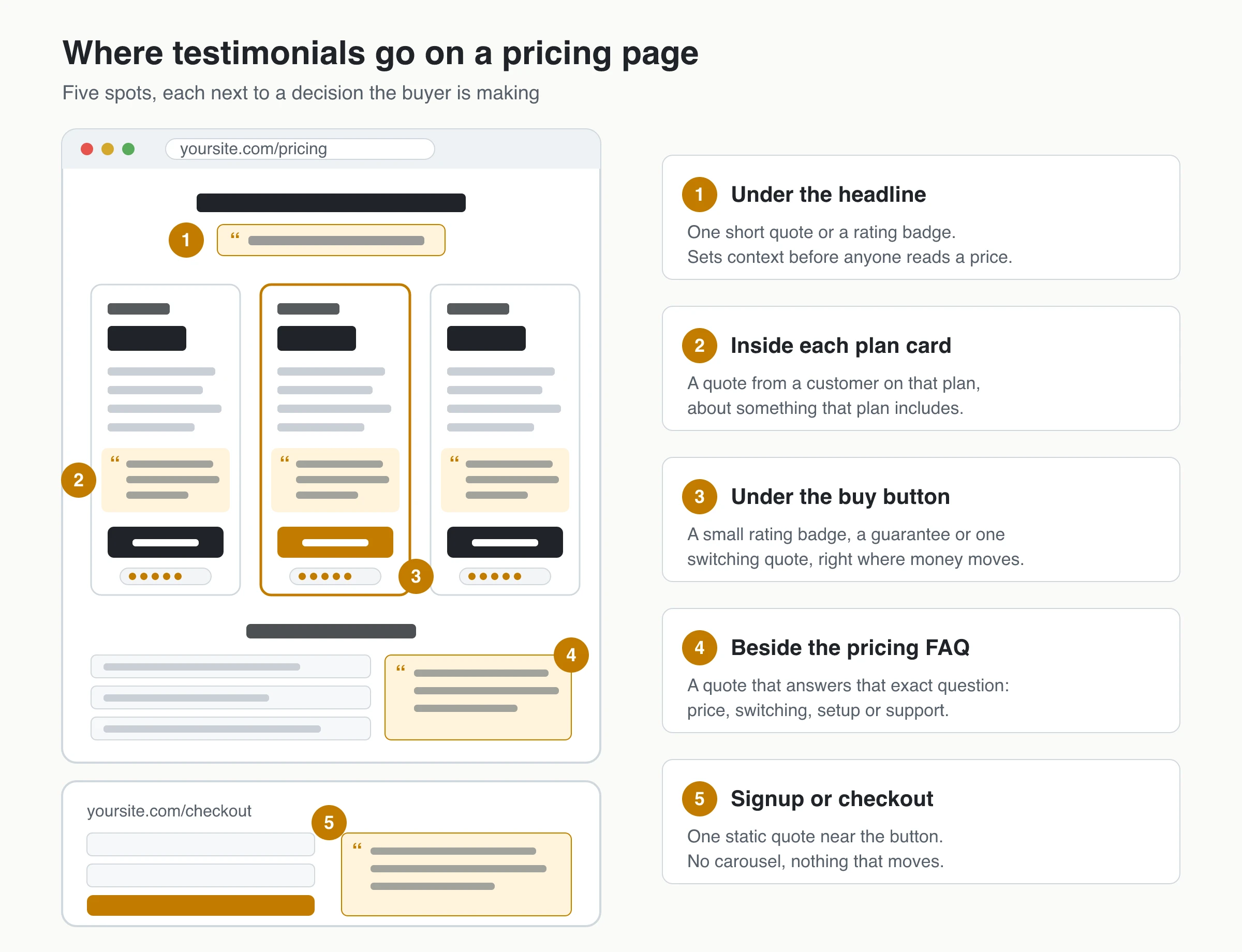
Yes, put testimonials on your pricing page, but place them next to specific decisions instead of in one block at the bottom. The quotes that earn their space answer the doubt a buyer has at that exact spot: is this worth the price, how painful is switching, and is this plan right for a team like mine. Generic praise does little there.
Below: the five spots where pricing-page testimonials work, which quotes belong in each, what five real SaaS pricing pages do (as of November 2026), the FTC rules that apply to results claims, and how to test whether any of it changes conversions.
Should you put testimonials on your pricing page?
Usually, yes. A pricing page is where a visitor stops browsing and starts weighing cost and risk, so it is the page where social proof has the most specific job to do. A short quote from a customer who had the same doubt, placed next to the price that triggers it, does more than a general testimonials page the visitor may never open.
Buyers also read on-site quotes skeptically. In Nielsen Norman Group’s 2016 research on trustworthy web design, participants valued quotes and case studies but assumed a company would only show favorable feedback, and they trusted outside review sites more. So a pricing-page testimonial has to be specific, attributable and believable, or it gets discounted.
Leave them out until you have real, specific quotes. Placeholder or invented quotes are worse than none, and generic praise (“Love it!”) adds length without answering anything. Whatever you add, treat it as a change to measure; the testing section covers how.
Where to put testimonials on a pricing page
Placement matters more than volume. Each spot below sits next to a different decision, and each one calls for a different kind of quote.
Under the headline
A single short line or a rating badge under the headline sets context before anyone reads a number. Pick a quote about value or the decision itself, not a feature.
Buttondown, the newsletter tool, publishes its experiments; its log lists a pricing masthead testimonial test (August 11, 2025) that swaps the standard subheadline for a one-line customer quote. As of November 2026 it is marked Active with no result published. Treat this spot as a hypothesis to test, not a proven win.
Inside or directly under each plan card
A quote inside a plan card should come from a customer on that plan, about something that plan includes. This is plan-locked placement, and it prevents a quiet problem: a quote praising an Enterprise-only feature sitting above the Basic price, which reads as a promise the cheaper plan can’t keep.
Tag every testimonial with the customer’s plan, role and company size, put the matching quote in the matching column, and label any feature from a higher plan or add-on. Re-check placements whenever you rename plans or move features. If pricing is usage-based or packaging changes often, place quotes by eligibility (“teams over 20 seats”) or use one quote under all the cards instead.
Next to the buy button
Right under the main call to action, where money moves, use something small: a compact rating badge, a refund or cancellation promise, or one short switching quote. It should support the button, not compete with it. The trial terms printed there matter as much as the quote; see no-credit-card-required vs card-upfront trials.
Beside the pricing FAQ
Pricing FAQs already list the objections your sales team hears: “Why does it cost more than X?”, “How hard is it to move our data?”, “What if we outgrow the plan?”. A quote that answers that exact question, placed next to the answer, is one of the most targeted uses of a testimonial on the whole site: it is objection handling in a customer’s words. Buttondown’s FAQ does a version of this, answering “How do people feel after switching?” with a link to its testimonials page.
At signup or checkout
Checkout is the last place a buyer hesitates. One short, static quote near the payment button can reassure without distracting. Avoid carousels, popups and anything that moves here; the visitor is typing card details, and motion pulls attention away from the form.
Logos and “trusted by” counts
Logos and counts (“trusted by 2,000 teams”) are fast to scan but come with conditions:
- Only real, current customers. A logo says the company uses your product; trial users, former customers or non-buyers make it a false claim.
- Ask first. Many companies restrict how their logo appears in vendor marketing.
- Counts must be true and current, including live “X teams joined this month” lines.
Logos tell a visitor who uses the product. A quote tells them why, which is usually more useful on a pricing page.
Which testimonials work on a pricing page
Pick quotes by objection, not by how enthusiastic they sound. Start from the doubts you hear on sales calls, in support tickets and in cancellation reasons, then find the quote that answers each one.
| Buyer doubt | Quote that answers it | Best spot |
|---|---|---|
| “It’s expensive” | Value in the customer’s terms: time saved, a tool it replaced, what it costs compared with the alternative | Under the headline or by the higher-priced plan |
| “Switching will be painful” | How long the move took, what came across, what they’d tell someone switching | Pricing FAQ (migration question) or under the CTA |
| “Is this plan right for us?” | A customer of similar size or role on that plan | Inside the plan card |
| “Will we need support?” | A specific support interaction, with a timeframe | Pricing FAQ (support question) |
| “Will it pay off?” | A result with a number, used only with permission and substantiation | Near the plan it applies to |
| “Can I trust this company?” | Named, dated quotes plus a link to outside reviews | Below the plans |
Attribution makes each one more credible: full name, role, company and a date where the customer agrees to it. If someone prefers to stay anonymous, “Operations lead, 40-person logistics company” is still far more useful than “J.”
Price and value quotes
The best price quotes don’t say “worth every penny.” They describe what the customer stopped paying for, stopped doing or started doing. “Replaced two tools we were paying for separately” or “Our weekly report now takes ten minutes instead of an afternoon” lets the reader do the value math themselves. If the quote includes a number, it falls under the results rules below.
Switching quotes
Switching is often the real objection behind “too expensive”: the price is fine, the migration effort is not. Quotes that name the old tool, how long the move took and what surprised the customer answer it directly. If a quote names a competitor, make sure the wording is the customer’s own and approved by them.
ROI and results quotes
A quote with a number (“cut onboarding from three weeks to four days”) is persuasive because it is specific, and that is exactly why it carries legal weight. Under the FTC’s Endorsement Guides, 16 CFR 255.2 says a consumer endorsement about a key attribute is likely to be read as what consumers will generally achieve. If you can’t show that, you should clearly disclose the generally expected result. The guide’s own example is a set of heat-pump testimonials claiming $100–$150 monthly savings when fewer than 20% of buyers save $100 or more: “Results not typical” is not enough to fix that.
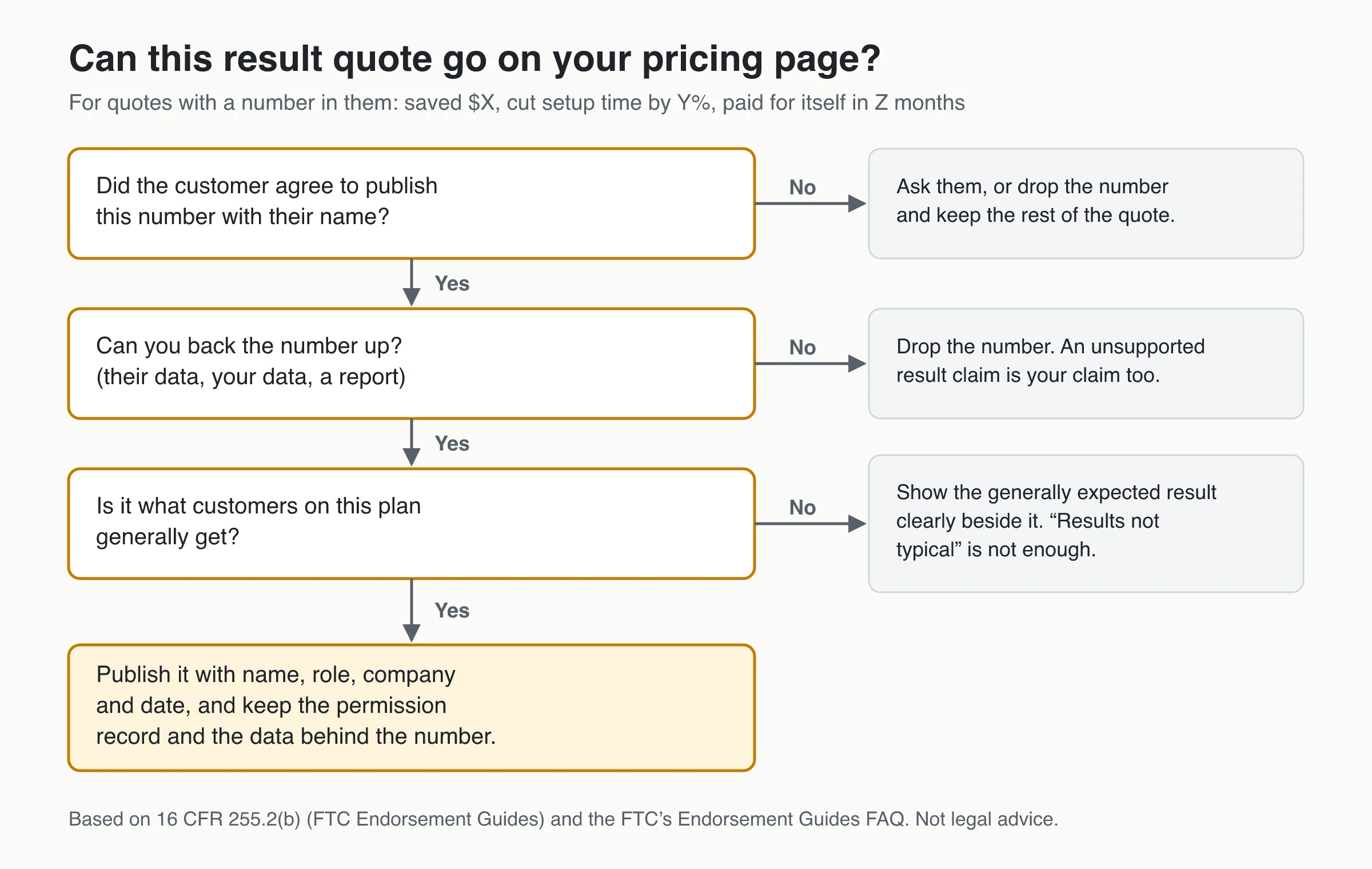
Get the customer’s written OK to publish the number with their name (see how to get permission to use testimonials), keep the data behind it, and present it as one customer’s result in their context. Longer results stories belong in a case study you link to; writing a B2B case study testimonial covers how to get the metrics approved.
Red-flag phrases that don’t help
These lines look positive but answer nothing a pricing-page visitor is asking:
- “Game-changer” with no situation
- “Love it” with no outcome
- “The best” with no comparison
- “Highly recommend” with no buyer type
- “So easy to use” with no task
If a quote could sit on a competitor’s homepage unchanged, it won’t settle a pricing doubt. Don’t rewrite it; ask for a better one.
Questions that produce usable quotes
Better quotes come from better questions, not from editing. Ask customers:
- What made you start looking for a tool like this?
- What did you compare us with, and why did you pick us?
- What was switching or setup like for your team, and how long did it take?
- Which feature do you use every week?
- What changed in your work after the first month?
A free testimonial question generator can help you adapt these to your product.
Real SaaS pricing pages that use testimonials
Five live pricing pages, checked in November 2026. They are examples of placement and content, not proof that the approach lifted conversions; none of these companies publishes a result for its pricing-page testimonials.
| Pricing page | Where the proof sits | What kind of proof |
|---|---|---|
| Buttondown | FAQ answer and the closing call to action | A “How do people feel after switching?” FAQ answered with a link to its testimonials page, plus two named quotes about day-to-day use above the closing “last email platform you’ll switch to” prompt |
| SavvyCal | Between the plan comparison and the FAQ | A “Why people upgrade” section: three named quotes with titles, two about leaving Calendly; plan buttons carry a 30-day money-back guarantee |
| Transistor | Directly under the three plan cards | One five-star quote with name and company, plus a count of podcasters who moved to Transistor that month near the top |
| Intercom | Below its cost calculator and ROI prompt, before the FAQ | Named quotes (job title and company) from support leaders, some with hard numbers such as resolution rates; the page is served in more than one version, so the exact quotes vary |
| Basecamp | After the plan details and demo prompt | One endorsement from Shopify co-founder and CEO Tobi Lütke, followed by a link to meet more customers |
Patterns worth copying:
- Proof next to a decision. Intercom’s customer quotes follow its cost calculator; SavvyCal’s upgrade stories follow the plan comparison.
- Switching as a theme. Two of SavvyCal’s three quotes are about leaving Calendly, and Buttondown answers its switching FAQ with a link to customer testimonials.
- Few quotes, full attribution, a route to more. None uses a wall of anonymous quotes, and Buttondown and Basecamp link to fuller customer stories for visitors who want depth.
Formats: single quote, rating badge, logos or video
| Format | Best spot | Watch out for |
|---|---|---|
| Single text quote | Plan cards, FAQ, checkout | Vague praise; missing name or role |
| Rating badge (stars and count) | Under the headline or the buy button | Implying the average covers all customers when it covers only quotes you approved |
| Customer logos | Under the headline or below the plans | Logos without permission or from non-customers |
| Short video | Below the plans, click-to-play | Autoplay, no captions, heavy page weight |
| Testimonial wall or carousel | A separate page linked from pricing | Motion and length where people compare numbers |
There’s no proven number of quotes to aim for. A practical rule is one per decision point; beyond that, link to a full testimonials page instead of stacking quotes on pricing.
Rating badges and averages
A compact review badge (“4.8 from 212 reviews”) is quick to read, but say what it is based on. Link a third-party average to its profile; call an average of your own approved testimonials exactly that, not an overall rating.
Don’t chase a perfect 5.0. Northwestern’s Spiegel Research Center found purchase likelihood typically peaks for ratings between 4.0 and 4.7 and drops near 5.0 (product-review research first published in 2017, not specific to SaaS pricing).
Motion, accessibility and page speed
Auto-rotating testimonials are a poor fit for a pricing page. WCAG 2.2 success criterion 2.2.2 (Pause, Stop, Hide) requires a way to pause, stop or hide content that moves automatically for more than five seconds alongside other content. W3C’s guidance says a pause that lasts only while focus stays on the element doesn’t count as a pause mechanism, and hover isn’t available to keyboard or touch users at all. A static quote avoids the issue entirely.
Speed matters too. Google’s Cumulative Layout Shift guidance names third-party widgets that resize themselves as a common cause of layout shift. Reserve the widget’s space, load it asynchronously, and never let it delay the plan cards or the buy button.
Pricing page testimonial mistakes
Most problems come from using testimonials as decoration rather than evidence. These are the ones that cost trust on a pricing page specifically.
The wrong customer for the plan
Visitors map themselves onto the person quoted. An enterprise logo next to a freelancer plan, a consumer quote on a B2B page, a different industry or country, or a job title that never buys software all make the plan look like a poor fit. Tag quotes by plan, role, company size and industry, and place them by match, not by how impressive the name is.
A quote that sells a feature the plan doesn’t include
A Basic-plan card quoting someone who loves single sign-on, when SSO is Enterprise-only, sets up a support ticket and an unhappy customer. Watch for enterprise features praised on cheaper plans, add-ons described as included, power-user workflows sold as default, and features you have since removed. Plan-locked placement and a short label (“Enterprise feature”) fix most of it.
Stale quotes
Quotes go stale when the experience they describe no longer matches what a new customer gets. Common triggers:
- Price increases or new packaging
- Renamed or merged plans
- A redesign that changed the workflow the quote describes
- Changes to onboarding or support (for example, hands-on setup moving to a higher plan)
- An acquisition or rebrand
Show a date or “customer since” label near each quote, review the set whenever pricing or packaging changes, and retire quotes that describe something you no longer sell.
Cherry-picking presented as the full picture
Showing your best quotes is normal; implying they represent everyone is the problem. Call a curated set “What customers say” rather than “Reviews” with an average, and link to an outside review profile if you have one.
Fake urgency and unverifiable claims around the quotes
Invented countdown timers, “only 3 spots left at this price” banners, made-up “47 people bought today” counters and unsourced superlatives (“the #1 rated tool”) are false claims in their own right, and they make the real quotes beside them look staged. If a claim can’t be backed up, remove it.
Rules that apply to pricing-page testimonials
In the US, testimonials on your own pricing page are advertising. Two FTC sources matter most: the Endorsement Guides (16 CFR Part 255) and the Consumer Reviews and Testimonials Rule (16 CFR Part 465, in effect since October 21, 2024). Other countries have their own rules; this is general guidance, not legal advice.
Fake, rewritten and insider testimonials
16 CFR 465.2 prohibits businesses from writing or selling fake reviews and testimonials, buying fake reviews, and publishing testimonials they knew or should have known misrepresent that the person exists, used the product, or had the experience described. That covers invented quotes, stock-photo “customers” and quotes rewritten into something the customer didn’t say.
16 CFR 465.5 covers insiders: testimonials from officers, managers, employees or agents need a clear and conspicuous disclosure of the relationship when it isn’t otherwise obvious. For anyone else with a connection the reader wouldn’t expect, such as an advisor, investor or friend of the founder, the Endorsement Guides’ material-connection rule (16 CFR 255.5) calls for the same kind of label.
Incentives and rewards
Thanking customers with a discount or gift for feedback is allowed, but 16 CFR 465.4 bans incentives conditioned on a consumer review expressing a particular sentiment, positive or negative. The FTC’s Endorsement Guides FAQ puts it plainly: you can’t make a discount depend on the review being positive. Apply the same standard to testimonials: offer the reward for honest feedback, and disclose it near the quote when readers wouldn’t expect it, since a free or discounted product counts as a material connection under 16 CFR 255.5.
Curated sets and review suppression
16 CFR 465.7 makes it a violation to imply that the reviews shown represent most or all reviews submitted while suppressing reviews because of their rating or negative sentiment. Withholding content for neutral reasons that apply equally to all submissions (abusive content, personal information, unrelated content, likely fakes) is not suppression. A curated “customer quotes” block is fine; a “4.9 average from our reviews” badge built only from the positive ones is not. Results claims fall under 16 CFR 255.2, covered in the ROI section above.
Google review stars
Adding Review or AggregateRating markup to testimonials on your own pricing page won’t earn star snippets. Google treats reviews a business controls about itself as self-serving reviews and doesn’t show review rich results for them on LocalBusiness and Organization types, including when they come from an embedded third-party widget. Treat pricing-page testimonials as conversion content, not as an SEO tactic.
How to test testimonials on your pricing page
Published evidence specific to pricing-page testimonials is thin. One example is a win report from Conversion Rate Experts: for a chain of entertainment venues, adding a block above the pricing tiles with a benefit headline, a named and dated customer testimonial with a photo, and a Google five-star rating produced an 8% increase in conversions (report published June 2026). Three elements changed at once, and the report doesn’t give sample size or confidence, so it shows the idea can work, not how much a single quote adds.
Run your own A/B test instead of borrowing someone else’s number:
- Change one thing. For example, plan-matched quotes in the plan cards versus none. Testing placement and content together makes the result unreadable.
- Pick the metric first. Plan-button clicks are an early signal; started checkouts, trials and paid conversions are the outcome.
- Size the test before launch with a sample-size calculator, your current conversion rate and the smallest lift you care about. Many pricing pages can’t detect a small change in a few weeks.
- Run full weeks and don’t stop early when the numbers look good.
- Check segments. A quote aimed at teams may help team-plan selections and do nothing for solo buyers.
Too little traffic for a clean test? Ask new customers what almost stopped them buying, mine sales calls for repeated objections, and watch session recordings to see whether visitors read the quotes. Then change the quotes and watch the trend, knowing it’s weaker evidence than a controlled test.
Setting it up with ShowTrust
ShowTrust is a testimonial collection and display tool, and two of its display options fit pricing pages specifically.
- Single-testimonial embed. From the dashboard, any approved testimonial can be shared as an image, a link or a one-card embed. The embed is meant for pricing, checkout or signup pages, so you can put one plan-matched quote inside a plan card or next to a FAQ answer without a whole wall.
- Rating badge. A compact “★ 4.9 · 128 testimonials” badge that you place with one
<div>next to a pricing table, in a header or at checkout; it links to your hosted wall (setup steps). The average and count come from the testimonials you have approved, so label it as testimonials rather than as an overall rating.
Behind both: a Pending → Approved queue with pinning and tags in curation (tag quotes by plan, role or objection), an optional or required permission checkbox on the collection form, and an async embed script under 8 kB. Approved changes appear within about five minutes.
Limits: ShowTrust doesn’t verify customer identities or purchases, doesn’t sync reviews live from G2, Capterra or Google (pasted imports only), doesn’t add review schema and doesn’t run A/B tests; its analytics count widget impressions and CTA clicks, so measure sign-ups with your own testing tool. Its carousel layout rotates every five seconds and the moving layouts pause only while the pointer hovers over them, so the static masonry layout is the safer choice anywhere near pricing.
Pricing page testimonial checklist
- [ ] Each quote sits next to a specific decision: a plan, the buy button, a FAQ answer or checkout.
- [ ] Each quote answers a real objection: price, switching, fit, support or payoff.
- [ ] Plan-card quotes come from customers on that plan and mention only what it includes.
- [ ] Every quote has a name, role or company and a date, as far as the customer agreed.
- [ ] Quotes with numbers have written permission, data behind them, and the typical result shown if they aren’t typical.
- [ ] Logos and counts are real, current and approved.
- [ ] Insider and incentivized quotes are labeled; no reward depended on a positive review.
- [ ] Rating badges say what the average is based on.
- [ ] Nothing auto-rotates without a pause control; the widget doesn’t shift the layout.
- [ ] The set is reviewed whenever pricing or packaging changes.
- [ ] The change is tested against a metric decided in advance.
Frequently Asked Questions
- Should testimonials go above or below the pricing table?
- Both, for different jobs. One short quote or rating badge above the plans sets context; plan-matched quotes go inside or directly under the plan cards; objection-specific quotes go next to the matching FAQ answer. A long block at the very bottom does the least, because it isn't next to any decision.
- How many testimonials should a pricing page have?
- There's no proven number. A practical rule is one quote per decision point: one per plan card, one per major FAQ objection and at most one at checkout. Link to a full testimonials page for the rest.
- Can I put customer logos on my pricing page?
- Only logos of real, current customers, and ideally with their permission. A logo implies the company uses your product, so showing trial users, former customers or companies that never bought is a misleading claim. Match logos to the plan's audience too.
- Do I need permission to use a customer's quote on my pricing page?
- Get written permission whenever you can, and always when you publish a name, photo, company or a specific result. A ticked permission checkbox on your collection form or an approval email reply works as a record. Ask again if you edit the wording or reuse the quote somewhere new.
- Will review schema on my pricing page give me star ratings in Google?
- No. Google treats reviews a business shows about itself as self-serving and doesn't display review rich results for them on LocalBusiness and Organization types, including reviews from embedded widgets. Use testimonials on pricing pages for conversion, not for search snippets.
- Is a testimonial carousel a good idea on a pricing page?
- Usually not. Moving content distracts visitors who are comparing numbers, and WCAG 2.2 requires a pause, stop or hide control for content that moves automatically for more than five seconds. A few static, well-placed quotes are easier to read and easier to test.
ShowTrust’s Free plan covers one project with unlimited testimonials, the approval queue, tags, the single-testimonial embed and the rating badge, plus a small credit link you can switch off; Pro ($4.99/month or $49.99/year per project slot) adds video testimonials and white-label. See ShowTrust pricing.
Written by
ShowTrust
Notes from the ShowTrust team on collecting testimonials and building authentic social proof.
Share: