October 24, 2026
·
Updated November 6, 2026
·
14 min read
How to Create a B2B Case Study Testimonial in 8 Steps
A B2B case study testimonial is a customer's attributed statement about a result they got, set inside a challenge → solution → result story and approved by the customer's company for public use. To create one, pick a customer with a result you can prove, agree the approval route with their team before the interview, ask questions that surface a baseline and a number, confirm every metric in writing, write the story, lock one canonical quote, get written sign-off, then reuse that quote across formats.

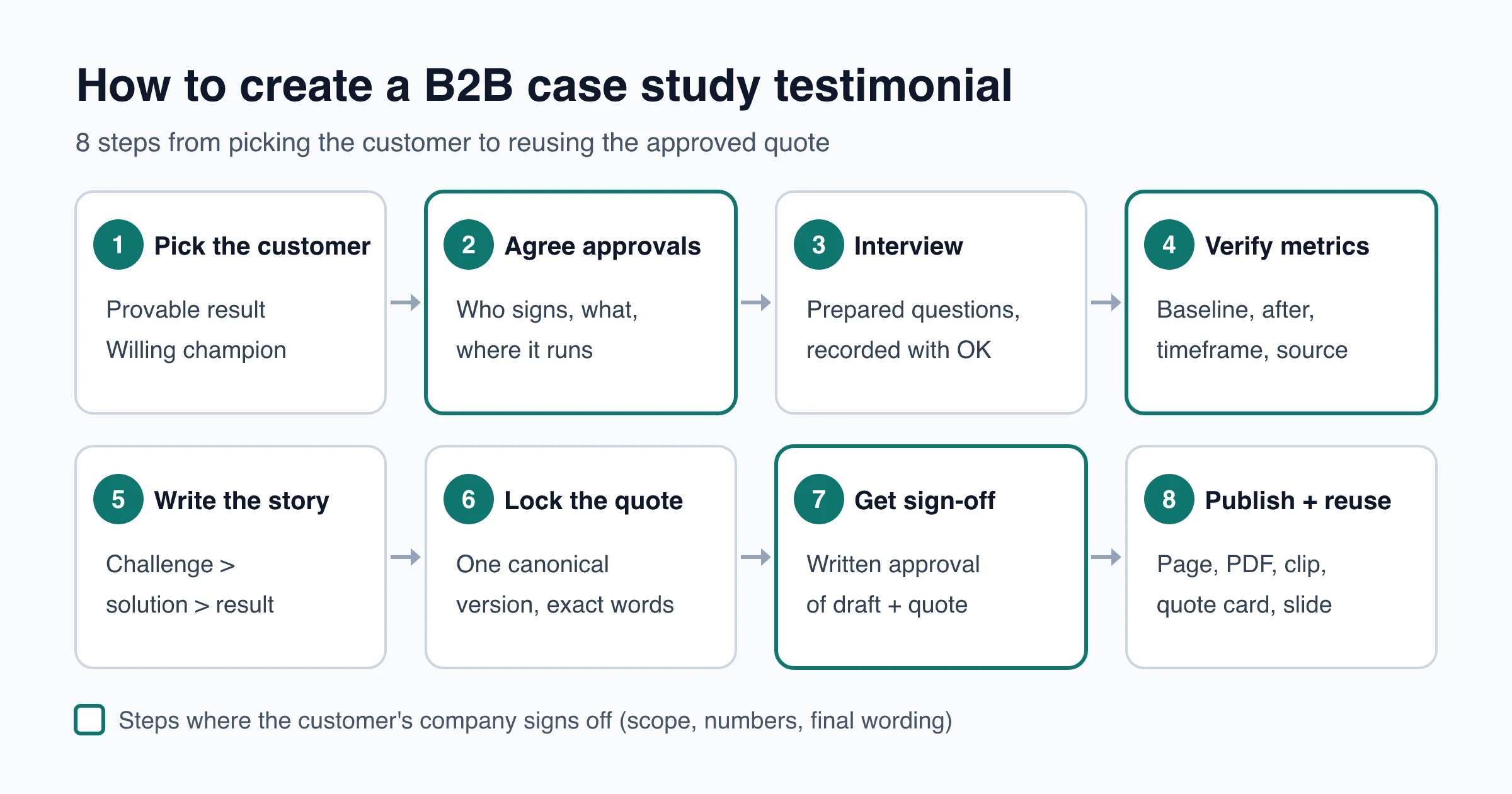
The writing is rarely the slow part. Customer stories tend to stall at approval: the champion loves the draft, then their communications or legal team asks to drop the company name, soften a number or wait a quarter.
The eight steps below move those conversations to the start, so the quote you capture is one you can actually publish on a case study page, in a sales deck and on your pricing page. Along the way you get an interview question list, a metrics sheet and a format table to copy.
What a B2B case study testimonial includes
A testimonial on its own is a statement about someone’s experience. Inside a B2B case study it has to carry three things a buying committee can check: who said it, in what situation, and what changed.
| Part | What it includes | Illustrative example | Without it |
|---|---|---|---|
| Attribution | Full name, job title, company (or the level the customer approved) | Controller, 300-person logistics company | Reads as anonymous |
| Context | Team or use case, starting point, time period | Month-end close, first two quarters after rollout | Sounds generic |
| Claim | An observable change, ideally with a number | Close finishes days earlier; no manual report rebuild | Reads as praise |
Copy-and-paste skeleton (fill every bracket):
"[What changed, in the customer's words] because [what they did differently]."
— [Full name], [Job title], [Company] ([industry, size])
Context: [team or use case], [starting point], [time period]
Result: [metric] went from [baseline] to [after] between [start] and [end] (source: [report or system])
Filled in, it looks like this (an invented example for illustration, not a real customer):
“Month-end close used to wait on one spreadsheet that two people rebuilt by hand. Now the report builds itself, and we close [X] days earlier.”
— [Name], Controller, [Company], 300-person logistics firm
The case study is the full story; the testimonial is the customer-voice unit you lift out and reuse. Both earn their keep: in the Content Marketing Institute’s B2B outlook for 2025 (980 B2B marketers, surveyed June to August 2024), 75% had used case studies or customer stories in the past 12 months. Asked which of the content types they used produced the best results, 53% picked case studies or customer stories, second only to videos at 58%.
Step 1: Pick the right customer
The best candidate isn’t your happiest customer. It’s the one with a result you can prove and a company that will let you say so in public. Ask sales and customer success for names, then check each one against this list.
| Check | Why it matters |
|---|---|
| A measurable before and after | Without a baseline you get praise, not a result |
| Results old enough to measure | A quote from week two describes hopes, not outcomes |
| A champion who can speak for the team | They will also steer the draft through their own approvals |
| The company allows public vendor references | Some companies restrict naming suppliers. Check the publicity clause in your contract too, since it may already cover name and logo use |
| Looks like the buyers you want | Same industry, size or role as the deals in your pipeline |
| A healthy account | No open escalation, no renewal dispute |
Pick one story per case study. If a customer has three wins, choose the one closest to the problem your prospects bring to sales calls.
When you ask, say what you want (a short call and one review round), where it will appear and that they approve everything before it goes live. A clear, small request is easier to accept than “would you be up for a case study?”
Step 2: Agree the approval route before the interview
Your champion saying yes isn’t the company saying yes. At larger companies a public customer story usually needs sign-off from marketing or communications, and sometimes legal or brand, before it goes live. Find out now, not after you’ve written 1,500 words:
- Who approves: the champion, their manager, communications or PR, legal.
- What they approve: name, logo, job title, photo or video, quotes and every number.
- Where it will run: your website, a PDF, sales decks, social posts, events, paid ads. Ads often trigger a separate review, so list them up front.
- Attribution fallback: named person and logo → role and industry only → anonymous. Agree the fallback before you need it.
- Review rounds and timing: how many rounds, and how long each one usually takes.
- What the customer gets: review rights, a link back, co-marketing. If you give a discount, credit or gift for taking part, that’s a material connection. The FTC’s Endorsement Guides list free or discounted products as one (16 CFR 255.5), and it should be disclosed clearly and conspicuously, close to the testimonial.
Send a short scope note and get a written “yes, go ahead” before the interview:
Subject: Customer story with [Company]: scope for your OK
What: a customer story (web page + one-page PDF) and short quotes taken from it
Where: [your website], sales decks, [social / email / ads]
Attribution: [Name], [Title], [Company] + logo (fallback: role + industry)
Numbers: only figures your team confirms in writing
Your review: you approve the full draft and every quote before anything is published
Time needed: one recorded call ([length]) + one review round
For consent wording, release forms and keeping a record, see how to get permission to use testimonials.
Step 3: Interview the customer (questions to ask)
Before the call, read the account notes, know which numbers you hope to confirm and send the questions ahead so the customer can pull data. Ask permission to record. Use open questions and follow up with “what did that look like day to day?” and “how do you measure that?”
Background
- What does your team do, and what’s your role in it?
- Who uses [product] today, and for what?
Before: the challenge
- What were you trying to get done before [product]?
- How did you handle it, and what did that cost in time, money or risk?
- What finally made you look for something new?
- What would have happened if nothing had changed?
The decision
- What else did you consider, including building it yourselves or doing nothing?
- Why did you choose [product]? What almost stopped you?
- Who else had to agree to the purchase, and what did they need to see?
Rollout
- What did rollout look like, and how long until the team used it every day?
- What was harder or easier than you expected?
Results
- What do you do differently now?
- Which numbers moved? What were they before, and over what period?
- Where does that number come from (report, dashboard, system), and can we cite it?
- What changed that’s hard to measure, such as visibility, stress or how other teams see yours?
Quote prompts
- How would you describe [product] to a peer at another company?
- If you had to sum up the difference in one sentence, what would it be?
- Who is [product] not a good fit for?
Close
- Is there anything I didn’t ask that a peer should know?
Question 18 sounds risky, but an honest answer about fit makes the rest of the story more believable. If you need prompts tailored to your product, the free testimonial question generator drafts them.
If the champion can’t spare a call, send the five most important questions as a form instead. ShowTrust’s collection page shows up to five questions (140 characters each) and can ask for role, company and a photo. A form gives you the customer’s own wording but rarely the depth of a conversation, so use it for the quote and a follow-up email for the numbers.
Step 4: Get real metrics, with permission
Numbers are what turn a nice quote into proof, and they’re the part a customer’s team is most likely to change. Build a one-row metrics sheet for every number you want to use and send it to the customer before you draft.
| Field | What to record |
|---|---|
| Definition | Exactly what counts, e.g. “tier-1 tickets closed without escalation” |
| Baseline | Value before, with the date range |
| After | Value after, with the date range |
| Source | The report or system, and who owns it at the customer |
| Other changes | Anything else that moved in the same period: new hires, seasonality, a price change |
| Approved wording | The exact sentence the customer agrees you may publish |
Customers often agree to share a result but not the raw figure. These presentations are all honest, as long as they come from the same sheet:
| Format | Example shape | When to use |
|---|---|---|
| Exact figure | from [A] to [B] in [period] | Customer approves the numbers |
| Percentage change | [X]% fewer [unit] in [period] | Absolute values are confidential |
| Range | between [X] and [Y]% | Results varied across teams or months |
| Relative | “cut from days to hours” | Only the direction and scale are approved |
| Specific, no number | “we stopped rebuilding the report by hand” | Nothing measurable was tracked |
Never round up, never swap units between versions and never add a number the customer didn’t confirm.
If you market in the US, check one more thing. Under the FTC’s Endorsement Guides, a testimonial about a result is likely to be read as what other customers can generally expect. If this customer did unusually well, you need support that the result is typical, or you must clearly say what results people generally get. A “results not typical” line doesn’t fix it (16 CFR 255.2), and customer quotes on their own don’t substantiate a performance claim. The FTC’s plain-English Endorsement Guides FAQ covers common cases. Rules vary by country and industry, so check with counsel if you sell into a regulated market.
Step 5: Write it as challenge, solution, result
Draft from the transcript and the metrics sheet only. No new numbers appear at this stage.
| Section | What goes in |
|---|---|
| Headline | Customer + result + how, e.g. “[Company] closes the books [X] days faster with [product]” |
| Snapshot | Industry, size, region, team, products used and the one to three headline metrics |
| Challenge | The baseline, what it cost and why they acted when they did |
| Solution | What they chose and why, how rollout went, who was involved |
| Result | Each metric with its timeframe, plus what changed day to day |
| Quotes | One to three attributed quotes, each placed next to the claim it supports |
| Next step | One call to action for a reader with the same problem |
Keep the customer as the subject of most sentences, and swap adjectives for specifics: “the finance team stopped rebuilding the report by hand” beats “streamlined workflows”.
Three real B2B case study formats to borrow
These live pages show three different ways to lay out the same challenge → solution → result arc (as of November 2026; layouts change, so check the current page):
- HubSpot’s Kelly Services case study: metrics-first. A logo with industry and company-size tags, three large percentage callouts near the top, “Story Overview” and “About Company” blocks, then narrative sections and a pull quote from a named vice president with her full title.
- Slack’s Commvault story: led by one senior voice. The hero carries a quote from the CIO, followed by an “In this story” table of contents, “About Commvault” and “The challenge” sections and a short customer summary (industry, company size, department). Its figures sit inside the text rather than in callouts.
- Notion’s Ramp story: operator to operator. Three metric callouts at the top, sections without “challenge” or “result” labels that still follow the arc, quotes from two named people with their titles, an “Advice you can steal” list and an embedded video.
All three attribute every quote to a named person with a job title, and none of them makes you open a PDF to read the story.
Step 6: Lock one canonical quote
The canonical quote is the one approved version you store and cut shorter versions from, so the wording never drifts between your website, decks and emails.
- Pick the line. From the transcript, choose the sentence that names the before and the after and still makes sense without the rest of the story.
- Edit lightly. Remove filler words and fix grammar. Keep the meaning, the numbers and any qualifiers (“in our team”, “so far”). In US guidance, quotation marks present the customer’s exact words, and a quote can’t be reworded or cut so that it distorts what the customer meant (16 CFR 255.1). The customer approves the edited version in step 7 anyway.
- Store it as one record. Exact text, attribution line, a one-line context tag, the metric it relies on and where it’s approved to run.
- Shorten by deleting only. Make a hero line, a results-box version and a social version by cutting clauses. Never paraphrase and never change a number.
- Translate the quote into its promise. Ask what a buyer will think it promises them. “Cut onboarding time in half” reads as “you’ll cut yours in half too”, so make sure the support from step 4 covers that.
Step 7: Get written sign-off
Send one approval packet, not a trickle of separate questions:
- the full draft (web version; the PDF follows the same text)
- the canonical quote and every shortened version
- the attribution line, logo and any photo or video
- the results paragraph with sources
- the list of places it will appear
- any disclosure line, such as a participation discount
Ask for “approve” or “request changes” by a date. If they change anything beyond typos, send a clean new version and get a second written OK, rather than publishing from the first approval. Keep the approval email, the date, the version and the approver’s name with the quote record.
Approval covers the uses you listed; a new channel such as paid ads means asking again. Put a review date on every story too: US guidance says you can keep running an endorsement only while you have good reason to believe the endorser still uses the product (16 CFR 255.1©), so pull or update the story if the customer churns, and check the attribution if your champion changes jobs. For a repeatable system, see testimonial approval and organization workflows.
Step 8: Publish the formats and repurpose the quote
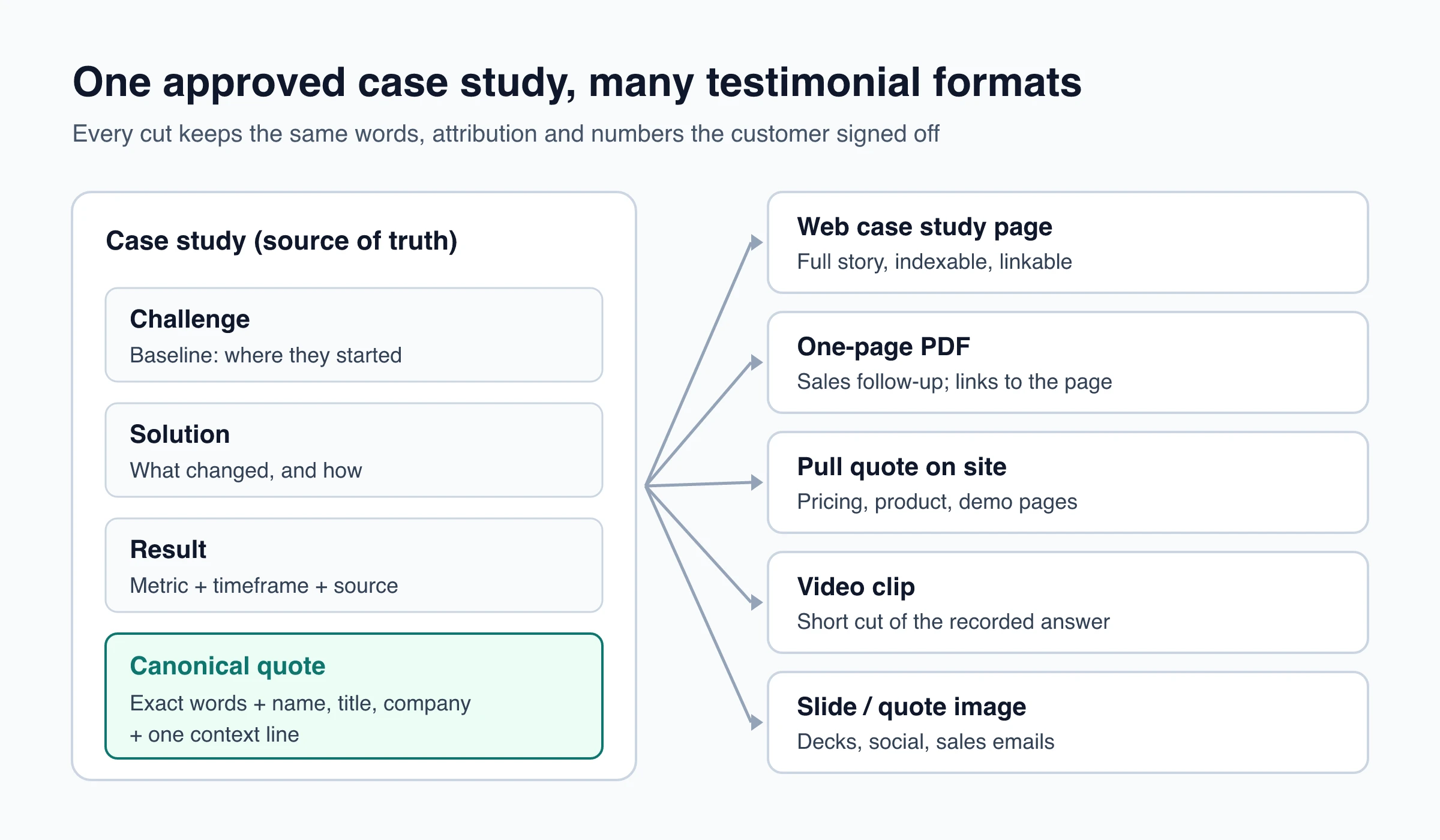
| Format | Where it’s used | Must keep | Breaks when |
|---|---|---|---|
| Web case study page | Your site; everything else links here | Full story, all approved quotes, any disclosure | It’s PDF-only or gated, so it can’t be linked or found |
| One-page PDF | Sales follow-up | Headline result, snapshot, one quote, link to the page | Context gets cut to fit the layout |
| Pull quote on site | Pricing, product and demo pages | Attribution + context line | It reads like a slogan |
| Results callout | Next to the metrics | Number + timeframe + attribution | The number floats without a “from” and “to” |
| Video clip | Case study page, social, decks | Name and title on screen, captions | A cut changes what the speaker meant |
| Slide or quote image | Sales decks, LinkedIn, sales emails | Attribution and approved logo | Name or logo is missing |
For where short quotes earn their place, see testimonials on pricing pages and testimonials in email marketing.
Turn the case study into on-site testimonials
Once the story is approved, the short quote can also live with your other testimonials. With ShowTrust, that works like this:
- Collect it in the customer’s own words. Send the customer your collection page so the approved quote arrives with their name, role, company and photo. You can make the permission checkbox required, and each testimonial records whether it was ticked. On Pro, they can record a short video testimonial in the browser or upload one (15 seconds to 5 minutes).
- Publish by approving. New submissions arrive as Pending and only show once you approve them.
- Reuse one quote anywhere. Share a single testimonial as a 1200×630 or 1080×1080 image, as a link with a rich preview, or as a single-card embed for a pricing or checkout page.
- See what gets seen. Analytics show impressions, CTA clicks and impressions per site.
Know the limits. ShowTrust doesn’t build the case study page or PDF, doesn’t transcribe or caption video and has one login per account. The customer’s legal and communications review happens over email or a shared doc, not inside ShowTrust.
Checklist before you publish
- The customer’s company agreed to the scope in writing (who, what, where, attribution fallback)
- Every number has a definition, baseline, timeframe and source, and the customer confirmed the wording
- Results that may not be typical have support or a clear note on what customers generally get
- Any discount, credit or other connection is disclosed next to the quote
- One canonical quote is stored; shorter versions were made by deletion only
- The final draft and every quote version have written approval, with the date and approver on file
- The web page is live first; the PDF, clips and quote images link back to it
- A review date is set, so the story is updated or pulled if the customer leaves
Frequently Asked Questions
- What is the difference between a case study and a testimonial?
- A case study is the full story of one customer: the challenge, what they did and the measurable result. A testimonial is a short statement in the customer's own words. A B2B case study testimonial is the attributed quote inside the case study that you can also reuse on its own, on your website, in decks and in emails.
- Can I publish a B2B case study without the customer's company name?
- Yes, if the customer agrees. Use the level of attribution they approve, such as role plus industry and company size, and keep the context specific enough to be believable. Never invent a name, title or company to fill the gap, and agree the anonymous fallback before the interview so it isn't a surprise.
- What if the customer won't share exact numbers?
- Ask what they will approve: a percentage change, a range or a relative description such as cutting a task from days to hours. Every version should come from the same confirmed baseline and timeframe. If nothing was measured, use a specific observable change instead of a vague claim.
- Do I need to disclose that a customer got a discount for the case study?
- In the US, generally yes. The FTC's Endorsement Guides treat free or discounted products as a material connection, which should be disclosed clearly and close to the testimonial when readers wouldn't expect it. Rules differ by country and industry, so check with counsel if you are unsure.
- Should a B2B case study be a PDF or a web page?
- Publish a web page first so the story can be linked, shared and found in search, then offer a one-page PDF as a copy for sales follow-up. Put the page URL on the PDF so forwarded copies point back to the current, approved version.
ShowTrust’s Free plan gives you a hosted collection page, the Pending → Approved queue and single-testimonial sharing for one project with unlimited testimonials. Free shows a small credit link you can switch off; Pro ($4.99/month or $49.99/year per project slot) adds video testimonials and is white-label. Compare plans.
Written by
ShowTrust
Notes from the ShowTrust team on collecting testimonials and building authentic social proof.
Share: