October 3, 2026
·
Updated November 6, 2026
·
13 min read
How to Get Permission to Use Testimonials (7 Steps)
How to get permission to use testimonials on your website: when you need it, copy-paste request email and consent clause, rules for Google, G2, Trustpilot and LinkedIn reviews, separate consent for name, photo, logo and video, and FTC and GDPR basics.

Yes, you need permission to use a testimonial, and you should get it in writing before it goes on your website, in an email or in an ad. The words belong to the person who wrote them, and their name, photo, company logo or video adds a second layer: their identity, which many laws protect separately. A clear reply to an email ("Yes, you can use this") or a ticked permission box on your collection form is usually enough, as long as it names the exact quote and where it will appear.
Below are seven steps with copy-paste request wording, a short consent clause for your form, what changes when the praise comes from Google, G2, Trustpilot or LinkedIn, and the FTC and GDPR basics that still apply after someone says yes. This is general information, not legal advice; if you work in health, finance or another regulated field, or plan big paid campaigns around a claim, check with a lawyer.
Do you need permission to use testimonials?
Almost always. Copyright in a customer’s words stays with the customer, so you need at least a license to reuse them. Showing who said it (name, photo, voice, employer) is a separate use of their identity: New York’s Civil Rights Law § 50, for example, makes it a misdemeanor to use a living person’s name, portrait, picture, likeness or voice for advertising without their written consent. In the EU and UK, a named quote and photo are also personal data, which brings in GDPR.
Where the praise came from changes what you need:
| Source of the praise | Permission needed? | What to know |
|---|---|---|
| Your own form, with a permission box ticked | Covered for what the box says | Keep the wording of the box. Ask again for uses it doesn’t mention, such as paid ads |
| Email, support ticket, DM, Slack message | Yes | It was written to you, not for publication. One reply-YES email fixes it |
| Google review | Yes, for your marketing | Google’s brand guidelines say reviews belong to the people who wrote them and you need the reviewer’s consent; you can ask by replying to the review |
| G2 review | Yes, plus G2’s own rules | As of November 2026, G2’s guidelines require a Professional plan or above, a backlink to the review on G2, and the customer’s opt-in |
| Trustpilot review | Recommended, plus a paid plan for ads | Trustpilot’s brand guidelines (v2.0, Feb 2023) allow reviews in advertising on a paid plan, ban out-of-context quotes and recommend asking the reviewer |
| LinkedIn recommendation or post | Yes | The LinkedIn User Agreement says members own their content and bars copying or displaying content from LinkedIn without the owner’s consent |
| Screenshot of any of the above | Yes | A screenshot also copies the name, profile photo and platform logos. Crop or ask |
| Anonymous quote, no identifying details | Still ask | The identity risk drops, but the words are still theirs |
A testimonial you collected yourself is the easiest case because you can build the permission into the request. Reviews on third-party platforms are the hardest, because you have to satisfy both the reviewer and the platform. If you want to show Google reviews on your site, the checks for displaying Google reviews cover the display side.
Step 1: Pin down exactly what you want to use
Permission is only as good as its scope, so decide the scope before you ask. Write down three things:
- The content. The exact quote, a shortened excerpt, a screenshot, a star rating, or a video clip. If you plan to trim or translate it, prepare that version now so the person approves what you will actually publish.
- The identity details. Full name or first name only, job title, company name, company logo, headshot, social handle, face and voice (for video).
- The placements. Website pages, product pages, emails, organic social posts, paid ads, sales decks, print. Paid ads deserve their own line: people who are happy to appear on your homepage are often less keen to appear in a retargeting ad.
This list becomes the body of your request in Step 2 and the record you keep in Step 5. It also keeps you honest later: if a new campaign needs a placement that isn’t on the list, you know you have to ask again.
Step 2: Ask in writing (copy-paste email)
The best request shows the exact text you’ll publish, says where it will appear, and makes “yes” a one-word reply. Paste this into your email client and fill in the brackets:
Subject: Can we share what you wrote?
Hi [first name],
Thank you for your note about [product]. We’d like to share it on [our website’s pricing page and in our customer newsletter]. Here is exactly what we would publish:
“[exact quote, or the shortened version you prepared]”
— [Full name], [Job title], [Company] [+ your profile photo]Could you reply with one of these?
- YES: use it as shown
- YES, with changes: e.g. first name only, no photo, no company name
- NO: no problem at all
You can ask us to remove it at any time by replying to this email.
Thanks,
[Your name]
For a DM or a chat message, a shorter version works: “Thanks for this! Could we quote it on our website as ‘[quote]’ with your name and company? Reply yes or no, and you can ask us to take it down any time.”
Three details matter more than the wording:
- Show the final version. If the quote they approve is not the quote you publish, the approval doesn’t cover it.
- Ask for a license, not ownership. You only need permission to use the words. In the US, the Consumer Review Fairness Act voids form-contract terms that make customers transfer intellectual property rights in their reviews, except a non-exclusive license to use them.
- Mention any perk up front. If they got a discount, a free month or a gift for the testimonial, say you will note it next to the quote (Step 6 explains why).
Need help with the first ask, before you have anything to quote? The testimonial request email templates cover that, and the free testimonial request email generator drafts one for you.
Step 3: Add a consent checkbox to your collection form
When customers submit testimonials through a form, collect permission in the same step so you never have to chase it. For everyday website and social use, a short clause usually works:
☐ I agree that [Company] may publish this testimonial, with my name, job title and company [and photo], on its website, emails and social media. I can ask for it to be removed at any time by emailing [address].
If you want people to choose what you show, split it into separate boxes:
☐ You may publish my testimonial
☐ …with my full name (otherwise first name only)
☐ …with my photo
☐ …with my company name and logo
☐ …in paid advertising as well
Leave every box unticked by default. If you collect from people in the EU or UK, GDPR sets the bar for consent:
- A clear, active yes. Consent must be “freely given, specific, informed and unambiguous” and given by a statement or a clear affirmative action (GDPR Art. 4(11)). Recital 32 says silence, pre-ticked boxes or inactivity don’t count.
- Proof. You must be able to demonstrate that the person consented (Art. 7(1)). In practice, that means keeping a record of who consented, when, how, and what they were told.
- Easy withdrawal. People can withdraw consent at any time, it must be as easy to withdraw as to give, and withdrawal doesn’t make your earlier use unlawful (Art. 7(3)).
A form checkbox and a release form solve different problems. The checkbox covers everyday website and social use; a signed release is for bigger productions, such as a filmed case study or a TV spot. The limits of testimonial release forms explain what a release still won’t cover.
Step 4: Get separate consent for name, photo, logo and video
A “yes” to the words is not automatically a yes to the face. Treat each identity element as its own permission:
| Element | What to ask | Watch for |
|---|---|---|
| Full name | “May we show your full name?” | Offer first name and last initial as a fallback |
| Job title and company name | “May we show your role and company?” | People sometimes need their employer’s OK to endorse a vendor |
| Company logo | Ask whoever owns the brand, often marketing | The person quoted may not be allowed to approve logo use |
| Photo | “May we use this photo?” and say which one | Pulling a headshot from LinkedIn is copying LinkedIn content (see the table above) |
| Video (face and voice) | Consent to the specific clip, and to editing it | Laws like New York’s § 50 cover likeness and voice; a minor needs a parent or guardian’s consent |
| Results or numbers | “May we quote the figure you mentioned?” | Customers may share internal numbers in confidence |
If someone says yes to the quote but no to everything else, you can still publish it as “Operations lead, logistics company.” An honest, specific description often reads better than a name nobody recognizes anyway.
Step 5: Keep a simple record of each yes
You don’t need legal software, but you do need to answer five questions about any published testimonial, quickly, months later:
- Who agreed: name and email or account.
- When: date of the reply or form submission.
- To what: the exact text, file or clip they approved, and the identity elements they allowed.
- Where: the placements they agreed to, and where it actually runs now (page URLs, email templates, ad IDs).
- Any connection: reward, discount, free product, employee, friend, partner.
An email thread or a form submission is a valid record. In the US, the E-SIGN Act says a contract or signature can’t be denied legal effect solely because it is electronic. Save the email (or a PDF of it) next to the testimonial rather than leaving it in one person’s inbox.
If you change the wording of your form’s consent box, keep a dated copy of each version. A ticked box only proves something if you can show what the box said on the day it was ticked.
Step 6: Run the FTC checks that permission doesn’t cover
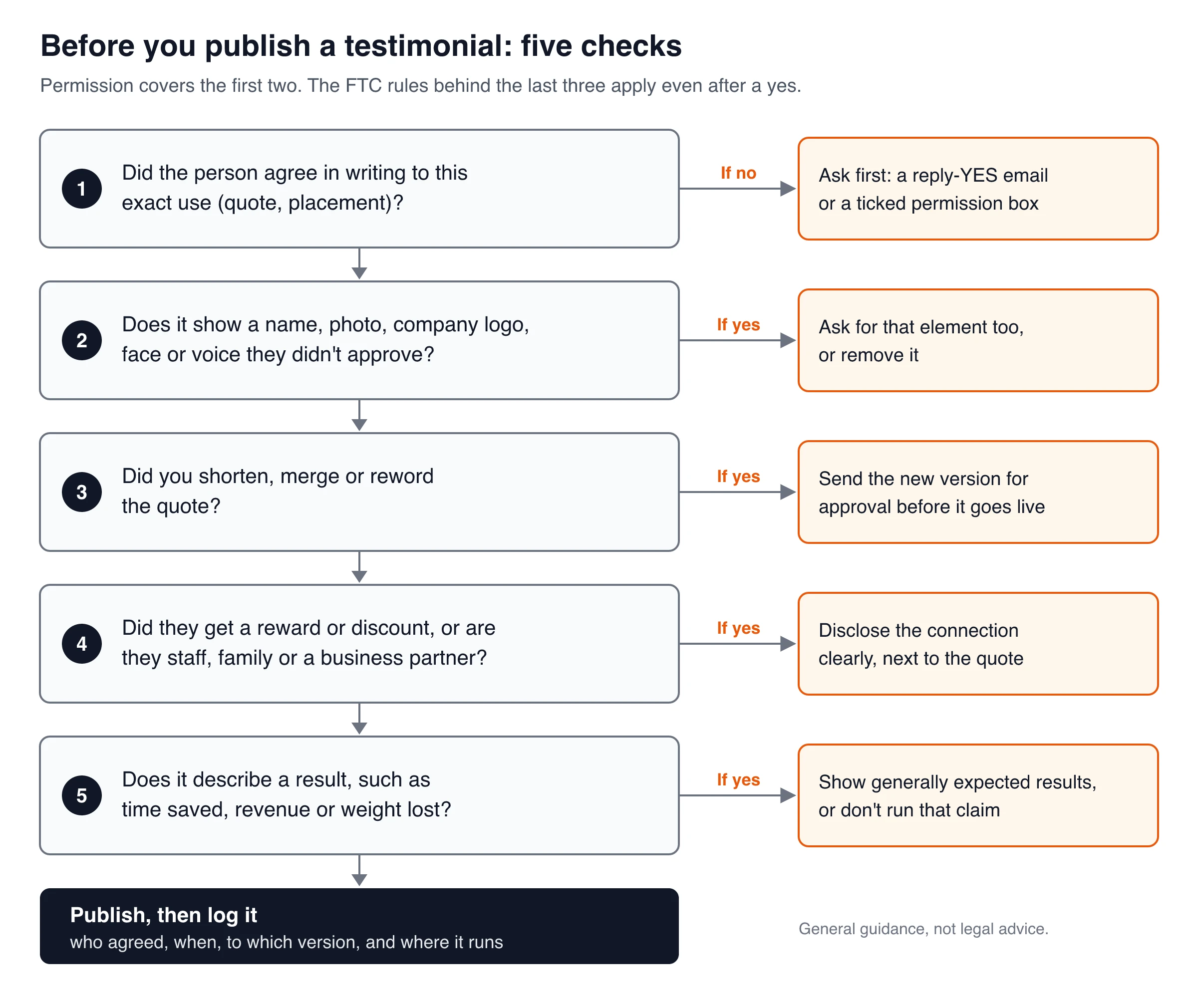
A signed permission doesn’t make a misleading testimonial legal. In the US, two FTC texts apply to every testimonial in your marketing: the Endorsement Guides (16 CFR Part 255) and the Rule on the Use of Consumer Reviews and Testimonials (16 CFR Part 465), in effect since October 21, 2024.
- Exact words means exact words. You don’t have to quote verbatim, but if you use quotation marks you are presenting the person’s exact words, and you may never take the quote out of context or reword it in a way that distorts their opinion or experience (§ 255.1(b)). Fixing a typo is fine; turning “it saved me some time” into “it saved me hours” is not.
- They have to be a real user, and stay one. If the ad says the person uses your product, they must have been a genuine user when they said it, and you can keep running it only while you have good reason to believe they still are (§ 255.1©). When a featured customer churns, retire or reword the quote.
- Results are read as typical. A testimonial about a key result (hours saved, revenue, weight lost) will likely be read as what customers generally achieve. If you can’t back that up, clearly disclose the generally expected results (§ 255.2(b)).
- Disclose material connections. Payment, free or discounted products, the chance to win a prize, or a business, family or personal relationship must be disclosed clearly and conspicuously when the audience wouldn’t expect it (§ 255.5). A short line under the quote, such as “Received a free month for sharing feedback,” does the job.
- Insiders need a label. Testimonials from officers, managers, employees or agents need a clear disclosure of the relationship when it isn’t otherwise obvious (§ 465.5).
- No made-up or bought sentiment. Part 465 bans testimonials that misrepresent whether the person exists, whether they used the product, or what they experienced (§ 465.2), and incentives conditioned on reviews with a particular sentiment, positive or negative (§ 465.4).
If you run testimonials through an internal review before they go live, these checks belong there. The testimonial approval workflow shows how to set that up for a small team.
Step 7: Re-ask when things change, and honor withdrawals
Permission is not a one-time event. Ask again when:
- you edit, shorten, merge or translate the approved version;
- you want a placement that wasn’t in the original ask, most often paid ads;
- the person changes jobs and the quote still shows their old title or company;
- the claim in the quote no longer matches your product (a removed feature, a new price).
When someone asks you to take a testimonial down, treat it as a short checklist rather than a debate:
- Reply to confirm you received the request.
- Use your record from Step 5 to find every place it runs: website and widgets, email templates and automations, ads, social posts you control, sales decks.
- Remove or replace it everywhere, then tell the person it’s done.
- Keep a note of the withdrawal (date and scope) so nobody reuses the quote later.
Emails already delivered and old social posts that others have shared can’t always be recalled; say so honestly if asked, and stop any further use. Under GDPR, withdrawal ends your consent basis for future use but doesn’t make past use unlawful.
Collecting permission in ShowTrust
ShowTrust’s hosted collection page has a built-in permission checkbox. It starts on Don’t ask, so switch it on: under Permission you choose Don’t ask, Optional or Required and can edit the checkbox text. The default reads “I give permission to use this testimonial on the website and social media.” (shown in the form’s language if the form isn’t in English). With Required, the form won’t submit until the box is ticked. Each testimonial records whether the customer ticked it, so you see it while reviewing (collection page docs).
What that does and doesn’t cover:
- Recorded: a yes/no permission flag per testimonial, plus the name, date and other fields you collect. The CSV export includes every field, permission among them (managing testimonials).
- Not recorded: a copy of the checkbox wording at the time of submission. If you edit the text, keep your own dated copy of each version.
- Imports carry no consent. Testimonials you import from an X post, an App Store listing, a CSV or pasted G2, Capterra, Trustpilot or LinkedIn text arrive without any permission flag. Ask those people separately (Step 2) before you approve them.
- Approval is one click by the account owner. New testimonials land in Pending and appear on your wall only after you approve them. ShowTrust has no team roles, customer sign-off portal or audit trail, so keep edited-quote approvals in email.
- Rewards are material connections. If you use thank-you rewards such as a coupon or a free month, disclose them next to the testimonials they apply to (Step 6).
The checkbox, imports and rewards are available on the Free plan; video testimonials are Pro.
The short version
Before any testimonial goes live, you should be able to say yes to each of these:
- The person agreed in writing to this version of their words.
- They agreed to each identity detail you show: name, title, company, logo, photo, face and voice.
- They agreed to this placement, including paid ads if that’s where it runs.
- Any reward or relationship is disclosed next to the quote, and any result claim reflects what customers generally get.
- You can find the record in under a minute, and you know every place to remove it from.
If any answer is no, send the reply-YES email from Step 2 before the testimonial goes live.
Frequently Asked Questions
- Can I use a customer testimonial without permission?
- You shouldn't. The words belong to the customer, and showing their name, photo or voice in advertising needs consent in many places; New York, for example, requires it in writing. Asking takes one short email, and a clear yes is your record if questions come up later.
- Do I need permission to use Google reviews on my website?
- Yes, if you copy them into your own marketing. Google's brand guidelines say reviews belong to the people who wrote them and that you must get the reviewer's consent; you can ask by replying to the review. Linking to your Google Business Profile so visitors read reviews there is a different thing from republishing them.
- Is an email reply enough written permission?
- Usually, yes. In the US, the E-SIGN Act says an agreement can't be denied legal effect only because it is electronic. Make the email show the exact quote and where it will appear, and save the reply. For larger productions such as a filmed case study, a signed release is common.
- Can I edit a testimonial after the customer approves it?
- Small fixes such as typos and punctuation are fine. If you shorten, merge or reword it, send the new version back for approval. Under the FTC Endorsement Guides, quotation marks mean the person's exact words, and you may never edit a quote in a way that distorts their opinion.
- What should I do if a customer withdraws permission?
- Confirm the request, remove the testimonial from every place you control (website, email templates, ads, social posts, sales decks), tell the customer it's done and note the withdrawal so nobody reuses it. Under GDPR, people can withdraw consent at any time and it must be as easy as giving it.
- Do I have to disclose that a customer got a discount for their testimonial?
- Yes, when your audience wouldn't expect it. The FTC Endorsement Guides list payment, free or discounted products and the chance to win a prize as material connections that must be disclosed clearly and conspicuously, for example in a short line under the quote.
ShowTrust’s Free plan includes a hosted collection page with the permission checkbox (Don’t ask, Optional or Required) and the Pending → Approved queue for one project with unlimited testimonials. Pro ($4.99/month or $49.99/year per project slot) adds video testimonials and white-label. Compare plans.
Written by
ShowTrust
Notes from the ShowTrust team on collecting testimonials and building authentic social proof.
Share: