July 8, 2026
·
Updated November 6, 2026
·
15 min read
Social Proof Widget Not Showing? 10 Fixes (CSP, SPA, CSS)
A DevTools triage and ten fixes for a social proof or testimonial widget that won't show: Content Security Policy, ad blockers, consent managers, containers, Next.js, React and Astro routing, CSS and caching.

A social proof widget that won't show is almost always one of four things: the script never ran, its data request was blocked, it rendered with nothing to show, or it rendered where you can't see it. A few minutes in DevTools tells you which.
Each fix gives the symptom, how to confirm it, and the fix. Examples use ShowTrust's wall of love embed, but the checks apply to any script-based testimonial wall, review feed or popup.
Why Is My Social Proof Widget Not Showing? A 2-Minute Triage
Open the page in DevTools (F12, or Cmd+Option+I on a Mac), tick Disable cache in the Network tab, reload, and answer four questions in order.
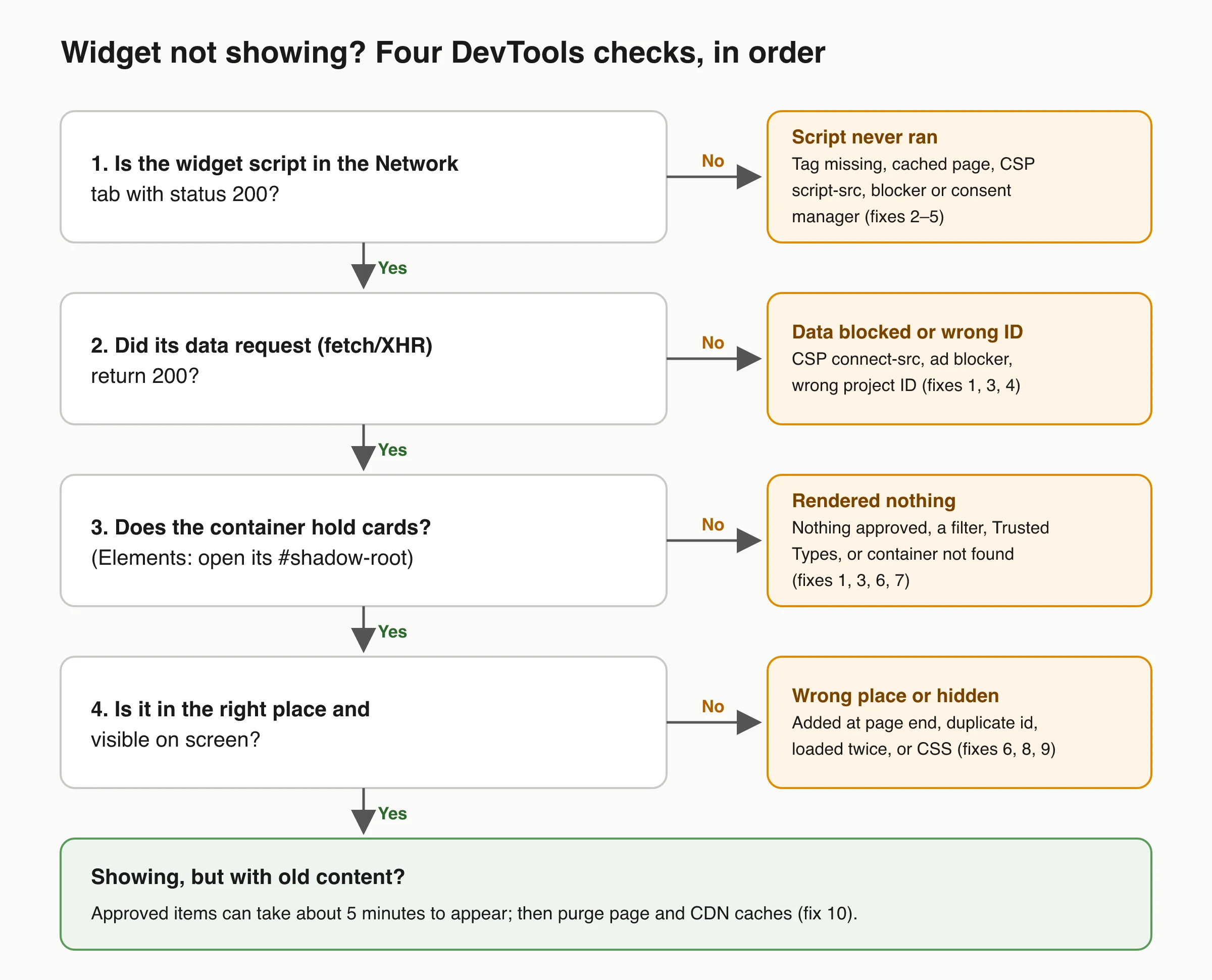
- Is the widget script in the Network tab with status 200? Filter by the vendor’s domain. Missing, red, or
(blocked:csp)means the script never ran. - Did its data request succeed? Most widgets fetch their content after the script loads. A failed fetch means the code ran but got no data.
- Does the container hold anything? Many widgets, ShowTrust’s included, render inside a shadow root, so expand the container in the Elements tab and look for
#shadow-root. - Is it on screen? Markup that’s present but invisible means placement or CSS.
Also read the Console: ShowTrust’s loader logs errors prefixed ShowTrustTo:, and CSP messages name the blocked directive and URL. The Chrome DevTools Network reference covers filters, blocked requests and the disable-cache switch.
| Symptom | Likely cause | Fix |
|---|---|---|
| Blank space, no errors, script and data load fine | Nothing approved, or a filter hides everything | 1 |
| Script missing from Network | Tag not on the rendered page, cached HTML, editor preview | 2 |
Console names script-src, connect-src or style-src |
Content Security Policy | 3 |
net::ERR_BLOCKED_BY_CLIENT |
Ad blocker or privacy extension | 4 |
| Appears only after accepting cookies | Consent manager | 5 |
| Wall shows up below the footer | Container not found | 6 |
| Works on refresh, not after clicking a link | Single-page app routing | 7 |
| Shows twice, or vanishes after a re-render | Loaded twice, or container replaced | 8 |
| Markup present but invisible | CSS | 9 |
| New testimonials missing for a few minutes | Caching | 10 |
Fix 1: The Widget Has Nothing to Show
An empty feed looks exactly like a broken install, so check content before code.
A ShowTrust wall shows only Approved testimonials. New submissions arrive as Pending and stay hidden until you approve them (see testimonial statuses). If nothing passes your filters, the wall renders no cards, no heading and no placeholder. Common reasons:
- Nothing approved yet. Everything is still in the Pending tab.
- “Only these tags” is set in Display options and no approved testimonial carries those tags.
- Video is switched off in Display options and your approved testimonials are all videos.
- The snippet belongs to a different project. Each project has its own ID and its own wall.
The opposite also happens: your first project starts with six Demo testimonials that do appear on the wall. Click Clear demo data under Testimonials before launch.
How to confirm: open Widget Preview in the dashboard, which renders your saved wall with your real approved testimonials. Empty preview: fix the content. Preview fine but site blank: keep reading.
Fix 2: The Script Never Loads
If the script never appears in the Network tab, the browser was never told to load it.
- Check the rendered page, not your template. Search the Elements panel (Cmd/Ctrl+F) for the script URL. A tag in the wrong template, behind a condition, or in a field that strips
<script>never reaches the DOM. - Test the published URL. Site-builder editors and previews may not run third-party scripts.
- Check for a sandboxed frame. A page shown inside an
<iframe>whosesandboxattribute lacksallow-scriptsruns no scripts (MDN iframe reference). - Keep the config before the loader. ShowTrust’s loader reads
window.SHOWTRUSTTO_WIDGET_CONFIGthe moment it runs. If the config isn’t there yet, the Console showsShowTrustTo: projectId is required in SHOWTRUSTTO_WIDGET_CONFIG. The dashboard snippet sets the config and then adds the loader, so paste it unchanged. If you split it into two tags, as the framework guides do, the config tag goes first. In Astro, keepis:inlineon both, as the Astro install guide shows, so Astro doesn’t bundle them. - Look for a typo. A 404 on the script URL means the
srcwas mangled while copying.
For where the snippet goes on each platform, see the embed guide; Shopify themes have their own Shopify widget troubleshooting guide.
Fix 3: Content Security Policy Blocks the Script, Data or Styles
A Content Security Policy lists the sources a page may load scripts, data, styles and media from. Anything else is blocked without a visible error on the page, but the Console names the directive and the blocked URL.
A script-based widget usually needs several directives. For ShowTrust’s wall of love:
| Directive | What breaks if it’s missing | What to allow |
|---|---|---|
| script-src | The loader never runs | https://app.showtrust.to, plus a nonce or hash for the inline config script |
| connect-src | Script runs, wall stays empty | https://api.showtrust.to |
| style-src | Cards render unstyled: raw text, no layout | 'unsafe-inline' (the wall’s CSS arrives as inline <style>) |
| img-src / media-src | Avatars or videos are broken | Copy the blocked hosts from the Console (X profile photos, for example, come from pbs.twimg.com) |
The popup and badge script (showtrust.js) needs the same entries, plus frame-src https://showtrust.to if you use its “Leave a testimonial” form.
What Chrome’s Console shows when connect-src is too strict:
Connecting to 'https://api.showtrust.to/widget/…' violates the following
Content Security Policy directive: "connect-src 'self'".
ShowTrustTo: Failed to load widget TypeError: Failed to fetch
A strict style-src shows repeated Applying inline style violates the following Content Security Policy directive 'style-src …' errors.
- The inline config needs permission too. With a nonce-based policy, add the nonce to the inline
<script>. If the policy also uses'strict-dynamic', scripts loaded by a nonced script inherit its trust, which covers the loader tag the dashboard snippet creates. - Test before enforcing. Ship changes as Content-Security-Policy-Report-Only first. For nonces in Next.js, follow the Next.js CSP guide.
- Policies stack. A
<meta http-equiv>tag, your server, your host and a CDN can each add one, and the browser enforces all of them.
Trusted Types. With require-trusted-types-for 'script', the browser rejects plain strings written to HTML sinks such as ShadowRoot.innerHTML (MDN Trusted Types API). ShowTrust’s loader writes the wall that way, so the Console shows ShowTrustTo: Failed to load widget TypeError: Failed to set the 'innerHTML' property on 'ShadowRoot': This document requires 'TrustedHTML' assignment. Either leave enforcement off on pages with the wall or add a default policy, which MDN recommends only as a transition aid.
Fix 4: Ad Blockers and Privacy Extensions
Content blockers match request URLs against filter lists. When a widget’s script or data URL matches, Chrome logs net::ERR_BLOCKED_BY_CLIENT and the widget never appears for that visitor, while your server logs look normal.
How to confirm: open the page in a fresh browser profile with no extensions. If the widget appears there, re-enable extensions one at a time. Also try the browser’s strictest tracking protection.
What you can do: design for blockers. Don’t reserve a large fixed-height block that turns into an empty gap when the widget is blocked, and add a plain link next to the embed. With ShowTrust, the hosted wall page at showtrust.to/w/your-slug lists every approved testimonial and works as that fallback.
Fix 5: A Consent Manager Holds the Script
Cookie banners and consent management platforms (CMPs) often hold third-party scripts until the visitor opts in, either by rewriting the tag (for example to type="text/plain") or by auto-blocking domains they haven’t classified. Symptoms: the widget appears only after “Accept”, only in some regions, or only from the second page view.
How to confirm: a changed type or a CMP-specific data attribute on the script tag means the CMP has it. Compare a visit with consent denied to one with consent granted.
Fix: put the widget in the CMP category that matches what it does. ShowTrust states that its widget analytics use no cookies; how you classify any script is a decision for you and your privacy adviser. If the CMP re-inserts the tag after consent mid-visit, ShowTrust’s loader still works, because it starts immediately when the page has already loaded.
Fix 6: The Container Is Missing, Duplicated or the Wrong Element
ShowTrust’s default mount point is <div id="showtrustto-widget"></div>, and the containerId option points it elsewhere. If no matching element is found, the wall is added at the end of the page, under your footer, where nobody scrolls.
Common container mistakes:
- The id doesn’t match. You renamed the div, or
containerIddiffers from the element’s id. - The id appears twice. Responsive templates sometimes render a section once for desktop and once for mobile, hiding one. The script takes the first match, which may be the hidden copy.
- The id is on the wrong element. ShowTrust mounts into ordinary elements such as
div,section,article,spanorp. If the id is on a<script>, a list item, a table cell or a custom element, the loader creates its own div at the end of the page instead. - The container is inside another shadow DOM. A document-level lookup can’t see into a shadow root, so a container inside a web component isn’t found (MDN: Using shadow DOM). Move it into the main page.
- The script is site-wide but the container isn’t. With the script in a shared layout and the container on one page, every other page gets a wall at the bottom. Load the script only where the container is.
Fix 7: Widget Not Showing After Navigation in Next.js, React or Astro
The classic “works on refresh, not after clicking a link” bug: a single-page app swaps components without a full page load, while most widget loaders, ShowTrust’s included, run once per page load.
Next.js loads a next/script only once, even when the visitor moves between pages (Next.js scripts guide). With the script in the root layout:
- A visitor lands on
/, which has no container. The loader runs and adds the wall at the end of that page. - They click through to
/customers, which has the container. The script doesn’t run again, so the container stays empty.
The root-layout setup in ShowTrust’s Next.js App Router guide is fine when visitors reach the wall with a full page load. Otherwise, load the script from the component that renders the container.
Next.js and React: load the script from the wall component
Each time this component mounts, it sets the config and adds the loader, which finds the fresh container and renders into it. Repeat loads come from the browser cache.
'use client'; // Next.js App Router only
import { useEffect, useRef } from 'react';

export function WallOfLove() {
  const box = useRef(null);

  useEffect(() => {
    window.SHOWTRUSTTO_WIDGET_CONFIG = { projectId: 'YOUR_PROJECT_ID' };

    // Strict Mode runs effects twice in development: add the loader once per container.
    const el = box.current;
    if (!el.dataset.stLoaded) {
      el.dataset.stLoaded = '1';
      const s = document.createElement('script');
      s.src = 'https://app.showtrust.to/showtrustto-widget.js';
      s.async = true;
      s.onload = () => s.remove();
      document.body.appendChild(s);
    }

    // If the visitor leaves before the loader runs, drop the config so the
    // loader stops instead of adding the wall to the end of the next page.
    return () => {
      delete window.SHOWTRUSTTO_WIDGET_CONFIG;
    };
  }, []);

  return <div id="showtrustto-widget" ref={box} />;
}
Then remove the two global <Script> tags from your root layout, so the loader doesn’t also run on pages without a container. The guard covers the extra development-only effect run described in React’s StrictMode docs. The same component works in the Pages Router and in Vite with React Router; the Vite + React guide has the basic container setup. On Free with the credit link switched on, put the credit <a> from your dashboard snippet inside the div.
Astro with view transitions
Without Astro’s client router, every navigation is a full page load and the standard snippet works. With view transitions on, Astro’s docs say bundled scripts run only once, while inline scripts may or may not run again. Add data-astro-rerun to both inline scripts so they run after every transition, and put them in the page or component that holds the container, not in the shared layout:
<script is:inline data-astro-rerun>
  window.SHOWTRUSTTO_WIDGET_CONFIG = { projectId: 'YOUR_PROJECT_ID' };
</script>
<script is:inline data-astro-rerun src="https://app.showtrust.to/showtrustto-widget.js" async></script>
<div id="showtrustto-widget"></div>
Fix 8: The Widget Shows Twice or Vanishes After a Re-render
Two walls, one at the bottom. The loader ran twice. In its default shadow-root mode, ShowTrust’s loader won’t render into a container that already holds a wall, so the second run adds a new one at the end of the page. Typical causes: the snippet in both the layout and the page, a tag manager adding a second copy, or an unguarded React effect. Add the script in one place only.
Gone after an interaction. A shadow root belongs to one DOM node. If your framework replaces that node, the wall goes with it, and a run-once loader won’t bring it back. Nodes get replaced when a parent’s key changes, when the container renders conditionally or behind a loading state, or when React recovers from a hydration error by rendering on the client. React’s hydrateRoot docs say to treat hydration mismatches as bugs. Keep the container stable, or use the component above so every new node loads its own wall.
Fix 9: CSS Hides a Widget That Rendered Fine
Markup present but invisible is a layout problem. ShowTrust’s wall renders inside a shadow root, so your stylesheet can’t restyle the cards, but it can still hide or clip their container. Select the container, open Computed, and walk up its parents looking for:
display: noneat some breakpoint. Utility classes likehidden md:blockon a parent are a frequent culprit.- Zero height with clipping:
height: 0or a smallmax-heightplusoverflow: hidden, as in a closed accordion or an inactive tab panel. opacity: 0left by a scroll-reveal animation that never fired.visibility: hiddenon an ancestor, which children inherit.- For floating popups and badges, a covering element with a higher
z-index, or a parent that creates a new stacking context and traps the widget under a sticky header.
Quick test: give the container and its parents display:block; opacity:1; height:auto; overflow:visible in DevTools, then remove the overrides one at a time to find the culprit.
If you set allowCssOverride: true, the wall renders without its style boundary and your global CSS applies to it. Turn the option off to check whether a site-wide rule is the cause.
Fix 10: Caches and Script Optimizers Serve an Old Page
The widget’s own cache. ShowTrust caches the wall briefly, so new approvals and saved design changes reach your site within about five minutes. Disable cache only skips your browser’s copy, so give a fresh approval a few minutes.
Your page cache or CDN. HTML cached before you added the snippet doesn’t include it. Open View Source on the live page: if the snippet is missing there, purge your CMS or plugin cache and your CDN.
Script optimizers. Features that defer, combine or delay JavaScript can hold a widget until the visitor interacts, or reorder the config and the loader. Cloudflare’s Rocket Loader skips any script tag with data-cfasync="false", placed before src when the tag has one (Cloudflare docs). WordPress performance plugins with “delay JavaScript” or “combine JS” settings usually have an exclusion list; add the widget’s script URL there.
Service workers. Tick Bypass for network under Application → Service workers in Chrome DevTools to rule one out.
Popup or Badge Not Showing? Check the Display Rules
Social proof notifications often load fine and then decide not to show. Event-based popup tools usually need an active pixel, a page included in the campaign’s trigger rules, recent events to display and an active widget; Social Proofy’s own checklist covers exactly these. Some also stop at a monthly visitor or impression quota. This comparison of social proof widget types explains how popups, review feeds and walls differ.
ShowTrust’s on-site widgets show approved testimonials rather than live events, with their own rules:
- Popups use only approved testimonials under 280 characters that meet your minimum star rating.
- They respect your first-popup delay and per-visit cap. A visitor who dismisses them, or who left a testimonial during the visit, sees none for the rest of that visit, so test in a new private window.
- The script tag needs
data-project="YOUR_PROJECT_ID". Without it, the Console logsShowTrust: add data-project="YOUR_PROJECT_ID" to the script tag. - Settings changes apply within five minutes.
- The rating badge renders into
data-showtrust-badgeelements that exist when the script loads. In a single-page app, callwindow.ShowTrust?.refreshBadges?.()after a route that adds a badge has rendered (the function exists once the badge data has loaded).
ShowTrust has no domain allow-list and doesn’t meter page views on any plan, so those limits aren’t a cause here.
Keep the Widget From Breaking Again
These failures tend to return with the next deploy, CSP change or plugin update. Three habits catch them early:
- Keep the widget’s CSP entries in code next to the snippet, with a comment naming the widget.
- After each release, check one page in a clean browser profile: script 200, data 200, container filled.
- Watch impressions per site. ShowTrust counts an impression when the wall is on screen for at least one second, so a site that drops to zero after a deploy points to a regression.
Frequently Asked Questions
- Why does my widget show on desktop but not on mobile?
- Usually CSS or duplicate markup: a parent hidden at small breakpoints, or separate desktop and mobile sections sharing the container id, where the script fills the first (hidden) one. Check the container's computed styles with device emulation on.
- Why does the widget work locally but not in production?
- Production usually adds a stricter Content Security Policy, a CDN that defers or rewrites scripts, page caching and a consent banner. Compare the production Console with your local one; it usually names the blocked URL or directive.
- How long does a newly approved testimonial take to appear on my site?
- With ShowTrust, within about five minutes, because the widget is cached briefly. If it still hasn't appeared, check that you approved it in the project your snippet uses, and purge any page or CDN cache.
- Does ShowTrust's wall of love use an iframe?
- No. The script renders the wall directly in your page inside a shadow root, which keeps your site's CSS and the wall's styles apart. Setting allowCssOverride to true in the embed config removes that boundary so your stylesheet can style the wall.
- Why does my testimonial widget appear at the bottom of the page?
- The script couldn't use a container. ShowTrust adds the wall at the end of the page when no element has the expected id, the id is on an element it can't mount into, the container sits inside another shadow root, or it already holds a wall from an earlier load.
If you’re setting up a testimonial wall rather than fixing one, ShowTrust gives you a two-part snippet, framework guides and a Widget Preview to check the wall before it goes live. Free covers one project with unlimited testimonials (with a small credit link you can switch off); Pro is $4.99/month or $49.99/year per project slot and adds video and white-label. Compare plans.
Written by
ShowTrust
Notes from the ShowTrust team on collecting testimonials and building authentic social proof.
Share: