September 6, 2026
·
Updated November 6, 2026
·
14 min read
Social Proof Widgets for Websites: 5 Types and Best Tools
A social proof widget is an embeddable element that shows visitors evidence that other people already trust you: testimonials, reviews, ratings, recent activity or customer posts. There are five main types, and each has a different best tool as of November 2026: ShowTrust or Senja for testimonial walls, Elfsight or EmbedSocial for review feeds, Fomo or ProveSource for sales and activity popups, Trustpilot TrustBox for third-party rating badges, and Tagembed, Juicer or Curator.io for social feeds. Pick the type first, then check how the tool bills (views, visitors, notifications or testimonials), because that meter decides what you pay as traffic grows.

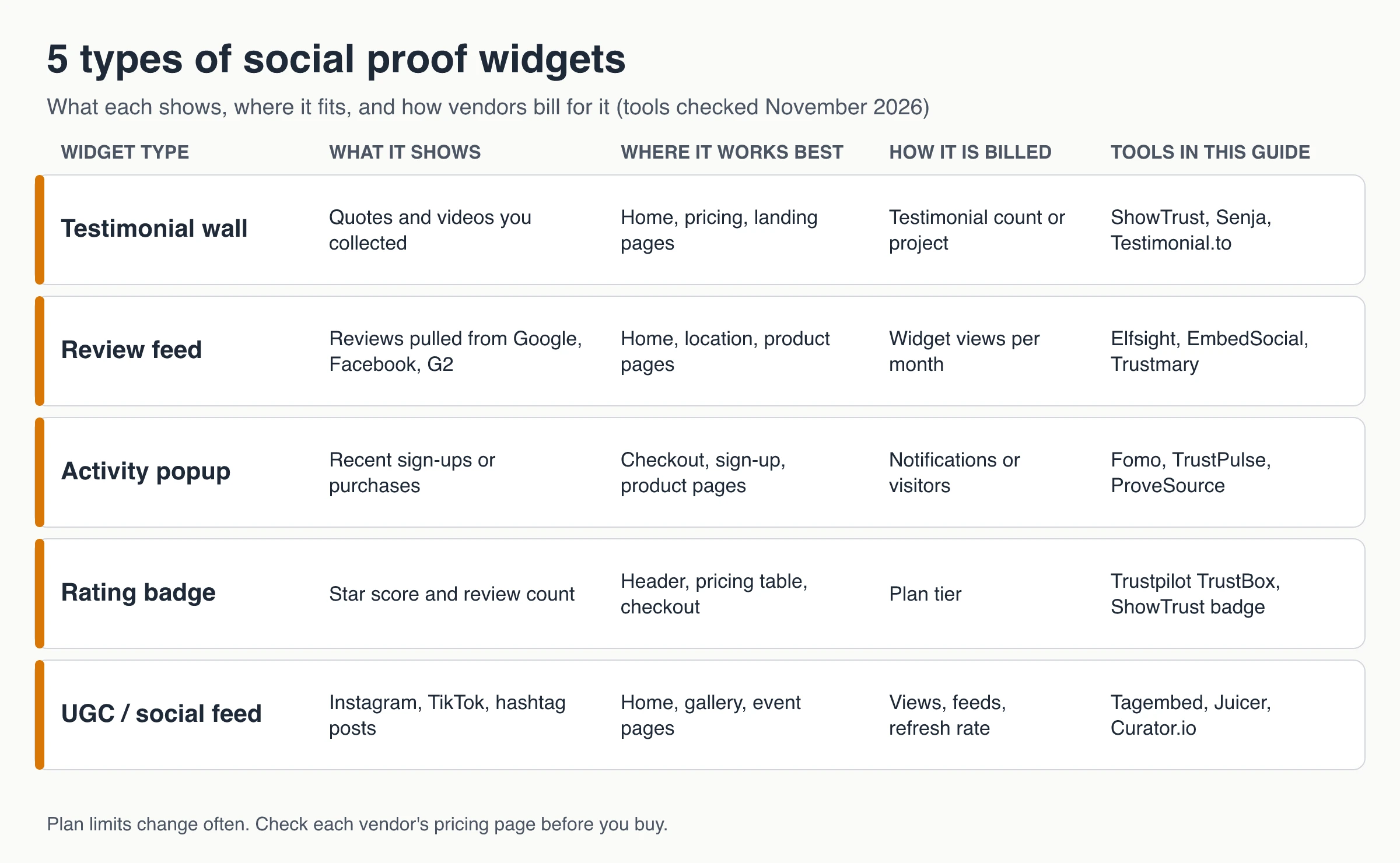
Most "best social proof tools" lists mix these categories, so a purchase popup ends up ranked against a wall of love. Here each type gets its own tools, with free-plan limits and starting prices taken from each vendor's pricing page in November 2026.
After the tool list you'll find a short guide for anyone looking for a Tagembed alternative, a plain explanation of pricing meters, the legal line on fake activity popups, and how to install widgets without slowing your pages.
What is a social proof widget?
A social proof widget is a small piece of embed code that puts proof from other customers on your pages. Social proof works because people facing an uncertain choice look at what others did, so the widget’s job is to answer “do people like me trust this?” at the moment a visitor hesitates.
The widgets fall into two jobs:
- Lasting credibility. Testimonial walls, review feeds and rating badges sit on a page and get read when a visitor is forming an opinion: home page, pricing, product pages.
- In-the-moment reassurance. Popups and counters appear while someone is about to sign up or pay. They are short, they move, and they are the easiest kind to overdo.
A second split matters just as much: who controls the proof. Reviews shown from Google or Trustpilot come from a third party, which gives them independence. Testimonials you collect yourself give you full control over what appears, which also makes you responsible for keeping them honest.
5 types of social proof widgets
Each type shows different evidence, suits different pages and is billed differently.
1. Testimonial walls and single-quote embeds
A wall of love is a grid, carousel or masonry layout of testimonials you collected: written quotes, star ratings, sometimes short videos. It suits home, pricing and landing pages, where a visitor reads several quotes before deciding. A single-quote embed is the small version: one strong testimonial beside a pricing table or checkout button.
Watch out for: free plans that cap how many testimonials you can collect or show, and vendor branding on the free tier.
2. Review feeds
A review feed pulls reviews you already have on Google, Facebook, Yelp or G2 and displays them on your site, usually with the platform’s logo and star rating. It’s the natural choice for local businesses and stores with an active Google profile. For setup details and the rules on Google’s content, see this guide to displaying Google reviews on your website.
Watch out for: monthly view caps. Many review-feed tools hide or switch off the widget once you pass them.
3. Sales and activity popups
A social proof notification is a small card that slides into a corner: “Someone in Denver just started a trial,” “37 people signed up this week,” or a short review. Tools connect to your store, payment or form data to show real events. They fit checkout, sign-up and product pages.
Watch out for: annoyance (cap how many a visitor sees) and honesty. A popup that invents activity is a deceptive practice; see the legal section below.
4. Rating and trust badges
A rating badge is a compact “★ 4.8 from 1,200 reviews” element for headers, pricing tables and checkout. Badges from an independent review platform carry the most weight, because the visitor knows the business didn’t compute the score itself. Badges built from your own testimonials are useful too, but they are first-party proof and should be presented that way.
Watch out for: platform badges that are locked to paid plans.
5. UGC and social media feeds
A social feed aggregator embeds posts from Instagram, TikTok, X, YouTube or a hashtag: customers wearing your product, event photos, creator mentions. It works on home, gallery and event pages, and for brands with active communities.
Watch out for: refresh rates on cheaper plans (a feed that updates once a day looks stale during a launch), view caps, and permission. A public post is not automatic permission to use it in marketing.
Best social proof widget tools by type (November 2026)
Prices and limits below come from each vendor’s pricing page as of November 2026. They change often, so recheck before you buy.
| Tool | Widget type | Free plan | Paid plans from | Billed by |
|---|---|---|---|---|
| ShowTrust | Testimonial wall, popups, rating badge | 1 project, unlimited testimonials, small credit link you can switch off | Pro $4.99/mo or $49.99/yr per project slot | Project slots (no view or visitor meter) |
| Senja | Testimonial wall | 15 testimonials, Senja branding | Starter $29/mo | Testimonials, then projects and seats |
| Testimonial.to | Testimonial wall | 10 text + 2 video testimonials, Testimonial branding | Starter $25/mo billed yearly ($300/yr) or $30/mo monthly | Testimonial credits, then per space |
| Elfsight | Review feed (one app per plan) | 200 views/mo, 1 widget, Elfsight branding | Basic $5/mo billed yearly, 5,000 views | Views per app |
| EmbedSocial | Review and social feeds | 1 source, 500 views/mo, daily refresh | Pro $29/mo, 3 sources, 5,000 views | Sources and views |
| Trustmary | Review feed and collection | Solo: 5 survey responses, 200 widget views/mo | $29/mo ($25/mo yearly), 10 responses, 5,000 views; Starter bundle $388/mo yearly | Widget views, responses, add-ons |
| Fomo | Activity popups | None (14-day trial) | Starter $25/mo or $250/yr, 8,000 notifications, 1 site | Notifications |
| TrustPulse | Activity popups | None (free up to 500 sessions for brand-new sites) | Basic $5/mo intro, billed annually, renews at $9/mo; 1,500 visitors | Unique visitors |
| ProveSource | Activity and review popups | 1,000 unique visitors/mo, branding | Starter $29/mo ($24/mo yearly), 20,000 visitors | Unique visitors |
| Trustpilot TrustBox | Rating badges and review widgets | Review Collector widget only | Plus from $319/mo billed annually | Plan tier per domain, 12-month contract |
| Tagembed | Social and review feeds | 1 feed, 300 views/mo, once-a-day update, branding | Starter $19/mo, 2 feeds, 10,000 views | Feeds, views, refresh rate |
| Juicer | Social feeds | 1 source, 300 views/mo, 24-hour refresh, branding | Lite $19/mo ($15/mo yearly), 3 sources, 5,000 views | Sources, views, refresh rate |
| Curator.io | Social feeds | 3 sources, 2,000 views/mo, 24-hour refresh | Pro $25/mo, 5 sources, 15,000 views | Sources, views, refresh rate |
Notes on the table: Elfsight prices one app (for example its Google Reviews widget), and its 96-app pack starts at $15/month billed yearly. Trustpilot’s paid prices are listed per domain with a prepaid 12-month contract.
Testimonial walls: ShowTrust, Senja, Testimonial.to
ShowTrust collects text testimonials on a hosted form (video on Pro) and displays approved ones in an embeddable wall with six layouts, plus a hosted wall page, single-testimonial embeds, popups and a rating badge from the same approved testimonials. The Free plan has no testimonial or view cap. Pro is $4.99/month or $49.99/year per project slot and adds video and a white-label wall. Its limits: reviews from Google, Facebook or Yelp come in by copy-paste import only (no live sync), there is no transcription or captioning for video, one login per account, and the widget adds no review schema.
Senja is a broader testimonial platform with imports, forms and many widget templates. Its pricing page caps Free at 15 testimonials (new ones are hidden after that) with Senja branding. Starter costs $29/month with 1 project and 2 seats.
Testimonial.to Free covers 10 text and 2 video testimonials in total, and its plan card marks white-label widgets as not included. Starter is $25/month billed yearly ($300/year) or $30/month billed monthly, and unlimited video starts on Ultimate at $50/month per space billed yearly ($600/year), per its pricing page.
If you’re choosing mainly on how testimonials get collected, see the comparison of testimonial collection and display tools.
Review feeds: Elfsight, EmbedSocial, Trustmary
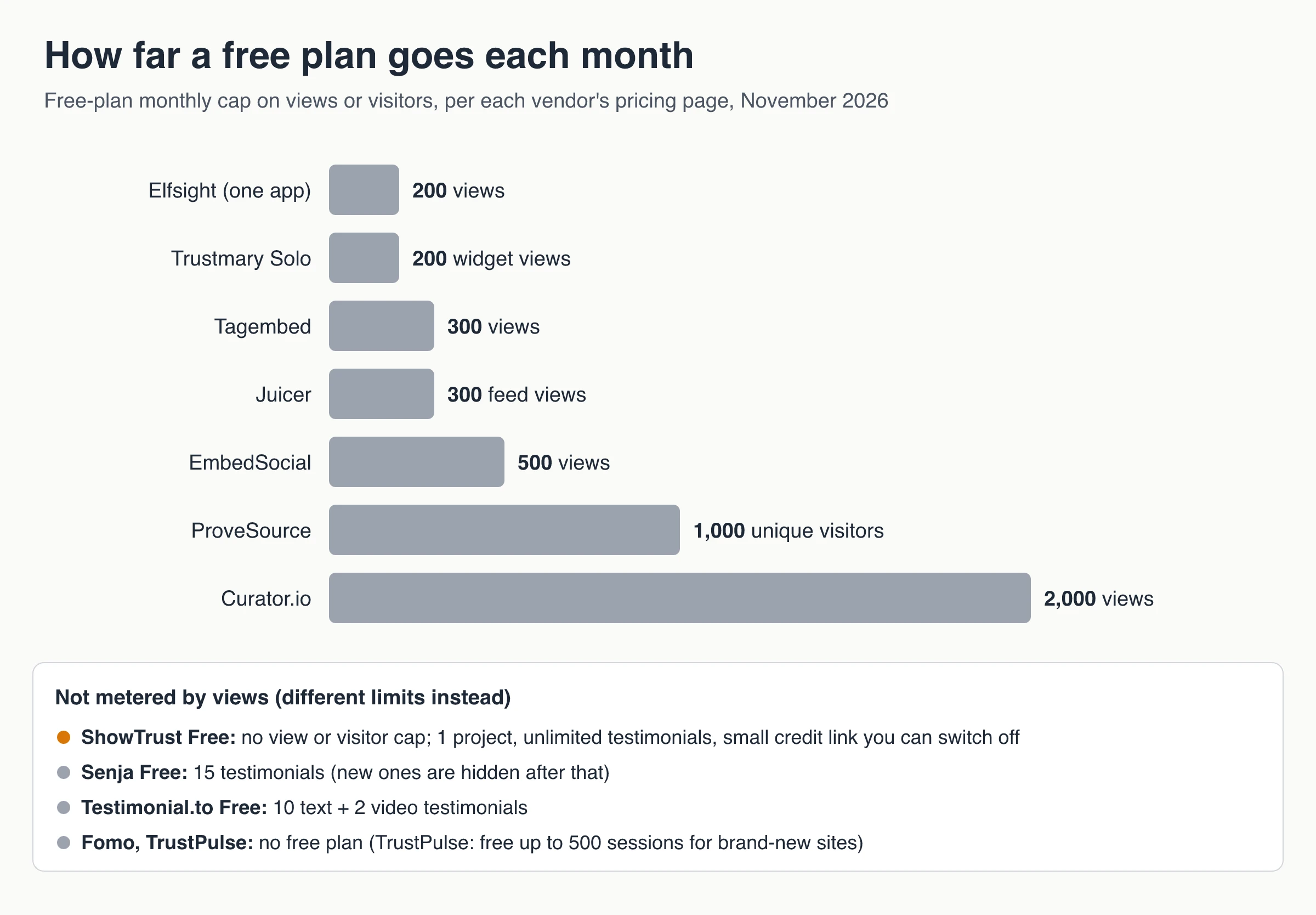
Elfsight sells each widget app separately. On its pricing page, Free allows 200 views a month with Elfsight branding, and Basic is $5/month billed yearly for 5,000 views. Going over the monthly view limit temporarily deactivates the app until the next period.
EmbedSocial combines review widgets and social feeds in one account. Its pricing page lists Free with 1 source, 500 views and a 24-hour refresh, and Pro at $29/month for 3 sources and 5,000 views.
Trustmary auto-imports reviews from Google, Facebook, G2, Capterra, TripAdvisor and Yelp and adds surveys and review collection. Its free Solo plan includes 5 survey responses and 200 widget views a month. Its plan builder starts at $29/month ($25/month billed yearly) for 10 responses and 5,000 widget views; the preset Starter bundle, which adds review connections, custom surveys, analytics and premium support, is listed at $388/month billed yearly ($462 monthly), per its pricing page. The page’s FAQs disagree on what happens at the view limit: one says the widget is hidden until the limit resets, another that widgets keep showing while Trustmary contacts you about more views. Trustmary is built for review-heavy businesses with a budget to match; for a testimonial-only setup, see ShowTrust vs Trustmary.
Activity popups: Fomo, TrustPulse, ProveSource (and testimonial popups)
Fomo bills by notifications shown. Starter is $25/month or $250/year for 8,000 notifications and 1 website, after a 14-day trial. Its pricing FAQ says Automatic Upgrades is on by default, which moves you up a tier when you pass the limit. Turn it off and notifications stop until the period resets.
TrustPulse bills by unique visitors. Basic is a $5/month introductory price billed annually (1 site, 1,500 visitors), and its pricing page notes that renewals are at full price, listed as $9/month. Brand-new sites can start free with up to 500 sessions.
ProveSource has a real free plan: 1,000 monthly unique visitors with ProveSource branding. Starter is $29/month or $24/month billed yearly for 20,000 visitors. Per its pricing page, it doesn’t auto-upgrade; it stops showing notifications to new visitors until the month resets.
Testimonial popups instead of activity. If you don’t have purchase volume to show, a popup can rotate short approved testimonials instead. ShowTrust’s on-site widgets do this with testimonials under 280 characters, a start delay, a per-visit cap, a minimum star rating and a dismiss button, on every plan. They show testimonials only, not live sign-up or purchase events.
Rating badges: Trustpilot TrustBox and first-party badges
Trustpilot gives independent proof, but the free plan is narrow. Its TrustBox overview lists only the Review Collector widget on Free, which asks visitors to leave a review rather than displaying your score. Star and TrustScore badges such as Micro Star, Micro Combo and Mini start on the Plus plan, listed from $319/month billed annually on Trustpilot’s pricing page.
First-party badges compute the score from testimonials you collected. ShowTrust’s rating badge shows the average rating and testimonial count of your approved testimonials (“★ 4.9 · 128 testimonials” style) and links to your hosted wall. Because the score comes from your own collection, it isn’t independent the way a Trustpilot score is. Present it as “from our customers,” not as a third-party rating.
UGC and social feeds: Tagembed, Juicer, Curator.io
Tagembed aggregates social networks (Instagram, Facebook, TikTok, YouTube, X and more) and review sites (Google, Facebook, Yelp, Amazon) into one feed. On its pricing page, Free has 1 feed, 300 views a month, 100 posts, a once-a-day manual update and Tagembed branding. Starter is $19/month for 2 feeds, 10,000 views and a 2-hour refresh. Growth is $29/month billed yearly ($39 monthly) for 4 feeds, 50,000 views and a 30-minute refresh. Every plan allows unlimited website embeds.
Juicer is a social feed aggregator. Free covers 1 source, 300 feed views and a 24-hour refresh with Juicer branding. Lite is $19/month ($15/month yearly) for 3 sources, 5,000 views and a 60-minute refresh, per its pricing page.
Curator.io has the roomiest free tier of the three: 3 sources, 2,000 views a month and a 24-hour refresh. Pro is $25/month for 5 sources, 15,000 views and hourly refresh, per its pricing page.
Tagembed alternatives: who should switch and why
Tagembed is a solid choice if you want many social networks and review sites in one feed with unlimited embeds. People usually look for an alternative for one of four reasons:
| If you need… | Why Tagembed may not fit | Look at |
|---|---|---|
| Testimonials you own, with the customer’s permission | Tagembed displays posts and reviews published elsewhere; it isn’t built around collecting and approving your own testimonials | A testimonial tool such as ShowTrust or Senja |
| More free traffic | Free stops at 300 views a month | Curator.io Free (2,000 views) |
| Fresher feeds on a small budget | Starter refreshes every 2 hours; 30-minute refresh starts on Growth | Juicer Lite or Curator.io Pro (60-minute refresh) |
| Mostly Google reviews | A social aggregator is more than you need | A review-feed tool such as Elfsight or EmbedSocial |
If your main goal is a testimonial wall rather than a social wall, the ShowTrust vs Tagembed comparison covers that switch in detail. If your feed is mostly Instagram and TikTok content, staying with an aggregator (Tagembed, Juicer or Curator.io) is usually the better fit than moving to a testimonial tool.
How social proof widget pricing works
The billing meter matters more than the headline price. The same $20 a month can cover a whole site or run out halfway through a busy month, depending on what’s counted.
| Meter | Used by (examples) | What to estimate first | What happens at the limit |
|---|---|---|---|
| Views per month | Elfsight, Tagembed, Juicer, Curator.io, EmbedSocial, Trustmary | Monthly pageviews on every page that loads the widget | Elfsight temporarily deactivates the app; Trustmary’s FAQs give conflicting answers |
| Unique visitors | TrustPulse, ProveSource | Monthly visitors on pages with the script | ProveSource stops showing notifications to new visitors |
| Notifications shown | Fomo | Your busiest month, not your average | Fomo auto-upgrades by default, or stops if you switch that off |
| Testimonials collected | Senja Free, Testimonial.to Free | How many testimonials you’ll gather this year | Senja hides new testimonials past 15 |
| Projects or slots | ShowTrust | How many brands or sites need their own wall | No traffic cap; each extra project needs a slot |
| Plan tier and contract | Trustpilot | Which widget designs you need | Annual, prepaid contract per domain |
A quick check before any trial: a widget placed sitewide counts a view on every pageview, so a site with 20,000 monthly pageviews will need about 20,000 views a month from a view-metered tool. Put the widget only where it helps (home, pricing, product, checkout) and the number drops.
Are social proof popups legal? Keeping social proof honest
Real popups are legal. Fake ones are where the risk sits. In the US, the FTC’s Consumer Reviews and Testimonials Rule has been in effect since October 21, 2024. Its questions-and-answers guide covers fake or false reviews and testimonials, buying positive reviews, undisclosed insider reviews, company-controlled “independent” review sites, review suppression through threats or intimidation, and fake social media indicators. Courts can impose civil penalties for knowing violations.
Invented activity is named directly too. The FTC staff report Bringing Dark Patterns to Light (September 2022) lists “false activity messages” as a social-proof dark pattern, with the example “24 other people are viewing this listing.” A popup claiming purchases that never happened is that pattern.
Practical rules for any social proof widget:
- Show only real events and real customers. If a tool lets you type in events by hand, enter only ones that happened. Never publish a fake review or an AI-written testimonial attributed to a customer.
- Disclose incentives and connections. If a testimonial was rewarded with a discount, or comes from an employee or partner, say so near the quote.
- Edit for typos, not meaning. Keep the original wording on file.
- Don’t misdescribe a curated selection. Featuring your best quotes is normal; labeling a hand-picked set as “all our reviews” is not.
- Check privacy rules before showing names or locations from purchase data, especially for visitors outside the US.
One more myth to drop: a widget won’t earn you review stars in Google for reviews about your own business. Google’s review snippet guidelines make LocalBusiness and Organization pages ineligible for star results when the business controls the reviews about itself. This isn’t legal advice; if you sell outside the US or run high-volume promotions, check the rules that apply to you.
Installing a widget without slowing your site
Most widgets install as a script tag plus a container element. Three habits keep them light:
- Load scripts asynchronously so the widget never blocks your page from rendering.
- Reserve space for inline widgets (a fixed min-height on the container) so the page doesn’t jump when reviews load. Layout jumps count against Cumulative Layout Shift, one of Google’s Core Web Vitals.
- Run one popup tool at a time and cap popups per visit, especially on mobile, where a corner card can cover the checkout button.
For reference, ShowTrust’s wall script is under 8 kB, loads asynchronously and renders inside a shadow root rather than an iframe, so your site’s CSS doesn’t leak in unless you opt in. The full walkthrough of script vs iframe embeds, layout shift and platform steps is in the guide to embedding testimonials on your website. If a widget installs but doesn’t appear, this checklist for a social proof widget that isn’t showing covers blocked scripts and content security policies.
Which social proof widget should you pick?
Start from the proof you already have:
- Happy customers but no public reviews: collect testimonials and show them in a wall, with a popup or badge on key pages (ShowTrust, Senja, Testimonial.to).
- A strong Google or Facebook profile: use a review feed (Elfsight, EmbedSocial; Trustmary if you also want automated review requests).
- Steady sign-ups or orders: add an activity popup fed by real events (Fomo, TrustPulse, ProveSource).
- An established Trustpilot profile: a TrustBox badge near the price, if a paid plan fits your budget.
- An active social community: a feed aggregator (Tagembed, Juicer, Curator.io).
Then check the meter against your traffic, and make sure everything the widget shows is real.
Frequently Asked Questions
- What is a social proof widget?
- A social proof widget is embeddable code that shows visitors proof that others trust you: testimonials, third-party reviews, star ratings, recent sign-ups or purchases, or customer posts from social media. The five common types are testimonial walls, review feeds, activity popups, rating badges and social feeds.
- Are social proof popups fake or illegal?
- Popups that show real events are legal. Popups that invent activity are deceptive: the FTC's 2022 dark patterns report names false activity messages, and the FTC rule in effect since October 21, 2024 bans fake reviews and testimonials. Feed popups from real store, payment or form data, or from approved testimonials.
- Do social proof widgets slow down a website?
- A well-built widget adds little if its script loads asynchronously and its container has reserved space. Problems come from stacking several tools, synchronous scripts and widgets that push content down as they load, which hurts Cumulative Layout Shift.
- Can a social proof widget give me Google review stars?
- Not for reviews about your own business. Google's review snippet guidelines say pages using LocalBusiness or Organization markup are not eligible for star results when the business controls the reviews about itself, whichever widget displays them.
- Is there a free social proof widget?
- Yes, with limits. As of November 2026, ShowTrust Free has unlimited testimonials for one project with a credit link you can switch off; ProveSource Free covers 1,000 visitors a month; Curator.io Free allows 2,000 views; Elfsight, Tagembed and Juicer free plans stop at 200 to 300 views a month. Fomo and TrustPulse have no free plan.
Want a testimonial wall, popups and a rating badge from one account? Start on ShowTrust’s Free plan with unlimited testimonials and no card, and move to Pro ($4.99/month per project slot) only if you need video, a white-label wall or more projects.
Written by
ShowTrust
Notes from the ShowTrust team on collecting testimonials and building authentic social proof.
Share: