July 11, 2026
·
Updated November 6, 2026
·
15 min read
Customer Won't Approve a Testimonial? 7 Mistakes to Fix
A troubleshooting guide for testimonial sign-off that stalls: seven common causes, copy-paste follow-up emails, when to stop chasing, and what the FTC Endorsement Guides mean for anonymous testimonials. General information, not legal advice.

When a customer won't approve a testimonial, it's rarely because they changed their mind about you. Usually the person you asked can't say yes on their own, the edited quote no longer sounds like them, or the request is too long to answer from a phone. Fix the request, send one short reminder, and if there's still no answer, offer a smaller version (no logo, no numbers, or a role-only attribution) or let it go. Never treat silence as a yes.
Below are the seven mistakes that stall customer sign-off, each with a fix and wording you can paste, a follow-up sequence, and the FTC rules that still apply when you publish a testimonial without the customer's name. For the full path from submission to publishing, see the testimonial approval workflow guide.
Why customers don’t approve testimonials
Two different approvals can stall. The customer’s sign-off answers “are these my words, and may you use my name?” Your own approval answers “should this go live?” Most stalls happen on the customer’s side, so that’s where this guide starts; the internal side has its own section further down.
Match what you’re seeing to the likely cause:
| What you see | Likely cause | Where to look |
|---|---|---|
| No reply at all | Wrong contact, too much to read, or no deadline | Mistakes 1, 4 and 5 |
| “Let me check internally,” then silence | Their legal, PR or communications team is reviewing it | Mistake 2 |
| “That doesn’t sound like me,” or heavy edits sent back | The quote was rewritten | Mistake 3 |
| “Happy to, just not with our name” | A policy or worry about endorsing vendors | Mistake 6 |
| “Can we take the number out?” | Figures they aren’t allowed to share | Mistake 7 |
Most stalls have more than one cause. Fix the one you can see, then follow the reminder sequence further down instead of sending the same request again.
Mistake 1: Asking someone who can’t say yes
The person who praised you often doesn’t control their company’s name. They can agree to their own words, but the company name, logo or a result may need marketing, communications or legal. Email only your champion and the request sits in their inbox while they work out who to forward it to.
Fix: ask who else needs to see it before you send the final version, not after it stalls.
Before I send the final wording: does anyone else at [Company] need to approve this before we use your name or the company’s? I’m happy to send it to them directly, or to you to forward.
Then send a version that can be forwarded without explanation (Mistake 2). If your contact has left the company, don’t reuse the old title. Ask whether they want to be quoted in their new role or not at all.
Mistake 2: Leaving their legal or PR team to guess
Some organizations limit when employees may endorse a vendor. US executive-branch employees, for example, may not use their government position or title to endorse any product, service or enterprise outside narrow exceptions. A 2014 University of Illinois policy lets employees give a vendor testimonial in the university’s name only with prior approval, and limits it to statements of fact but not value statements. Companies can have similar rules, sometimes unwritten until someone asks. A reviewer who gets a forwarded email with no context has one safe answer: do nothing.
Fix: send a short packet a reviewer can approve without a call:
- The exact text and attribution as it will appear, not a description of it.
- Where it will run, and where it won’t, for example “our website and sales decks, not paid ads.”
- What you’re not asking for: no logo and no figures unless they say yes.
- How to remove it: a reply to the email, and a date by which you’ll take it down.
- A facts-only fallback for policies that ban praise: “[Company] uses [Product] for [task].”
Subject: For review: one customer quote mentioning [Company]
Hi [Name],
[Champion] suggested you as the right person to approve this. We’d like to show the quote below on our website’s [page]. It would not appear in paid advertising.
“[Exact quote]” — [Name], [Title], [Company]
We won’t use your logo or any figures unless you tell us we can. If your policy only allows factual statements, we can use “[Company] uses [Product] for [task]” instead. You can ask us to remove it at any time by replying here.
Could you reply APPROVE, EDIT (with your changes) or NO by [date]?
If their legal team asks for a signed release, or sends its own, know what a release does and doesn’t cover before you agree: see what testimonial release forms can’t do.
Mistake 3: Asking them to approve words they didn’t say
Polishing a quote until it sounds like your homepage is a reliable way to get “let me think about it.” People hesitate to put their name to sentences they would never write. The FTC’s Endorsement Guides also limit how far you can go: an ad doesn’t have to use the endorser’s exact words unless it presents them as exact words, for example in quotation marks, and it may not be reworded so as to distort their opinion or experience. Over-edited quotes lose authenticity too, because they all start to sound like your own copy.
Fix:
- Cut, don’t rewrite. Pick the strongest one or two sentences they already wrote.
- Show both versions. Paste the original under the edit with a one-line note: “shortened to the first two sentences.”
- Offer “use my original as is” as one of the reply options.
- If they rewrite it, use their version, even if it’s weaker. If you want something stronger, ask a question that invites it instead of writing it for them.
Approvals also stall when the customer and you are looking at different versions:
| Version slip | What it looks like | Fix |
|---|---|---|
| Drafts in several places | Email, chat and a shared doc, each slightly different | One email thread with the final text pasted in the body |
| Attachments | Tracked changes they have to open and accept | No attachments; paste the text |
| Changes after the yes | You “just tidy” the approved text | Any new change goes back for a new yes |
Mistake 4: Sending too much to read
A full case-study draft, a four-paragraph email with the quote at the bottom, or a doc behind a login: the customer means to read it later, and later never comes. Long requests also leave “approve” unclear: the draft, the quote, the logo, or all three?
Fix: one decision per message, short enough to answer from a phone.
Hi [First name], quick one: may we put this on our pricing page?
“[One or two sentences]” — [Name], [Title], [Company]
Reply YES, or tell me what to change. Thanks!
For a case study, split the approvals: quote first, then the numbers, then the full story, and keep the draft short. The guide to writing a B2B case study testimonial covers that format. For an approval email that includes a change note and an anonymous option, use the template in the approval workflow guide linked above.
Mistake 5: Leaving the request open-ended
“Whenever you get a chance” usually means never. A request without a date loses to everything on the customer’s list that has one.
Fix: give a date, and say what happens if they don’t answer: nothing.
We’re updating the page on [date]. If I don’t hear back by then, no problem: we’ll leave your quote out. Nothing goes live without your OK.
That last line matters. Some internal workflows use “no response means approved” to keep their own reviewers moving, but don’t apply it to a customer’s name and words. Silence isn’t agreement, and in the EU and UK, GDPR says silence or inactivity doesn’t count as consent. A clear default of “not published” also makes the request feel safer, which tends to get you the reply.
Mistake 6: Asking for the company name and logo by default
Naming a vendor in public can look like an endorsement the person isn’t authorized to make (see Mistake 2), and it tells competitors which tools a company uses. Asking for name, title, company, logo and photo in one go forces an all-or-nothing answer, and “nothing” is easier.
Fix: offer the options in the first message and let them choose.
| Attribution | Example | When it fits |
|---|---|---|
| Name, title, company and logo | [Name], [Title], [Company] + logo | The person and their brand owner both agree |
| Name, title and company | [Name], [Title], [Company] | The person agrees; nobody has approved the logo |
| Name and title, company described | [First name] [initial], [Title] at a [type of company] | The company can’t be named |
| Role and company description only | [Title], [size] [industry] company | The person can’t be named either |
| First name and context (consumer products) | [First name], [city or customer type] | Individual buyers who prefer privacy |
Each step down protects the customer more and convinces readers a little less. Logos often belong to a brand or marketing team, so a “yes” from your contact may not cover the logo.
Mistake 7: Including numbers they can’t share
“Cut onboarding time by 40%” is great proof, and often exactly why their legal team says no. Internal figures can be confidential, can reveal volumes or revenue, and invite questions once they’re public. Numbers carry a risk for you as well: under the FTC’s guides, a customer’s result on a key feature is likely to be read as what people can generally expect, so you need to be able to support it or clearly disclose the generally expected results.
Fix:
- Highlight every number in the request and ask about each one separately: “Can we keep ‘40%’?”
- Offer a version without the figure, in their own words, if it’s still accurate: “onboarding is noticeably faster.”
- Drop the number rather than reshape it. Don’t round it up or turn it into a bigger claim.
- If the number stays, note where it came from and keep that note with the testimonial.
How to follow up when a customer doesn’t reply
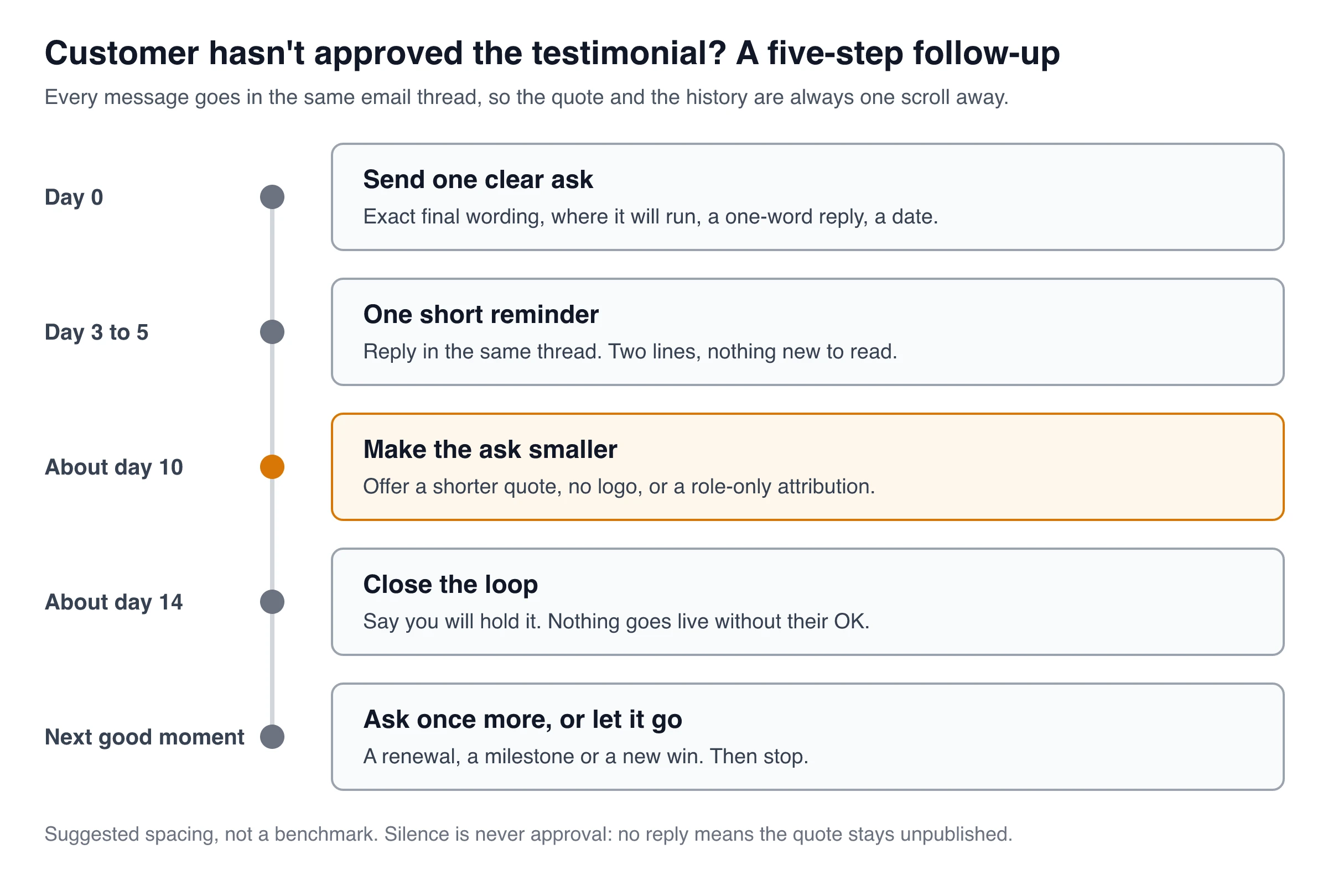
Stay in the same email thread so the quote is always one scroll away, and don’t add anything new to read in a reminder. The timing below is a suggestion, not a standard.
Reminder (day 3 to 5):
Hi [First name], bumping this in case it got buried. The quote is below; a one-word reply is all I need. Thanks!
Smaller ask (about day 10):
Completely understand if using your name or [Company]'s is tricky. Would either of these work instead?
- The same quote, shown as “[Title], [type of company],” with no name or logo
- Only the first sentence: “[short version]”
Close the loop (about day 14):
I’ll take this off my list for now, and we won’t use the quote. If it gets easier later, just reply here. Thanks again for the kind words.
Three things to avoid while chasing:
- Going over their head. Emailing their manager to speed up a quote puts your champion in an awkward spot.
- Attaching a reward to the approval. If a customer receives something for a testimonial, the FTC expects that material connection to be disclosed clearly when readers wouldn’t expect it, and a reward that depends on saying yes makes the quote look bought.
- A fourth reminder. After the closing note, wait for a natural moment such as a renewal, a milestone or a new win, ask once more, and then stop.
How long should testimonial approval take? There’s no reliable benchmark. A short quote that only the customer has to approve can be settled in one reply. Anything that goes through their legal or PR team runs on that team’s schedule, so ask early how long it usually takes and set your publishing date around the answer.
When to give up or publish without their name
Stop chasing when the customer says no or “not now,” when there’s no reply after your closing note, when their legal team declines, or when your contact has left and nobody else owns the request. A no from a company’s legal team is final for that quote. Don’t ask the employee to get around it.
Switch to a role-only attribution only when the customer agrees to that version. Removing the name doesn’t make the words yours: you still need their permission to use them. The guide to getting permission to use testimonials covers how to ask and what to record.
What the FTC rules mean for anonymous testimonials
In the US, an anonymous or role-only testimonial is still an endorsement under the FTC’s Endorsement Guides (16 CFR Part 255). The definition covers any marketing message consumers are likely to believe reflects the views of someone other than the advertiser, and nothing in it depends on showing a name. So the same rules apply:
- The person must be real and must have used the product. The FTC’s Consumer Reviews and Testimonials Rule prohibits testimonials that misrepresent that the testimonialist exists or had experience with the product. Keep a private record of who said it, when, and their approval.
- The description must be accurate. “Head of Operations at a 200-person logistics company” must be true. Don’t upgrade a title or make the company sound bigger, and if the people in an ad are presented as actual customers, they need to be actual customers (§ 255.2©).
- Honest, undistorted and current. The quote must reflect their honest opinion, can’t be reworded to distort it, and, if you present them as a user, can run only while you have good reason to believe they still use the product (§ 255.1(a) to ©).
- Connections still need disclosing. A discount, free months, a partnership or a family tie that readers wouldn’t expect has to be disclosed clearly, even when the name doesn’t appear (§ 255.5).
- Results claims still need support. A role-only quote with a dramatic number carries the same generally-expected-results issue as a named one (§ 255.2(b)).
Use the most specific accurate description the customer allows. This is general information, not legal advice; regulated fields such as health and finance have extra rules.
When the stall is on your side
Sometimes the customer said yes weeks ago and the testimonial is still waiting for you. The usual internal causes:
- Too many reviewers. Name one person who decides. Others can comment by a date, but they can’t block by staying silent. A “no response means approved” rule can work here, for your own colleagues, never for the customer.
- No shared criteria. Approve if it passes five checks: it’s accurate and the customer could confirm it; permission is on record for this use; it makes no claim you can’t support; any connection is disclosed; it contains nobody else’s personal details. If it fails one, it isn’t “almost approved,” it needs another look.
- Reviewing too late. Review new testimonials as they arrive, while the customer still remembers what they wrote and will answer a quick question.
- A queue nobody watches. Turn on alerts for new submissions and set a weekly slot to clear what’s pending.
- Missing context for the reviewer. Give them the decision in one line and pre-answer the obvious objections: “For the pricing page. Permission is on file and we only fixed grammar.”
Where ShowTrust helps, and where it doesn’t
ShowTrust is a testimonial collection and Wall of Love tool, so it covers the collection and your own approval, not the back-and-forth with a customer’s legal team.
What helps:
- Permission at submission. The hosted collection page has a permission checkbox you can set to Don’t ask, Optional or Required, with your own wording. Each testimonial records whether it was ticked, and the CSV export includes it. If you publish a testimonial as submitted, under the details the customer gave, there’s no separate sign-off to chase.
- No forgotten queue. New testimonials land in Pending and aren’t shown until you approve them. The sidebar shows how many are waiting, you get an email for each new one (on by default), and you can send alerts with a Review button to Slack or Discord (notifications). You can approve, reject, pin, edit and tag them; editing is meant for typos, not changing meaning.
- Reminders for requests. If the problem is that customers never submit at all, email invites send one automatic reminder after three days and never ask the same person twice within seven days.
What it doesn’t do:
- No customer sign-off flow. ShowTrust doesn’t send approval requests or approval reminders to customers. If you edit beyond typos or want a new use, get the customer’s yes by email and keep it with your records.
- No team roles or approval chains. There’s one login per account and no audit trail. Approval is the account owner moving a testimonial from Pending to Approved.
- Imports carry no consent. Testimonials imported from X, the App Store, a CSV or pasted review text arrive without a permission flag, so ask those customers separately before you approve them (managing testimonials).
Unstick a stalled approval in ten minutes
- Find out who actually has to say yes at the customer’s company.
- Re-send one short message with the exact final wording, the attribution and where it will run.
- Remove what triggers extra review: the logo, the numbers, your rewrites.
- Offer a smaller version: a shorter quote or a role-only attribution.
- Give a date, and say that nothing goes live without their yes.
- Send one reminder, close the loop, then move on to the next happy customer.
Frequently Asked Questions
- Can I publish a testimonial if the customer doesn't reply?
- Not if you still need their approval. Silence is not a yes. If they already gave permission for this exact use, for example by ticking a permission box on your form, and you publish the testimonial as submitted, that permission covers it. Edits beyond typos, a new placement such as paid ads, or adding their company, logo or photo need a fresh yes.
- How many times should I follow up on a testimonial approval request?
- A reasonable limit is three messages after the first ask: one short reminder a few days later, one smaller ask (shorter quote or no name), and a closing note saying you won't use it. After that, wait for a natural moment such as a renewal or a new result, ask once more, and then stop.
- How long should testimonial approval take?
- There is no reliable standard. A short quote that only the customer must approve can be settled in one reply. Anything that needs their legal, PR or communications team runs on that team's schedule, so ask early how long it usually takes and plan your publishing date around it.
- Can I use a testimonial anonymously without the customer's permission?
- Removing the name doesn't make the words yours, so ask first. In the US the FTC Endorsement Guides still apply to anonymous testimonials: the person must be real and a genuine customer, the description must be accurate, the quote can't be distorted, and any reward or relationship must be disclosed.
- Does ShowTrust send approval requests to customers?
- No. ShowTrust has no customer sign-off flow or approval reminders. You can collect permission with a checkbox on the collection page, and approval inside ShowTrust is the account owner moving a testimonial from Pending to Approved. Get sign-off on edited wording by email.
ShowTrust’s Free plan includes the permission checkbox, the Pending queue and email alerts for one project with unlimited testimonials; Pro ($4.99/month or $49.99/year per project slot) adds video testimonials and white-label. Compare plans.
Written by
ShowTrust
Notes from the ShowTrust team on collecting testimonials and building authentic social proof.
Share: