August 5, 2026
·
Updated November 6, 2026
·
13 min read
Testimonials in Your CRM: HubSpot, Salesforce, Pipedrive
What HubSpot, Salesforce and Pipedrive can and can't do for customer testimonials as of November 2026, how to store quotes in the CRM, which deal stages should trigger a request, and how to connect a testimonial tool through an API and webhooks.

A CRM can store testimonials and decide when to ask for one, but it can't collect, approve or display them on its own. HubSpot, Salesforce and Pipedrive give you custom fields, automations and webhooks: enough to record a quote against a deal and to fire a request when the deal is won. The branded form customers fill in, the review queue, the permission checkbox and the widget on your website come from a dedicated testimonial tool.
Most agencies and service teams end up using both. The CRM decides when to ask, the testimonial tool collects and publishes, and approved quotes flow back to the CRM record where sales can find them. This guide shows what each CRM can do as of November 2026 and how to wire the two together, using ShowTrust's webhooks and API as the worked example.
Can a CRM manage testimonials?
The short answer: a CRM handles the when and the who, a testimonial tool handles the what and the where. Here is how the jobs split.
| Job | CRM on its own | Dedicated testimonial tool |
|---|---|---|
| Decide when to ask (deal won, onboarding done) | Yes, with workflows or automations on paid tiers | Not really: it doesn’t see your pipeline |
| Send the request | Yes, as a normal email or sequence | Yes, with a link to a hosted form, a reminder and an unsubscribe link |
| Collect the testimonial | Partly: a form can write answers into a contact field | Yes: a branded page for text and often video, no login for the customer |
| Record permission to publish | Only if you add a checkbox field yourself | Many tools store a permission checkbox with each quote |
| Approve before publishing | No queue; you build one from fields and tasks | Pending, approved and rejected states |
| Show testimonials on a website | No | Embeddable wall, carousel or single quote |
| Find a quote for a live deal | Yes, if the quote is stored on the account | Yes, by tag or search, but outside the CRM |
| Report views and clicks on the website | No | Often: impressions, CTA clicks |
A useful division of labor: the CRM is the system of record for revenue, and the testimonial tool is the system of record for the testimonial itself, meaning the text or video, the permission, and where it is published. Copy into the CRM what sales needs to find, plus a link back, not the whole asset.
For what the testimonial tool does on its own, see how testimonial management software works for agencies. This guide covers the CRM side and the connection.
What HubSpot, Salesforce and Pipedrive can do for testimonials
None of the three ships a testimonial feature: no collection page, approval queue or website wall. They offer building blocks. Details below are from each vendor’s help center and pricing pages as of November 2026; check them against your own plan.
HubSpot
- Custom properties are available on all products and plans. Types include multi-line text, date, dropdown and checkboxes; the number you can create depends on your subscription (HubSpot: create and edit properties).
- Custom objects, such as a “Testimonial” object associated with contacts, companies and deals, need an Enterprise subscription (HubSpot: create custom objects).
- Forms are available on all plans, and every form field writes to a CRM property, so a form can capture a quote and a consent checkbox onto the contact record (HubSpot: create forms).
- Workflows, which you need to send a request automatically when a deal changes stage, are on Professional and Enterprise tiers (HubSpot: create workflows).
- The “Send a webhook” workflow action needs Data Hub Professional or Enterprise. It sends POST or GET requests with a custom body and supports either a request signature or a single API-key header (HubSpot: webhooks in workflows).
- Feedback surveys (NPS, CSAT and CES) are part of Service Hub Professional and Enterprise (HubSpot customer feedback). A high score tells you whom to ask; a survey comment is not a publishable testimonial.
Salesforce
- Custom fields and custom objects are core platform features; how many you can create depends on your edition, so check yours before planning a custom object. Trailhead defines custom objects as “objects that you create to store information that’s specific to your company” (Trailhead: standard and custom objects). On editions that allow it, a Testimonial custom object related to Account and Opportunity is the usual pattern.
- Flow Builder, the automation tool, is not included in the Free or Starter Suite. Pro Suite allows 5 flows per org, and Core, Advanced and Max have no flow cap (Sales Cloud pricing).
- The Web Services API, which connectors such as Zapier and Make typically use to talk to Salesforce, is not in Free or Starter Suite, costs an extra $25 per user per month on Pro Suite and is included from Core up (same pricing table).
- Flow HTTP callouts let a flow call an external API from Flow Builder, using credentials an admin sets up first (Trailhead: HTTP callouts with Flow Builder).
- Feedback Management (Salesforce’s survey product) is a paid add-on for Core and Advanced and included in Max (Service Cloud pricing).
There is no built-in “client testimonial tool” in Salesforce. Teams either build the object-plus-flow setup themselves, add a third-party customer reference app from AppExchange (listed from Pro Suite up), or connect an outside testimonial tool through the API.
Pipedrive
- Custom fields can be added to leads and deals (which share fields), people, organizations, products and projects (Pipedrive: custom fields). There are 16 field types, including large text, single option and date (Pipedrive: custom field types).
- Field limits are set per company: 30 custom fields on Lite, 100 on Growth, 300 on Premium and 500 on Ultimate (Pipedrive: usage limits). A six-field testimonial setup uses a fifth of Lite’s allowance.
- No custom objects. Pipedrive’s fields attach to its built-in records, so a testimonial lives in fields on the deal, person or organization, or in a note.
- Automations are on Growth and higher plans, with 50, 150 or 250 automations per company on Growth, Premium and Ultimate. Triggers include a deal, person, lead, organization, project or activity being added, updated or deleted, plus date triggers (Pipedrive: workflow automation).
- The webhook request action inside automations sends POST, PUT or DELETE requests with a body built from Pipedrive fields or raw JSON. Only global admins can set it up, and Pipedrive’s article still says “Advanced and higher,” a pre-2025 plan name; on current plans, automations start at Growth (Pipedrive: automations webhook requests).
So a “Pipedrive client testimonial tool” is really a combination: a large-text field for the quote, an automation on the won or delivered stage, and a testimonial tool on the other end of the webhook.
Side by side
| HubSpot | Salesforce | Pipedrive | |
|---|---|---|---|
| Store a quote on a record | Custom property, all plans | Custom field (limits vary by edition) | Custom field (30 to 500 per company by plan) |
| One record per testimonial | Custom object, Enterprise only | Custom object, depending on edition | Not available (no custom objects) |
| Trigger a request on a deal stage | Workflows, Professional and Enterprise | Flow Builder: Pro Suite (5 flows) and up | Automations, Growth and up |
| Call an outside API | Send a webhook, Data Hub Professional and up | Flow HTTP callout; Web Services API from Core (add-on on Pro Suite) | Webhook request action, admins only |
| Built-in survey or feedback tool | Feedback surveys, Service Hub Professional and up | Feedback Management add-on; included in Max | Not covered here |
| Collection page, approval queue, website wall | No | No | No |
Vendor documentation and pricing pages, as of November 2026.
How to store testimonials in your CRM
There are three ways to keep testimonials in a CRM. Pick by how many quotes one account can have and whether you need to report on them.
- A few fields on the company or deal. Simplest, and enough when one quote per client is the norm. Works on most plans of all three CRMs, within each plan’s field limits.
- A note or activity on the record. No setup at all, but notes are hard to filter. You can’t easily pull up every approved quote from healthcare clients.
- A custom object (HubSpot Enterprise; Salesforce, depending on edition). One record per testimonial, associated with the contact, company and deal. An account can hold several quotes, and you can build reports such as “approved testimonials by service line.”
Whichever you choose, the same handful of fields covers what sales and account teams actually use:
| Field | Type | Why it’s there |
|---|---|---|
| Testimonial status | Dropdown: requested, received, approved, declined | Stops two teams from asking the same customer, and drives the automations |
| Quote | Multi-line or large text | The approved wording, copied from the testimonial tool |
| Author and role | Text | Who said it, as it may be published |
| Approved date | Date | Lets you retire stale quotes |
| Permission to publish | Checkbox or dropdown | A quick flag; the original record stays in the testimonial tool |
| Link | URL | Points to the published testimonial or wall, where the video and full context live |
Treat the CRM copy as an index and keep the full asset (video, photo, permission record) in the testimonial tool; a quote edited in two systems drifts. For what a permission record should contain, see how to get permission to use testimonials.
When to trigger a testimonial request from the CRM
The CRM’s real advantage is timing: it knows when a project was delivered or a renewal signed, the moments a customer has something concrete to say.
| CRM moment | How to detect it | Who should ask |
|---|---|---|
| Project delivered or first result | Deal moves to a “Delivered” or “Live” stage, not the moment the contract is signed | Automated request, signed by the account manager |
| Onboarding complete | Onboarding checklist or pipeline stage closes | Automated request |
| Milestone reported | Account manager logs the result on the deal or company | Account manager, personally |
| Renewal signed | Renewal deal marked won | Automated request |
| Support issue resolved with a high satisfaction score | Ticket closed and survey score at the top of the scale | Automated request, with a short delay |
| Expansion or upsell | New deal won on an existing account | Account executive, personally |
Two rules keep this from annoying customers:
- Filter before you send. Skip accounts with an open escalation, an overdue invoice, or a testimonial status of requested, received or declined.
- Split automated and personal asks. Automate the long tail. For strategic accounts, have the workflow create a task for the account executive instead, since a named quote or case study needs a personal ask; see how to create a B2B case study testimonial.
Agencies have these handoffs at two levels: their own CRM (asking clients about the agency) and each client’s CRM. Give every handoff one owner and one shared status field, or onboarding, renewal and upsell will each trigger an ask to the same contact in one quarter.
How to connect a testimonial tool to your CRM
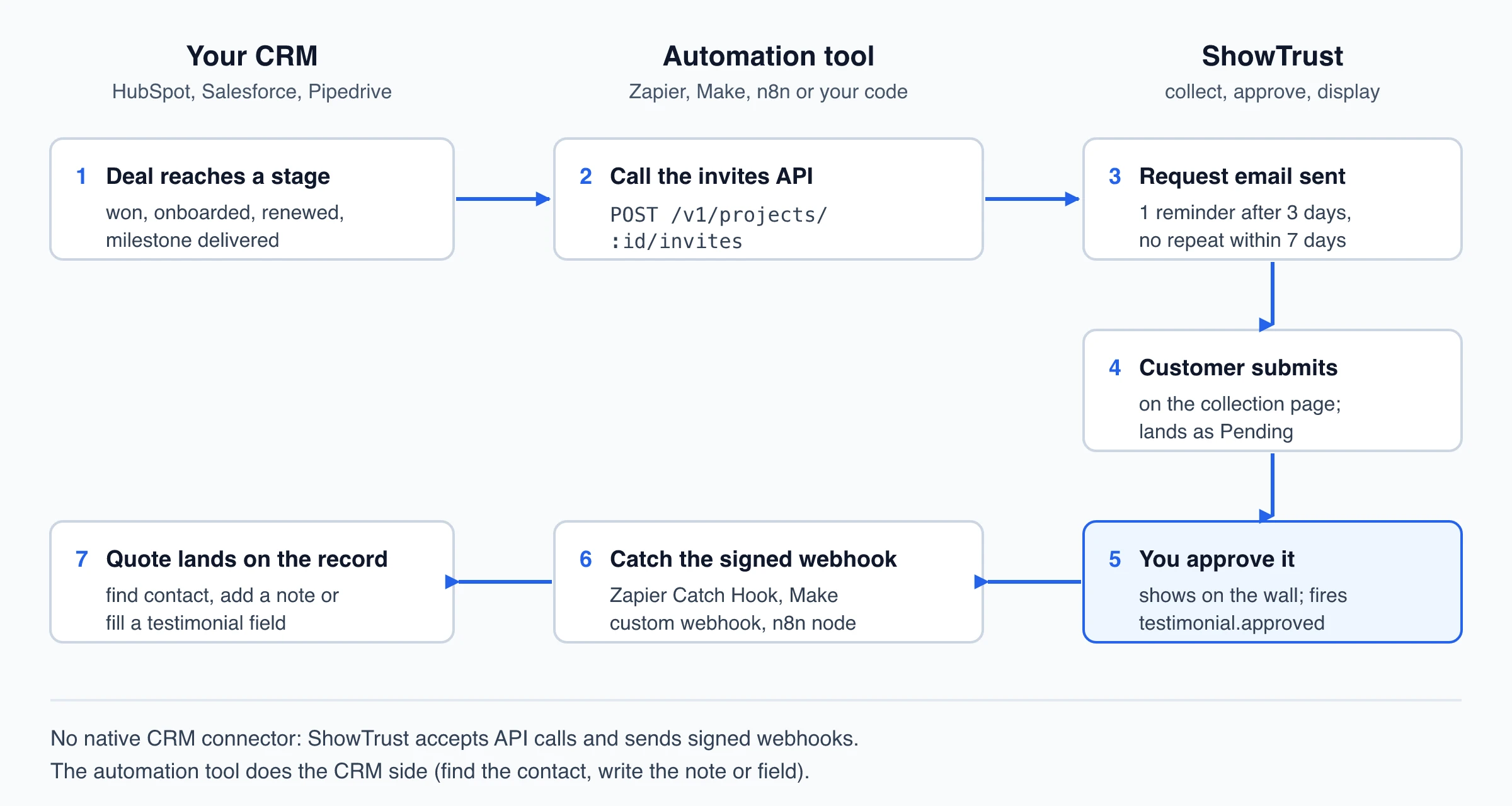
ShowTrust has no native HubSpot, Salesforce or Pipedrive integration and no Zapier app. It connects through two documented pieces: a REST API that can send testimonial requests, and signed webhooks that fire when a testimonial is created or approved. An automation tool (Zapier, Make, n8n or your own code) sits in between and handles the CRM side.
Step 1: Send the request from a deal stage
Set the trigger on the stage you chose above, such as a deal moving to “Delivered”, and have the automation call the invites endpoint with the customer’s email and first name:
POST https://api.showtrust.to/v1/projects/PROJECT_ID/invites
x-showtrust-account-id: ACCOUNT_ID
x-api-key: API_KEY
Content-Type: application/json

{"recipients": [{"email": "jane@acme.com", "name": "Jane"}]}
What happens next, per the ShowTrust API docs:
- The email goes out under the project’s name with a button to the collection page; replies go to the account owner’s email. An optional subject and message can use {{name}}.
- Up to 200 recipients per call. People who unsubscribed, already left a testimonial or were invited in the last 7 days are skipped and listed in the response, so it is safe to fire on every stage change.
- Email invites are capped per account at 25 a day on Free and 500 a day on Pro. One automatic reminder follows after 3 days unless you switch it off.
One wiring detail: the API needs two headers (account ID and API key). HubSpot’s “Send a webhook” action supports a single API-key header, and Pipedrive’s webhook article doesn’t document custom headers, so route the call through Zapier (Webhooks by Zapier “Custom Request”), Make’s HTTP module, n8n’s HTTP Request node, or your own code.
Step 2: Collect and approve in ShowTrust
The invite opens the collection page with the customer’s name and email filled in; no account needed. Customers write a testimonial (Free) or record or upload a video (Pro) and answer up to five questions you set.
Set the permission checkbox to Required with wording your client agreed to, so every form submission carries consent. Each submission lands as Pending. When you approve it, it appears on your wall within about five minutes. Approval is one click by the account owner: ShowTrust has one login per account, with no team seats or client approval portal, so client sign-off happens by email before you click.
Step 3: Send approved testimonials back to the CRM
In the project’s Settings → Integrations, paste a webhook URL: a Zapier Catch Hook (Webhooks by Zapier needs a Professional plan or higher), a Make custom webhook, or an n8n Webhook node. ShowTrust sends a JSON POST on testimonial.created and testimonial.approved. Filter on testimonial.approved so only published quotes reach the CRM.
The payload includes the author’s name, role and company, the text, rating, kind (text or video), video URL, tags, source, submission date and the project’s wall URL. Map it like this:
- Find the company or contact in the CRM.
- Write the quote, author and wall link into the testimonial fields, or create a note with them.
- Set the testimonial status to approved, which also stops further requests.
Three things to plan for:
- No customer email in the payload. ShowTrust leaves it out on purpose. Match on name and company, or add a step that calls GET /v1/projects/:id/testimonials, which returns
authorEmailfor approved testimonials when one was given. - No permission flag in the documented payload. The per-testimonial permission value is in the CSV export. With the checkbox set to Required on the form, submissions from the page all carry it.
- Retries and signatures. Failed deliveries are retried once. Each request is signed with HMAC-SHA256 (
X-ShowTrust-Signature); if the webhook lands on your own endpoint or in n8n, verify it and reject anything older than five minutes. The notifications and webhooks docs include a verification snippet.
If sales only needs to know a quote arrived, a Slack or Discord post per testimonial is lighter than a CRM write.
Step 4: Put the quotes to work in deals
Paste the hosted wall link (showtrust.to/w/your-name) into proposals, or share a single testimonial as an image or a one-card embed on a pricing page. Tag quotes by service line so the right one is easy to find for a deal. Agencies can run one ShowTrust project per client, with each client’s automation pointing at its own project ID and webhook.
CRM vs testimonial tool vs both: which fits?
The right setup depends on volume, who asks, and whether testimonials need to appear on a website.
| Situation | CRM only | Testimonial tool only | Both, connected |
|---|---|---|---|
| A few quotes a year, used only in sales decks | Good fit | More than you need | More than you need |
| No real CRM, small team, website proof is the goal | Not possible | Good fit | Not needed yet |
| Pipeline stages, several people asking customers, testimonials on the website | Missing collection, approval and display | Missing timing and sales visibility | Good fit |
| Agency running testimonials for several clients | Hard to keep clients apart | Works with one project per client | Best when clients’ CRMs trigger requests |
For agencies and service teams with an account team, both is the usual answer: the CRM supplies timing and the shared status that stops duplicate asks, the testimonial tool supplies the form, consent, approval and wall. The connection costs you the automation layer: either a CRM tier with native automation (HubSpot Professional, Salesforce Pro Suite, Pipedrive Growth or higher) or an automation tool’s own deal-stage trigger (Zapier’s HubSpot and Pipedrive apps both have one), plus, if you use Zapier, a paid plan that includes Webhooks by Zapier.
Setup checklist
- CRM decides when to ask and holds status; the testimonial tool holds the quote, video and permission.
- Add status, quote, author, date, permission and link fields (or a custom object).
- Pick two or three trigger stages: delivered, onboarding complete, renewal won.
- Filter out escalations, requests in progress and declines.
- Wire the trigger to the invites API through Zapier, Make, n8n or code.
- Make the permission checkbox Required; approve submissions promptly.
- Send
testimonial.approvedback and set the status to approved. - Each quarter, retire stale quotes and check nobody was asked twice.
Frequently Asked Questions
- Can HubSpot collect and display testimonials?
- Partly. HubSpot forms, available on all plans, can capture a quote and a consent checkbox into contact properties, and feedback surveys (Service Hub Professional and Enterprise) collect NPS, CSAT and CES responses. HubSpot has no approval queue or testimonial wall, so getting quotes onto your website means editing pages yourself or using a testimonial tool.
- Does Salesforce have a client testimonial tool?
- Not a built-in one as of November 2026. Teams build a Testimonial custom object with a flow that creates requests, add a customer reference app from AppExchange, or connect an outside testimonial tool through the API. Salesforce's survey product, Feedback Management, is an add-on for Core and Advanced and included in Max.
- Does Pipedrive have a testimonial feature?
- No. Pipedrive can store a quote in a large-text custom field on a deal, person or organization, and an automation (Growth plan and up) can send a webhook when a deal reaches a stage. Collecting, approving and displaying testimonials needs a separate tool connected through Zapier, Make, n8n or an API.
- Should testimonials live in the CRM or in the testimonial tool?
- In both, with different roles. Keep the original (text or video, permission, publishing status) in the testimonial tool, and copy the approved quote, author, date and a link into the CRM so sales can find it on the account and nobody asks the same customer twice.
- Does ShowTrust integrate with HubSpot, Salesforce or Pipedrive?
- Not natively, and it has no Zapier app. ShowTrust sends signed webhooks when a testimonial is created or approved and has a REST API that can send testimonial requests, so you connect it to any CRM through Webhooks by Zapier, Make, n8n or your own code.
Try the setup on a free ShowTrust project: a collection page, unlimited testimonials, and the API and webhooks used above. Pro adds video testimonials, white-label walls and more projects at $4.99/month or $49.99/year per project slot.
Written by
ShowTrust
Notes from the ShowTrust team on collecting testimonials and building authentic social proof.
Share: