June 2, 2026
·
Updated November 6, 2026
·
12 min read
10 Testimonial Request Email Templates (Copy and Paste)
Copy-and-paste testimonial request emails for ten situations, with subject lines, follow-ups, permission wording and the US rules on incentives. General guidance, not legal advice.

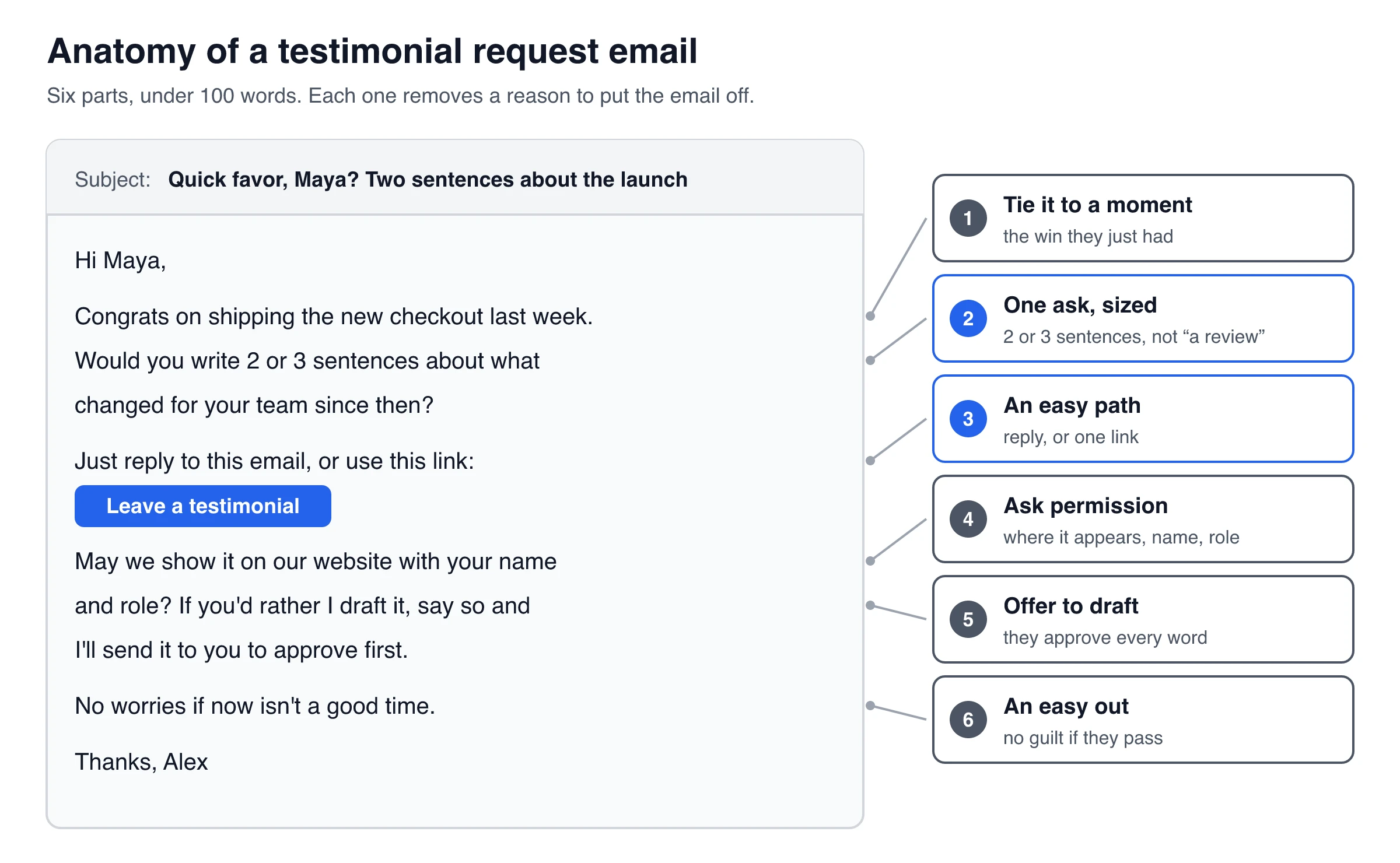
A good testimonial request email is short (about 100 words), arrives right after the customer gets a result, and asks for one specific thing: two or three sentences about what changed. Give them an easy way to answer (a reply or one link), ask permission to show their name, and offer to write a draft they can approve.
Below are 10 copy-and-paste testimonial request email templates with subject lines, each with a note on when to send it. You'll also find follow-up emails for people who don't reply, wording for asking permission, and what the FTC says about offering a reward.
Testimonial request email template (copy this one)
Use this one when you’re not sure which situation fits. It works for clients, customers and users, and takes about a minute to personalize.
Subject: Quick favor, [Name]?
Hi [Name],
[One line about the result they got, e.g. “Glad the new onboarding flow cut your setup time.”]
Would you write 2 or 3 sentences about what’s changed for you since [you started / your order / the project]? Just reply to this email, or use this link: [link]
May we show it on our website with your name and [role / company]? If you’d rather I draft it from what you’ve already told me, say so and I’ll send it to you to approve first.
No worries if now isn’t a good time.
Thanks,
[Your name]
Every line has a job: the opener ties the request to a moment they remember, the sized ask makes it feel like two minutes, and the permission line saves a second email.
Need a different tone or use case? The free testimonial request email generator fills in a version for you to copy.
Testimonial request email templates by situation
The best template is the one that matches what just happened. Pick the closest row, then copy the template below it.
| # | Situation | When to send | What you ask for |
|---|---|---|---|
| 1 | Any customer (above) | Right after a result | 2–3 sentences |
| 2 | After a win or support fix | Same day to a few days after | 1–2 sentences, by reply |
| 3 | SaaS onboarding | Right after the first success moment | 2 sentences |
| 4 | B2B or agency client | At project wrap-up | 3 short answers, or a draft to approve |
| 5 | Ecommerce | After they’ve used the product | 1–2 sentences via a link |
| 6 | Long-time customer | Renewal or anniversary | Why they’ve stayed |
| 7 | Video testimonial | After a yes or unprompted praise | A short recorded video |
| 8 | Past client | Months after the project | What changed since |
| 9 | Praise they already gave | As soon as you see it | Permission to publish |
| 10 | LinkedIn or DM | When that’s where you talk | One reply |
Replace everything in [brackets]. Change at least the opening line, because a specific detail is what shows you aren’t emailing a list.
2. After a customer win or support fix
When to send: the same day or within a few days of the result, such as a fixed bug, a goal hit or a successful launch, while it is still fresh.
Subject: Glad that worked, [Name]
Hi [Name],
Great to see [the result, e.g. “your import running cleanly again”]. Thanks for sticking with us while we sorted it out.
Would you share 1 or 2 sentences about how it went? Just hit reply. A line on what was happening before and what’s different now is perfect.
If it’s okay to quote you on our website, tell me how you’d like your name shown.
Thanks,
[Your name]
Keep this one reply-only. People who just had a problem solved are already in your inbox, so a link is one more step than they need.
3. After onboarding (SaaS)
When to send: right after the first success moment, like the first report sent, first invoice paid or first project published. Trigger it on that event, not on a fixed number of days after signup.
Subject: You just [first milestone], [Name]
Hi [Name],
I saw you [first milestone, e.g. “sent your first invoice”] in [Product] today. Nice work.
Quick question while it’s fresh: what were you using before, and what’s easier now? Two sentences is plenty. Reply here or use this link: [link]
If we may share your answer on our website, let me know (or tick the permission box on the form).
Thanks,
[Your name], [Product]
Ask about the switch (“what were you using before?”). Before-and-after answers make better quotes than general praise.
4. B2B or agency client at project wrap-up
When to send: after the final deliverable is accepted, ideally right after the client says something positive in the wrap-up call.
Subject: Before we close out [project]
Hi [Name],
Thanks again for a great [project]. [Specific result, e.g. “The new site went live two weeks early.”]
Would you be open to a short testimonial we can use on our website and in proposals? Three questions, and a sentence each is fine:
- What problem were you trying to solve before we started?
- What did we do that mattered most?
- What’s changed since [launch / delivery]?
If it’s easier, I can draft it from our wrap-up call and send it to you to edit and approve. Please also tell me how to credit you: name, role, company, and whether we may show your logo.
Best,
[Your name]
If the story is bigger than three sentences, turn it into a case study instead and ask for a 20-minute interview. Some business clients need sign-off from their own team before their company name appears publicly, so ask about the logo separately.
5. Ecommerce, after delivery
When to send: once the customer has actually used the product, not at order confirmation. That’s a few days after delivery for most goods, and longer for anything that takes weeks to show results.
Subject: How’s your [product] working out?
Hi [Name],
Your [product] arrived on [date], so I hope you’ve had a chance to try it.
If you have a minute, would you tell us in a sentence or two how it’s going? [Leave a testimonial]
Love it or not, we’d like to hear it. With your permission, we may show your words on our website with your first name and city.
Thanks,
[Store name]
“Love it or not” signals that you want an honest answer, which is also the safest framing if you offer a reward (see the FTC section below). For the trade-offs between asking by email and asking on your site or in the order flow, see this guide to collecting testimonials after a purchase.
6. Long-time customer
When to send: around a renewal or account anniversary, or soon after they say something nice in passing.
Subject: [X] years with us. Can I ask a favor?
Hi [Name],
You’ve been with us since [year], and that means a lot to a team our size.
Would you share a few sentences about why you’ve stayed? People who are considering [Product] ask us that all the time, and your answer would help them more than anything we could write.
Reply here, or use this link: [link]. Short is fine.
Thank you,
[Your name]
“Why did you stay?” gets a different answer than “why did you buy?”, and it speaks directly to buyers who worry about committing.
7. Video testimonial request
When to send: only after they’ve said yes to a written testimonial or praised you unprompted. A cold video request is the biggest ask on this list.
Subject: Would you record a 60-second video?
Hi [Name],
Thanks again for your kind words about [Product]. Would you be up for saying them on camera?
It takes about two minutes: open this link on your phone or laptop, read the questions on screen, and record. No script and no editing. Natural beats polished.
[Record a video]
Three things to talk about:
- What was going on before you found us?
- What changed?
- Who would you recommend us to?
If video isn’t your thing, a written version is just as welcome.
Thanks,
[Your name]
Always offer the written fallback: people who won’t go on camera may still type two sentences. If you use ShowTrust, video testimonials are a Pro feature. Customers record in the browser on a phone or desktop and see your questions on screen, one at a time. You set the maximum length, from 15 seconds to 5 minutes (2 minutes by default). For ideas on what to ask and how others present the results, see these video testimonial collection examples.
8. Re-asking a past client
When to send: several months after the project, once they’ve lived with the results long enough to know whether it worked.
Subject: Checking in on [project], [Name]
Hi [Name],
It’s been [time] since we wrapped up [project]. I hope [the site / the system / the campaign] is still doing its job.
I’m updating our website and would love to include a few words from you. With some distance, what difference has [project] made? Two or three sentences is perfect.
And if something isn’t working the way you hoped, I’d like to hear that too.
Best,
[Your name]
Acknowledge the gap rather than pretending no time has passed, and mean the “if something isn’t working” line: it can surface a problem worth fixing.
9. Asking permission to use something they already said
When to send: as soon as you spot praise in an email, chat, support ticket, call or social post. Keep a copy of the original.
Subject: Can we share what you said?
Hi [Name],
Last week you wrote: “[their exact words]”
That made our day. Would you be okay with us showing it on our website, with your name and [role / company]?
I’ve only [fixed a typo / shortened it to the line above]. If you’d like to change anything, just reply with your version.
Thanks,
[Your name]
Quote their words exactly, and show them any trimming. The FTC’s Endorsement Guides say a quote doesn’t have to be word for word unless you present it as exact words (for example, in quotation marks), but it can’t be reworded or taken out of context in a way that distorts what the person meant. For written consent, release forms and what to do if someone later withdraws, follow these steps to get permission to use testimonials.
10. LinkedIn or DM version
When to send: when your relationship lives on LinkedIn, Slack or a community rather than in email. Keep it under 50 words.
Hey [Name], quick one. Now that you’ve been using [product / service] for [time], what’s the biggest difference you’ve noticed?
If you’re happy for me to quote your reply on our website, let me know how to credit you. No pressure either way.
On LinkedIn, a recommendation on your profile is a separate thing. If you want both, ask for the quote first, then mention the recommendation in your thank-you message.
Subject lines for a testimonial request email
A good subject line is short, uses their name or their result, and hints that the ask is small. Avoid subjects that sound like a survey (“We value your feedback”) or put your needs first (“Help us grow!”).
| Subject line | Best for |
|---|---|
| Quick favor, [Name]? | Anyone you know well |
| Two sentences about [result]? | Right after a clear win |
| Glad that worked, [Name] | After a support fix |
| You just [milestone], [Name] | SaaS onboarding |
| Before we close out [project] | B2B or agency wrap-up |
| How’s your [product] working out? | Ecommerce after delivery |
| [X] years with us. Can I ask a favor? | Long-time customers |
| Would you record a 60-second video? | Video request |
| Checking in on [project], [Name] | Past clients |
| Can we share what you said? | Permission for existing praise |
| Re: [original subject] | Follow-ups |
Only promise a size (“two sentences”, “60 seconds”) that the email actually delivers.
Follow-up email when they don’t reply
No reply often just means the email got buried. One reminder is reasonable. A string of reminders costs more goodwill than the testimonial is worth.
| When | What to send |
|---|---|
| Day 0 | The request |
| A few days later | One short reminder in the same thread, with an even smaller ask |
| About a week after that | A final note that makes “no” easy (optional) |
| After that | Stop. Try again only after a new win |
Reminder email (a few days later)
Subject: Re: Quick favor, [Name]?
Hi [Name], bumping this in case it got buried.
Even one sentence would help. If it’s easier, just finish this one: “Before [Product], we… Now we…”
Thanks,
[Your name]
The fill-in-the-blank line cuts the effort to a single sentence.
Final follow-up (about a week later)
Subject: Re: Quick favor, [Name]?
Hi [Name], last note from me on this.
If you’d like to share a line, just reply and I’ll send it back to you to approve before anything goes live. If not, no problem at all, and thanks for being a customer.
[Your name]
Making “no” easy invites a reply either way, so you can close the loop.
If they say yes but never write it
A “sure, happy to!” followed by silence usually means blank-page trouble. Offer to write it:
Happy to draft something from what we’ve worked on together. Should I focus on (1) the result, (2) what working with us was like, or (3) the time it saved you? I’ll send two short options for you to edit or approve.
Build the draft only from things they actually said, in their words where possible, and publish nothing until they approve it.
If they send a vague compliment
“Great service, thanks!” is kind, but it won’t persuade anyone. Ask one follow-up question, not three:
- “Thank you! What were you doing before, and what’s different now?”
- “What’s one thing that got easier?”
- “What would you tell a friend who’s thinking about it?”
Don’t follow up at all if they’ve asked you to stop, if a complaint or refund is still open, or if the relationship feels strained.
How to ask for a testimonial without being awkward
The templates above follow a handful of rules. If you write your own, check it against these.
Ask at the moment of value
Ask when the result is fresh: after a fix, a first success, a delivery that’s been used, a renewal, or a thank-you email from the customer. Wait too long and the details are gone. For the full flow from first ask to a published quote, see this guide on how to collect testimonials.
Make one ask, and size it
“Would you write a testimonial?” sounds like an essay. “Would you write 2 or 3 sentences about what changed?” sounds like two minutes. Ask for one thing per email. Don’t bundle the testimonial with a review request, a referral and a survey.
Choose reply or link
| Reply by email | Link to a form | |
|---|---|---|
| Effort for the customer | Lowest: they just answer | One click, then type |
| What you get | Words only. You collect name, role and permission separately | Name, role, photo, rating and a permission box in one go |
| Best for | Clients you know well, support wins, DMs | Lists, ecommerce, video, anything you’ll publish at scale |
Offering both (“reply, or use this link”) works well for one-to-one emails. For bulk sends, a link is easier to track.
Give prompts, not a script
Prompts pull out specifics. A script gives you marketing copy with their name on it.
| Goal | Prompt | Avoids |
|---|---|---|
| Define the problem | “What were you trying to fix?” | Vague compliments |
| Capture the starting point | “What was happening before?” | Overclaiming |
| Pinpoint the change | “What’s different now?” | Feature lists |
| Find the reason | “Why did you choose us?” | Forced praise |
| Get a quotable moment | “Was there a moment you thought ‘this works’?” | Generic adjectives |
Two or three prompts per email is the limit. For more, the free testimonial question generator suggests prompts by business type.
For big asks, start in person
Email is the easiest way to ask, but not the most persuasive. In a study published in the Journal of Experimental Social Psychology (Roghanizad and Bohns, 2017), students each asked 10 fellow students they didn’t know to fill in a questionnaire, either face to face on campus or by email. Both groups predicted that about 5 of 10 would agree. In person, about 7 of 10 did. By email, the average was 0.2 of 10, about 2%. Those were cold requests to strangers, not customers who know you, so take the direction rather than the numbers. For a video or a case study, raise it on a call or at the end of a meeting, then send the email as the follow-up with the link.
Ask permission in plain words
Separate the permissions so it’s easy to say yes to some and no to others:
- “May we share your quote on our website and social posts?”
- “May we include your name and job title?”
- “Is it okay to show your company name or logo?”
- “We may lightly edit for length or typos without changing the meaning, and we’ll send you the final version first.”
Keep their reply or the ticked form box as your record.
Can you offer an incentive for a testimonial?
Yes, in the US, if you follow two rules. This is general guidance, not legal advice, and rules in other countries differ.
1. Never tie the reward to what they say. The FTC’s Consumer Reviews and Testimonials Rule (16 CFR 465.4) bans incentives “conditioned expressly or by implication” on reviews that express a particular sentiment, positive or negative. The FTC’s questions and answers on the rule say the rule doesn’t prohibit incentives for reviews when there’s no such condition, but you can’t suggest the review has to be positive to earn the reward. The Q&A also notes that section 465.4 only applies to consumer reviews, that testimonials are covered by other parts of the rule, and that failing to disclose an incentive could still violate the FTC Act. The safe habit is the same either way: reward every honest answer, and disclose it.
2. Disclose it where the testimonial appears. Under the Endorsement Guides (16 CFR 255.5), material connections can include free or discounted products and the possibility of winning a prize. If your audience wouldn’t expect the connection, it must be disclosed clearly and conspicuously, so put the disclosure with the testimonial (for example, “Received a discount for sharing feedback”).
| Say this | Not this |
|---|---|
| “As a thank-you for your time, everyone who shares a testimonial gets [reward], whatever you write.” | “Leave us a 5-star testimonial and get 20% off.” |
| “Honest feedback, good or bad, is what helps.” | “Best testimonial wins a gift card.” |
Contests that judge the “best” testimonial are risky, because the judging can end up rewarding positive content.
ShowTrust’s testimonial rewards work this way. You can give a coupon code or link for every testimonial, or only for videos, either instantly or by email after you approve it. If you choose “after approval”, approve on honesty and relevance, not on how positive the testimonial is.
Sending testimonial requests to a whole customer list
Personal emails from your inbox work for five clients. For fifty or five hundred, you need personalization, one reminder, and a record of who you’ve already asked. Your email platform or CRM can do this with a sequence. A dedicated tool can also send each request straight to a collection form.
ShowTrust’s email invites work like this (product facts as of November 2026):
- Recipients: paste addresses (one per line, or “Name <email>”) or upload a CSV.
- Personalization: use
{{name}}and{{project}}in the subject and message, and preview the exact email before sending. - Sender: emails go out under your business name, and replies come to your account email.
- Link: each invite links to your hosted collection page with the customer’s name and email pre-filled.
- Reminder: one automatic reminder after 3 days if they haven’t responded. You can switch it off.
- Guardrails: one-click unsubscribe, and nobody is invited twice within 7 days or after they’ve left a testimonial.
- Limits: 25 invites a day on Free and 500 a day on Pro, with response tracking per project.
- Automation: your own app can send invites through the REST API, for example after checkout or onboarding.
Limits worth knowing: invites are email only (no SMS), there’s exactly one automatic reminder, and video testimonials need Pro. Written testimonials work on both plans.
Because the invite email already contains a button to the form, cut the “just reply” line from the templates above and keep the message short:
Subject: Quick favor, {{name}}?
Hi {{name}},
Thanks for using {{project}}. Would you write 2 or 3 sentences about what’s changed for you since you started? It takes about two minutes, and the button below goes straight to the form.
No worries if now isn’t a good time.
[Your name]
The collection page can ask up to five questions and show a permission checkbox (Don’t ask, Optional or Required), so you don’t need to repeat either in the email.
Send your first request today
- Pick one customer who got a clear result in the last week.
- Copy the closest template above, rewrite the first line with a real detail, and keep the ask to two or three sentences.
- Add a permission line, and offer to draft if they’d rather not write it.
- If there’s no reply after a few days, send one reminder in the same thread. Then stop.
One sent request beats a perfect template sitting in drafts.
Frequently Asked Questions
- How do you politely ask a client for a testimonial by email?
- Thank them for something specific, ask for two or three sentences about what changed, and give them one easy way to answer (a reply or a link). Ask permission to show their name, offer to draft it for their approval, and make it clear that saying no is fine.
- When is the best time to send a testimonial request?
- Right after the customer gets a result: a fixed problem, a first success in your product, a delivered project, or a product they've had time to use. Waiting weeks means the details fade and the email feels out of the blue.
- How many times should you follow up on a testimonial request?
- Once, a few days later in the same thread, with an even smaller ask. Optionally send one final note about a week after that, which makes no an easy answer. Then stop until there's a new reason to ask.
- Can I offer a discount or gift for a testimonial?
- In the US, yes, as long as the reward doesn't depend on what the customer says and you disclose it where the testimonial appears. Offer the same thank-you for every honest answer, and avoid wording like "for a 5-star review". This is general guidance, not legal advice.
- What is the difference between a testimonial request and a review request?
- A review request asks the customer to post on a third-party site such as Google or G2, where the platform's rules apply. A testimonial request asks for a quote that you publish on your own website or materials, so you need the customer's permission to use it.
ShowTrust’s Free plan sends up to 25 personalized testimonial requests a day, with one automatic reminder, to a hosted page for written testimonials. Pro ($4.99/month or $49.99/year per project slot) raises that to 500 a day and adds video. Compare plans.
Written by
ShowTrust
Notes from the ShowTrust team on collecting testimonials and building authentic social proof.
Share: