September 8, 2026
·
Updated November 6, 2026
·
12 min read
Shopify Script Tag Deprecation: Testimonial Widget Limits
This guide covers the Shopify script tag deprecation dates and which testimonial widgets they affect, where testimonials can appear on each Shopify plan, theme and performance limits, the Google review-stars rule, and what to ask a testimonial app before you install it. Shopify details were checked against shopify.dev and the Shopify Help Center on November 6, 2026.

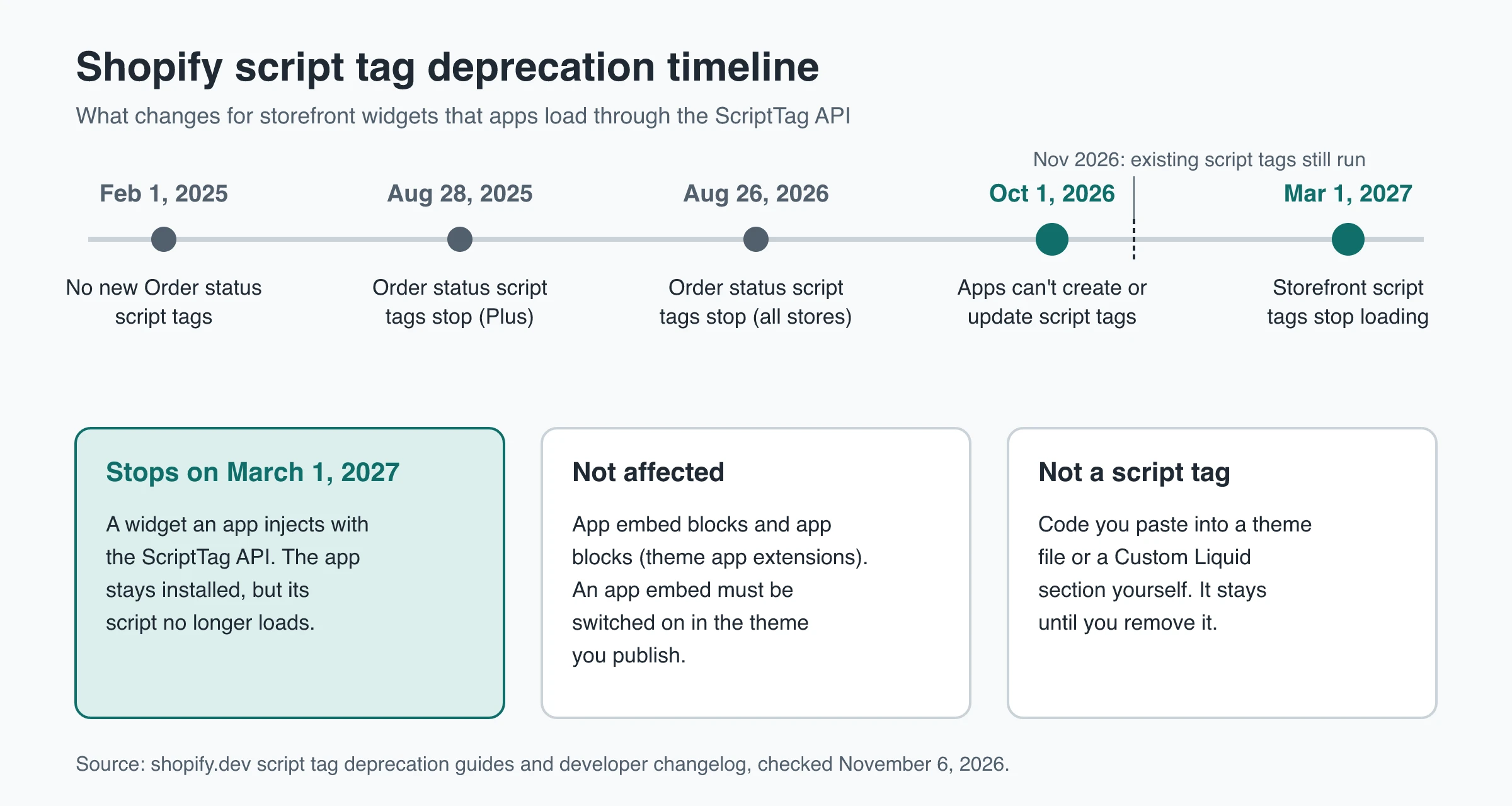
Since October 1, 2026, Shopify apps can't create or update script tags, and on March 1, 2027 Shopify stops injecting script tags into storefronts. A testimonial or review widget that an app still loads through the ScriptTag API will stop showing on that date, unless the developer moves it to an app embed block and you switch that embed on in your published theme. Code you pasted into your theme yourself, including a Custom Liquid section, is not a script tag and isn't part of this deprecation.
The deadline is one of several limits a testimonial widget runs into on Shopify. Checkout steps accept app content only on Shopify Plus, app blocks need an Online Store 2.0 theme, embeds are switched on per theme, uninstalls can leave code behind, and testimonials about your own store don't earn Google review stars. Each limit below links to the Shopify or Google page that sets it.
What the Shopify script tag deprecation changes
Script tags let an app load JavaScript onto a storefront through the Admin API without touching theme code. Shopify is removing them because they don’t appear in the theme editor, so merchants can’t easily see or control them. The replacement is the app embed block, part of a theme app extension, which shows up under Theme settings > App embeds where you can switch it off.
The dates, from Shopify’s script tag deprecation guide and its developer changelog post:
| Date | What happens |
|---|---|
| February 1, 2025 | Apps can no longer create script tags for the Order status page |
| August 28, 2025 | Script tags stop running on the Order status page for Plus stores |
| August 26, 2026 | Script tags stop running on the Order status page for all other stores |
| October 1, 2026 | scriptTagCreate and scriptTagUpdate fail on every API version; existing script tags keep running |
| March 1, 2027 | Shopify stops injecting script tags into storefront pages |
As of November 2026, an app that depends on script tags still works on stores where its tags already exist, but it can’t add them to a new store or change them. After March 1, 2027, Shopify’s storefront script tag guide says the script will no longer load and any feature that depends on it stops working. The app stays installed. Its widget just isn’t on the page.
Which testimonial widgets are affected
| How the widget is installed | Part of the deprecation? | After March 1, 2027 |
|---|---|---|
| App loads it through the ScriptTag API | Yes | Stops loading unless the app has moved to an app embed |
| App embed block (theme app extension) | No | Keeps working on the theme where it’s switched on |
| App block placed inside a section | No | Keeps working; needs an Online Store 2.0 theme |
| Script you pasted into a theme file or a Custom Liquid section | No, it isn’t a script tag | Keeps working until you remove it |
| Admin-created custom app that uses script tags | Yes | Can’t use app extensions, so the script has to move into the theme |
The last row matters if an agency built a private app for your store. Admin-created custom apps can’t use theme app extensions, so Shopify tells their maintainers to move the script into the theme: through a Custom Liquid block where possible, and the code editor only if needed. Shopify adds two caveats. A script in theme code stays there after the app is gone, and editing theme code takes the theme off its automatic upgrade path.
Web pixels, the other replacement Shopify names, only collect analytics and can’t render anything. A widget that displays testimonials needs an app embed or app block.
How to check your testimonial app before March 2027
- Open App embeds on your published theme. Go to Online Store, click Edit theme on your published theme, then click the App embeds icon in the sidebar. If your testimonial or review app is listed, make sure its toggle is on, then save. Embeds are off by default after install. An app can send you a deep link that opens the theme editor with its embed ready, but you preview and save it yourself. In the Shopify developer forum thread on the deprecation, a Shopify staff member said in August 2026 that apps had no programmatic way to switch embeds on for existing stores, and that he would take the question back to the team.
- Ask about any app that isn’t listed. If an app shows a widget on your storefront but has no app embed or app block, ask the developer how the widget loads and when their migration ships.
- Look for duplicates after a migration. View the source of a live page and search for the app’s script domain. Shopify warns that running a script tag alongside its replacement loads the script twice, which can render the widget twice.
- Don’t wait for a warning in your admin. Shopify had planned an install banner for apps that use storefront script tags. Its storefront guide now says it decided not to show the banner for now.
Where testimonials can and can’t appear on Shopify
Theme code, Custom Liquid sections, app blocks and app embeds only run on online store pages. Shopify’s theme structure overview says sections can be added to any online store page except gift card and checkout pages. Checkout, the Thank you and Order status pages, and customer accounts are built in the checkout and accounts editor, which only accepts app blocks from checkout or customer account UI extensions.
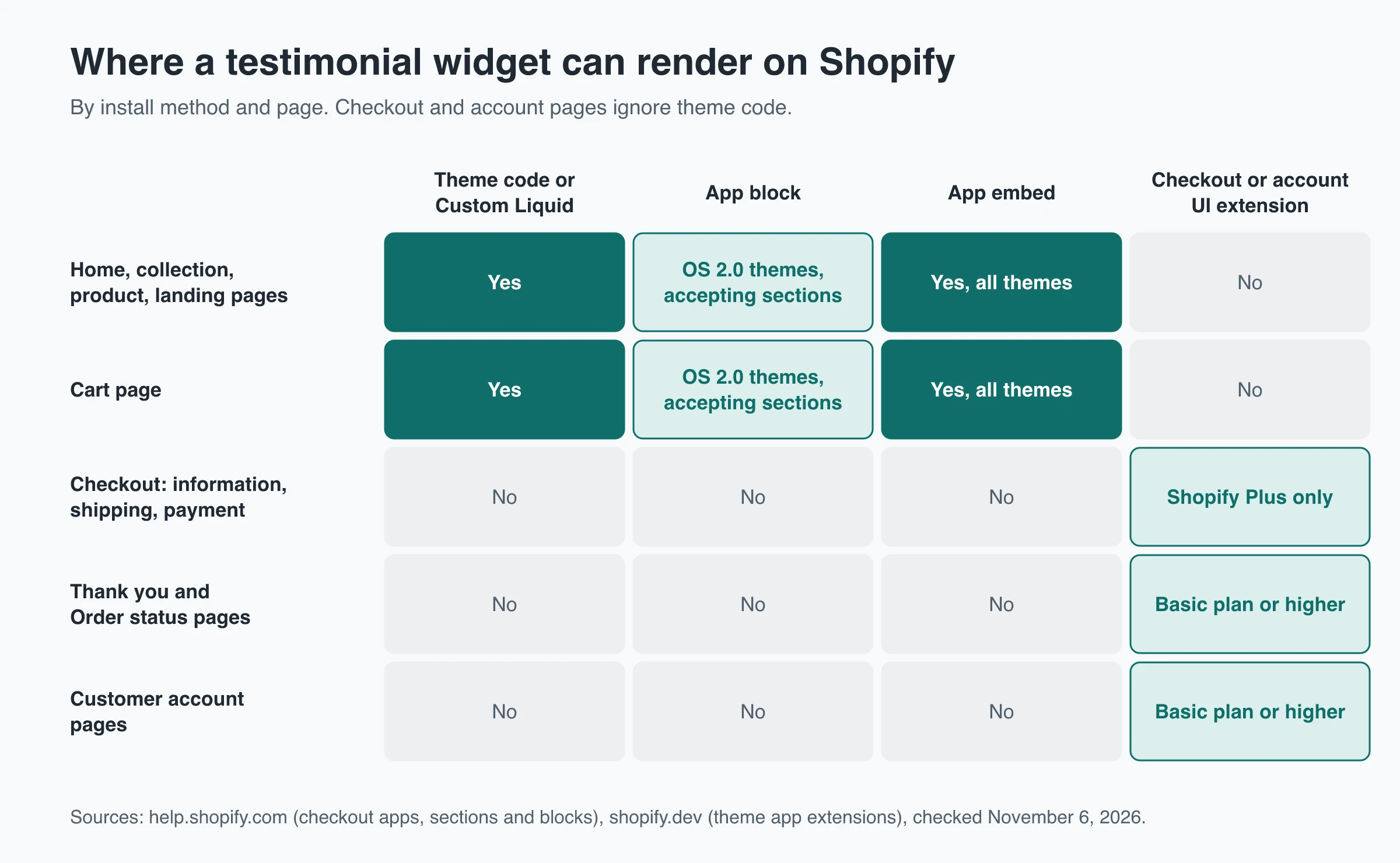
Plan rules come from Shopify’s checkout and customer accounts apps page:
| Page | How a testimonial block gets there | Plan required |
|---|---|---|
| Home, collection, product, cart and landing pages | Theme section, Custom Liquid, app block or app embed | Set by your theme, not your plan |
| Checkout information, shipping and payment steps | App built with checkout UI extensions | Shopify Plus only |
| Thank you and Order status pages | App built with checkout UI extensions | Basic Shopify or higher |
| Customer account pages | App built with customer account UI extensions | Basic Shopify or higher |
Two more caps apply in that editor. Shopify allows at most three apps per highlighted area, so a testimonial block competes with upsell, loyalty and delivery apps for the same slot. Some apps can also be placed only in specific areas.
Script tags on the Order status page stopped for every store on August 26, 2026, according to Shopify’s Order status script tag guide. Any old post-purchase testimonial script there has already gone dark.
If you’re not on Plus, put reassurance quotes on product and cart pages, where customers hesitate. Use the Thank you page to ask for a testimonial rather than to show one.
Theme limits: app blocks, app embeds and Custom Liquid
The install method decides which themes a widget works on and what happens when the theme changes. The guide to how a Shopify testimonial widget works explains each method; these are their limits.
| Limit | App block | App embed | Custom Liquid section | Code editor edit |
|---|---|---|---|---|
| Theme support | Online Store 2.0 only, in sections that accept app blocks | Vintage and Online Store 2.0 | Themes that include a Custom Liquid section | Any theme |
| Where it renders | Inline, where you place it | Before the closing head or body tag; suits floating elements | Inline, on the template where you add it | Wherever you add the code |
| After install | Not shown until you place it | Off until you switch it on | Shown once you save | Shown once you save |
| Theme update (new version of the same theme) | Carried over | Carried over | Carried over | Carried over only if the edit doesn’t conflict |
| Switch to a different theme | Add it again | Switch it on again | Add it again | Paste it again |
| App or tool removed | Removed automatically | Removed automatically | Stays until you delete it | Stays until you delete it |
Sources: Shopify’s theme app extension configuration and UX guidelines, the Help Center pages on apps in themes and updating themes. The theme-switch row is the easiest to miss. Shopify’s help page says apps you activated won’t be active by default in a newly published theme.
Template and section limits
- Section and block caps. A template holds up to 25 sections and 1,250 blocks across them, per Shopify’s sections and blocks page, and a section holds up to 50 blocks (section docs). On a full template, a new testimonial section won’t fit until you remove one.
- Fixed block types. Some sections accept only the blocks the theme designer allowed. If the section around your product details doesn’t accept app blocks, the widget has nowhere to go on that template.
- Static sections. App blocks aren’t supported in statically rendered sections (app block docs), and merchants can’t move or remove those sections.
- Vintage themes. No app blocks at all, and a vintage theme that isn’t listed in the Theme Store gets no updates. On these themes, app embeds and pasted code are the only options.
If a widget shows in the theme editor but not on the live store, or vanished after a theme change, the guide to fixing missing Shopify testimonial blocks walks through each fix.
How testimonial widgets affect store speed
Shopify calls removing unused third-party scripts the highest-impact speed fix for a theme. Its guide to auditing third-party scripts explains that every script competes for the browser’s main thread, which hurts INP, FCP and LCP. It names review and rating apps as a common culprit, because some inject scripts on every page even though reviews only show on product pages.
What that means for a testimonial widget:
- Load it only where it shows. App embeds can be limited to specific templates, which script tags never could. Shopify also suggests keeping the JavaScript a theme app extension references under 10 KB compressed. The limit is a recommendation, not enforced, so it’s fair to ask a vendor what their widget weighs.
- Scope pasted scripts. A script in a Custom Liquid section only runs on the template you add it to. If a script lives in
layout/theme.liquid, wrap it in a template check, as Shopify’s guide does:
{% if template.name == 'product' %}
  <script src="https://widget.example.com/testimonials.js" defer></script>
{% endif %}
- Watch layout shift. A widget that renders after the page has laid out pushes content down. The guide to embedding testimonials on your website covers reserving space and script vs iframe embeds.
- Clean up after uninstalling. Shopify’s uninstall guide warns that some apps add theme code that isn’t removed automatically. Search theme files for the app’s name or script domain, check
layout/theme.liquidand thesnippets/folder, then confirm in the page source that the script no longer loads.
Can a Shopify testimonial widget get Google review stars?
Not for testimonials about your store. Google’s review snippet guidelines say that when a business controls the reviews about itself, its pages using LocalBusiness or Organization markup aren’t eligible for star review features. That applies whether the reviews sit in the page’s structured data or arrive through an embedded third-party widget.
Product reviews marked up on product pages are a separate case, which is why product-review apps talk about rich results. Knowing whether you need store testimonials or product reviews tells you which kind of app to look at. If a testimonial app promises stars for your homepage, treat it as a red flag.
Questions to ask a testimonial app before installing
| Question | Why it matters |
|---|---|
| Does the storefront widget load through a script tag, an app embed or an app block? | Script tags stop loading on March 1, 2027 |
| Do I have to switch on an app embed, and on which theme? | Embeds are off after install and tied to one theme |
| Which of my theme’s sections accept your app block? Do you support vintage themes? | App blocks need Online Store 2.0 and a section that accepts them |
| Does your script load on every page, or only where the widget appears? | Site-wide scripts slow pages that show nothing |
| What stays in my theme if I uninstall? | Code added to theme files isn’t always removed |
| What store data does the app read? | Check the Data access section of the App Store listing |
| How many widgets and testimonials does each plan allow? | Free plans often cap one or both |
| Can it show testimonials in checkout on my plan? | Checkout steps need Shopify Plus |
| Do you claim Google stars for store testimonials? | Self-serving reviews aren’t eligible |
To make the last few concrete: as of November 2026, the Reputon Testimonials listing shows a free Demo plan with 1 widget and up to 4 testimonials and a paid Standard plan with up to 150. Its Data access section lists viewing customer names and email addresses and the Online Store theme. Both are normal for a Shopify app, and both belong in your decision.
Hosted testimonial walls without a Shopify app
Some testimonial tools have no Shopify app at all. You paste their embed code into a Custom Liquid section, which Shopify’s Help Center suggests as the place for app code when a theme offers one. Nothing is created through the ScriptTag API, so the March 2027 cutoff doesn’t apply. The theme-level limits above still do.
ShowTrust works this way: it has no Shopify app, app block or app embed. Its embed is a short script plus a container div:
<script>
  (function() {
    window.SHOWTRUSTTO_WIDGET_CONFIG = { projectId: 'YOUR_PROJECT_ID' };
    var script = document.createElement('script');
    script.src = 'https://app.showtrust.to/showtrustto-widget.js';
    script.async = true;
    document.head.appendChild(script);
  })();
</script>

<div id="showtrustto-widget"></div>
Paste both into a Custom Liquid section on each template where the wall should appear, such as the home page, a testimonials page or the product template. The script is under 8 kB, loads async and renders the wall in a shadow root, so theme CSS and the wall’s styles don’t affect each other; allowCssOverride: true lets your stylesheet style the wall. Approved testimonials appear within about five minutes without editing the theme again (embed settings). For a step-by-step build, see setting up a testimonial wall on Shopify.
Its limits on Shopify:
- It isn’t listed under Apps in the theme editor, so you re-add the section after switching themes and delete it yourself when you stop using it.
- It can’t render on checkout, Thank you, Order status or customer account pages.
- It has no Shopify product-review sync and no order-triggered review requests. Testimonials come from its own collection page, email invites and imports.
- It adds no review schema, so it won’t produce Google stars.
- Each project has one wall design. The Free plan shows a small credit link you can switch off.
Checklist before March 1, 2027
- Open Theme settings > App embeds on your published theme and confirm every testimonial or review app is switched on.
- Ask the developer of any app that shows a widget but has no app embed or app block how that widget loads and when it migrates.
- After a migration, check the page source for a duplicate widget script.
- Plan testimonials on checkout steps only if you’re on Shopify Plus; on other plans, use product and cart pages.
- After uninstalling an app, search the theme for leftover code.
- Don’t choose a testimonial widget for Google stars. Store testimonials don’t get them.
Frequently Asked Questions
- When do Shopify script tags stop working?
- On storefront pages, on March 1, 2027. Apps lost the ability to create or update script tags on October 1, 2026. Script tags on the Order status page already stopped: August 28, 2025 for Plus stores and August 26, 2026 for all others.
- Will my testimonial widget stop working in March 2027?
- Only if its app still loads it through the ScriptTag API. Widgets delivered as app embeds or app blocks keep working, as long as the embed is switched on in your published theme. If the app has neither an app embed nor an app block in your theme editor, ask the developer how the widget loads.
- Does the script tag deprecation affect code I pasted into my theme?
- No. It covers script tags that apps create through the Admin API. A script you paste into a theme file or a Custom Liquid section is part of your theme and keeps running until you remove it.
- Can I show testimonials on the Shopify checkout page?
- Only with an app built on checkout UI extensions. On the information, shipping and payment steps, that requires Shopify Plus. The Thank you and Order status pages accept these apps on Basic Shopify or higher, with at most three apps per highlighted area.
- Why did my testimonials disappear after I switched themes?
- App embeds, app blocks and Custom Liquid sections belong to one theme. After you publish a different theme, switch the app embed on again and re-add any app blocks or sections to the new theme's templates.
- Can a testimonial widget give my Shopify store Google review stars?
- Not for testimonials about your own store. Google treats reviews a business controls about itself as self-serving, so pages with LocalBusiness or Organization markup aren't eligible for stars, even when the reviews come through a third-party widget.
Want testimonials on Shopify that don’t depend on an app’s migration? ShowTrust installs as a pasted script in a Custom Liquid section. Free covers one project with unlimited testimonials and a small credit link you can switch off; Pro is $4.99/month or $49.99/year per project slot and adds white-label and video testimonials.
Written by
ShowTrust
Notes from the ShowTrust team on collecting testimonials and building authentic social proof.
Share: